

Small businesses need more than scattered files and manual follow-ups to manage contracts effectively. As agreement volumes grow, disconnected processes create avoidable delays, missed obligations, and revenue risk. CLM software for small businesses establishes a controlled system for creating, approving, signing, tracking, and renewing agreements—giving teams greater efficiency, visibility, and confidence.
TL;DR
CLM manages contracts from the first request through drafting, signing, renewal, and closeout.
Centralized files, templates, workflows, and version control reduce daily contract confusion.
Automated alerts help teams manage renewals, deadlines, obligations, and payment terms.
CLM supports stronger compliance, faster approvals, better teamwork, and clearer contract ownership.
Small businesses should start with key contracts, simple rules, and focused user training.
Contract reports help leaders measure savings, risk, delays, and missed business opportunities.
Understanding Contract Lifecycle Management for Small Businesses
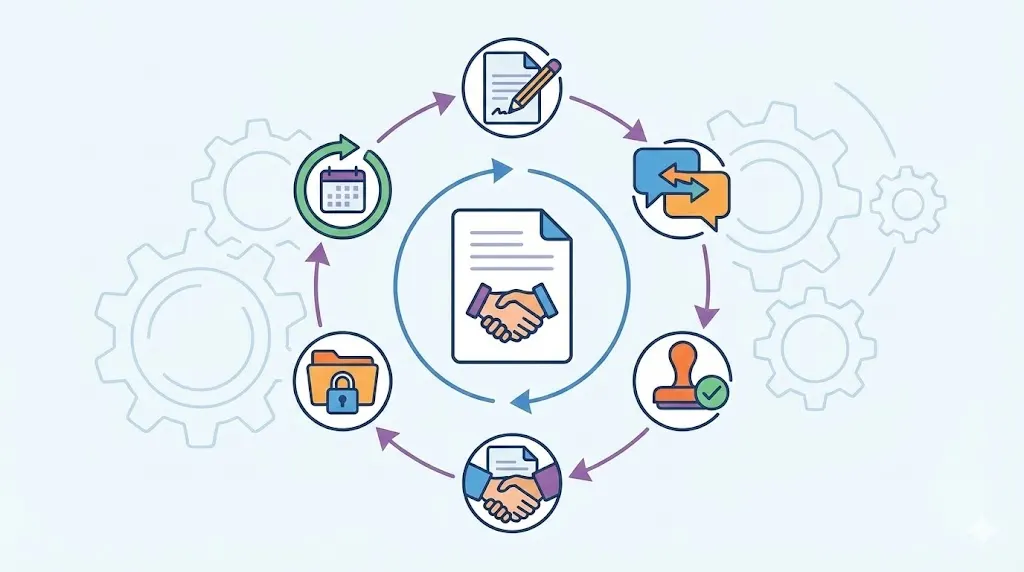
Contract lifecycle management, or CLM, covers every stage of an agreement. It begins with a request and ends with renewal, closure, or analysis. A CLM system keeps each stage connected, instead of treating every task as separate work.
This approach suits small businesses with limited legal and operations staff. Teams can follow clear rules without building a large contract department. Demand for contract management software is skyrocketing now, giving owners better control as the company grows.
From Contract Request to Execution
The process starts when someone requests a new contract. The requester provides basic details, such as the parties, purpose, value, and deadline. The system can then route the request to the right person.
Approved templates reduce the need to start each agreement from a blank page. Clause libraries help users select language that fits the deal. Reviewers can also suggest changes within a controlled process.
The usual flow looks like this:
Request, draft, review, approve, sign, and store.
Each stage has a clear owner. Approval rules can change based on value, risk, or contract type. Electronic signatures then help complete the agreement without paper handling.
After signing, the final document moves into a central repository. The system also records key details about the agreement. This creates one trusted record for future work.
From Execution to Renewal and Analysis
A signed contract still needs active management. It may contain service duties, payment dates, notice periods, or renewal terms. CLM helps assign those duties to specific people.
The system can send reminders before important dates. It can also track whether teams completed required actions. This keeps the agreement useful after signing.
Contract lifecycle management software can show renewal activity across the business. Leaders may see which agreements need review soon. They can also compare contract terms, suppliers, customers, and spending.
Reports turn contract records into useful business information. Teams can study approval delays, missed duties, and common risk terms. They can then improve their process using real contract data.
Related articles: Contract Management Software for Faster Legal Work
How CLM Improves Daily Contract Operations
Small teams often lose time checking inboxes and asking for updates. They may copy information between documents and spreadsheets. CLM replaces these tasks with repeatable steps and shared records.
The result is a more connected process for legal, sales, finance, procurement, and operations. Each team sees the work that needs attention. No one needs to rely on memory alone.
Centralized records: A secure repository keeps agreements in one searchable place. Users can search by party, date, owner, value, or contract type. Metadata means key details stored beside each document. Permissions limit access to approved users. Version history shows which file is current. Audit trails record important changes and actions. Teams spend less time asking where contracts are stored. They also gain more trust in the records they use.
Reusable templates: Approved templates give teams a safe starting point. Users can adjust approved fields without changing core legal terms. Clause libraries support common sales, supplier, and employment needs. Reviewers can focus on deal-specific issues instead of basic wording. This reduces copying mistakes and uneven contract language. It also makes contract drafting for small businesses more consistent.
Automated approvals: Workflow rules send contracts to the right reviewers. A low-value agreement may need one business approval. A high-risk deal may need legal and executive review. The system records each decision and sends follow-up reminders. This removes long email chains and unclear approval status. Electronic signatures can complete the process after final approval.
Clear collaboration: Shared status views show where each contract sits. Assigned tasks tell people what they must do next. Controlled access protects sensitive terms during collaboration. Comments and file history keep discussions tied to the agreement. Teams can work together without sending many attachments. This lowers the chance of reviewing an old version.
Fewer manual checks: CLM reduces repeated searching, copying, and calendar updates. It can fill key fields from stored contract data. It can also create tasks from important contract terms. Staff members spend less time checking basic information. They gain more time for customer, supplier, and finance work. These small savings can add up across many agreements.
Better daily control: Managers can see open requests and overdue tasks. They can identify bottlenecks before deals lose momentum. Team members can also view deadlines without asking another department. This supports faster action across the business. It creates a more steady contract process. The company gains control without adding complex layers.
Related articles: How to Build Centralized Contract Repository for Businesses
Business Benefits of CLM for Small Companies
CLM creates value beyond document storage. It connects contract terms with daily business activity. That connection can reduce costs, protect income, and improve decisions.
Small business contract management often fails when signed agreements become forgotten files. A CLM platform keeps them active throughout their working life. It helps people act on promises, dates, and rights.
Reducing Administrative Work
Contract work includes many small tasks. Someone must find the right file, check its status, and request updates. Another person may enter dates into a spreadsheet.
CLM automates many of these steps. It can capture contract details and assign follow-up work. Contract management software for finance It can also remind users when tasks need action.
Staff members then spend less time on routine administration. They can focus on sales, service delivery, purchasing, or customer support. The business gains more value from the same team.
Protecting Revenue and Improving Cash Flow
Contracts often contain revenue that teams must actively manage. A service agreement may allow a price increase after notice. A supplier agreement may include credits for missed service levels.
Teams can miss these rights when terms stay buried in documents. They may also forget to invoice for completed work. Renewal dates can pass without a pricing review.
CLM keeps these terms visible and assigns related tasks. Finance can review payment terms and billing duties. Account teams can prepare renewal discussions earlier.
This helps prevent revenue leakage, which means income lost through missed contract rights. It can also improve cash planning. Leaders gain a clearer view of future commitments and income.
Strengthening Compliance and Risk Control
Compliance means following required laws, rules, policies, and contract duties. CLM supports this work through standard terms and approval rules. It also creates a record of actions and decisions.
Teams can limit who changes sensitive agreements. They can require legal review for certain clauses. They can also receive alerts about duties that need proof or follow-up.
Risk review becomes more consistent when teams use shared rules. Reviewers can flag unusual language or missing provisions. They can then resolve issues before signature.
CLM does not replace legal judgment. It gives legal and business users better information. That support helps small companies control risk with limited staff.
Improving Management Visibility
Leaders need more than a folder of signed agreements. They need to see exposure, deadlines, duties, and contract trends. CLM reporting brings these details together.
Dashboards can show contracts by owner, type, value, or status. Reports can highlight upcoming renewals and overdue obligations. They can also show approval delays across departments.
This information supports better planning. A leader may spot too much dependence on one supplier. Another may find weak payment terms across customer contracts.
Managers can then act before problems grow. They can adjust templates, change approval rules, or renegotiate key agreements. Business contract management software makes these choices easier to support.
Related articles: Best Contract Management Software in 2026: Top 20 CLM Tools
Key Challenges in Small Business Contract Management
Small companies often manage contracts without a dedicated legal operations team. One person may handle sales terms, supplier files, and renewals. This creates pressure and leaves little room for missed details. For growing IT businesses, contract management software for IT companies can help organize software contracts, IT service agreements, and vendor contracts in one place.
Growth makes these problems more visible. More customers bring more agreements and more deadlines. New employees may also follow different processes.
Scattered documents: Agreements may sit in inboxes, personal drives, and filing cabinets. Staff may keep several copies without naming them clearly. No one knows which version contains the final changes. A team member may also leave with key contract knowledge. This makes basic searches slow and uncertain. It can delay sales, purchasing, payment, and service decisions.
Unclear ownership: A signed contract needs someone responsible for its next steps. Small companies often assume the person who signed owns everything. That person may not manage invoices, service duties, or renewal notice dates. Tasks can then fall between sales, finance, and operations. Clear ownership prevents this gap. Each important duty needs one named owner.
Missed renewals: Automatic renewals can extend unwanted agreements. Teams may miss notice periods because they track only the final date. A missed notice can limit negotiation options or increase costs. It may also renew a service that the company no longer needs. Renewal management keeps review dates visible. It gives teams time to decide, negotiate, or exit.
Overlooked obligations: Contracts may require reports, service levels, insurance proof, or payments. These duties can remain hidden after the signature. Missed duties may cause disputes, credits, or damaged relationships. They can also create compliance concerns. Obligation tracking turns contract promises into assigned tasks.
Inconsistent processes: Different teams may use different templates and approval habits. One deal may receive legal review while another does not. This creates uneven risk across the contract portfolio. It also makes training new staff harder. A shared workflow creates a more reliable baseline.
Related articles: Top Contract Lifecycle Management Solutions for Insurance
Best Practices for Managing Contracts With CLM
Good software cannot fix every process problem by itself. Small businesses need clear rules before they automate work. The rules should remain simple enough for daily use.
The goal is not to create more steps. It is to make important steps visible, repeatable, and easy to follow. That balance supports steady adoption.
Establish Standard Templates and Approval Rules
Start with the contracts used most often. Create approved templates for common customer, supplier, employment, and partnership needs. Keep special terms available for deals that need flexibility.
Fallback clauses can guide users during negotiation. These clauses provide safer alternatives when the other party rejects standard wording. Approval thresholds can also match contract value and risk.
For example, a low-value supplier agreement may need manager approval. A deal with unusual liability terms may need legal review. Escalation paths should explain what happens when approval stops.
These rules protect consistency without blocking sensible business decisions. Review them as the company learns from real contract work.
Assign Ownership Across the Contract Lifecycle
Every stage needs an accountable person. The requester should provide accurate business details. Legal reviewers should address legal risk and approved language.
Finance may own payment terms and billing duties. Operations may track service commitments. A business owner may decide whether to renew or exit.
CLM lets companies assign these roles inside each workflow. It can send tasks to named users instead of general inboxes. Managers can then see overdue work and reassign tasks when needed.
Ownership should continue after signature. A contract is not complete when the document is signed. It still needs monitoring, review, and action.
Start With High Value Contract Categories
Do not migrate every old document on the first day. Begin with contracts that create the most value or risk. This may include key customers, major suppliers, and frequent renewals.
Consider four factors when setting priorities. Look at contract value, business risk, document volume, and renewal frequency. Contracts with several of these factors deserve early attention.
Employment agreements may need strong access controls. Customer agreements may need revenue and renewal tracking. Supplier agreements may need service and delivery monitoring.
A focused start makes the project easier to manage. It also gives users a clear reason to adopt the new process. The company can expand after early workflows work well.
Related articles: Education Contract Management Software: Detailed Guide
Implementing CLM Without Overcomplicating the Business
Small businesses do not need a large technology project to start. A phased rollout can preserve familiar work while adding better control. The first goal should be a useful process, not perfect setup.
Choose one contract type and map its current path. Record who requests, reviews, approves, signs, stores, and monitors it. Then configure only the steps that solve clear problems.
Define one workflow: Map the current process before changing the tools. Record each handoff, delay, approval, and repeated task. Remove steps that add no useful control. Then build the shortest safe path inside the system. Test it with real users and real contract examples. Adjust the flow before adding more contract types.
Prepare old contracts: Create an inventory of existing agreements before migration. Record parties, dates, owners, values, and renewal terms. Remove duplicates and classify documents by contract type. Do not migrate every historic file without a clear reason. Move active and high-risk agreements first. Assign ownership for each migrated contract.
Connect current tools: Link CLM with tools employees already use daily. Useful connections may include email, e-signature, CRM, accounting, and procurement systems. Identity tools can also support secure user access. Start with connections that remove duplicate data entry. Avoid integrations that add cost without clear value. Review data movement and access rights before launch.
Train by role: Give each group training for its actual contract tasks. Requesters need simple intake instructions and required fields. Reviewers need clear approval rules and clause guidance. Managers need dashboards for status and overdue work. Short practice sessions often work better than long lectures. Collect questions and improve the process after launch.
Use phased rollout: Prepare the workflow, test a small pilot, and launch carefully. Watch user activity during the first few weeks. Fix confusing fields, alerts, and permissions quickly. Share early wins with the wider team. Add new contract categories only after the first process feels stable. Regular feedback keeps the system useful.
Related articles: Top 10 Contract Management Software in India (2026)
Measuring Contract Management Performance
Measurement shows whether CLM improves the business or simply stores files. Start with a baseline before implementation. Then review results at regular intervals.
Useful measures should connect work activity with a clear business goal. Each measure also needs a data source and an owner.
Cycle time: Track the days from contract request to signature. Use workflow timestamps as the main data source. The contract operations owner should review this measure monthly. A lower time can support faster sales or purchasing. Check delays by stage before changing approval rules. Faster work should still meet required review standards.
Approval time: Measure the time spent waiting for each approval. Use workflow records and approval timestamps for this view. Department managers should review the results each month. Long waits may show unclear rules or limited reviewer capacity. Compare delays across contract types and teams. Then fix the largest repeat bottleneck first.
Renewal capture: Track renewals reviewed before their notice deadlines. Use renewal tasks and contract dates from the repository. The business owner should review this measure each month. A strong result shows better renewal management and planning. Investigate every missed notice period. Record whether the company renewed, renegotiated, or exited.
Search time: Measure how long users need to find trusted agreements. Use short user checks or task records as evidence. The repository owner should review this measure each quarter. Better search results show stronger metadata and file organization. Compare searches before and after migration. Also check whether users still rely on personal folders.
Obligation completion: Track duties completed by their assigned deadlines. Use obligation records, task updates, and supporting documents. Operations or finance should review this measure monthly. Missed duties may signal unclear ownership or weak reminders. Group results by contract type and business owner. Use the findings to improve alerts and training.
Repository coverage: Measure the share of active contracts stored centrally. Use the contract inventory and repository records as sources. The contract owner should review coverage each quarter. Higher coverage gives leaders a fuller view of commitments. Find missing files through department checks and renewal reviews. Migrate priority agreements before historic records.
Related articles: Contract Management as a Growth Engine
Why Contract Management Software Matters
A dedicated CLM platform helps small businesses move beyond reactive file handling. It connects contract information with the work that follows signature. That creates better control across sales, purchasing, finance, and operations.
Generic contract management software for small businesses like media and entertainment centralize records and standardize daily steps. Automated alerts then keep deadlines visible. Reporting helps leaders act on contract data instead of guessing.
CLM also supports growth without requiring a large legal team. Companies can begin with key agreements and add more workflows later. This keeps change practical and easier for users.
A CLM platform can reduce manual administration while giving teams a reliable source of truth for agreements and obligations.
Standardized workflows and alerts help small businesses control risk, protect revenue, and maintain stronger relationships with customers and suppliers.
A phased implementation allows companies to begin with priority contracts and expand as adoption and measurable value grow.
Contract automation for small businesses works best when it matches real work. Clear ownership, simple rules, and useful reminders matter as much as features. The right system should help people complete contracts, not create extra burden.
Volody's CLM Software supports small teams with AI Contract Review, automated approval workflows, and a central contract repository. AI Contract Review can flag risky clauses and missing terms. Approval Workflow Automation can route agreements to the right people. The Central Contract Repository keeps signed files searchable, organized, and secure.
For example, a sales agreement can receive a risk check, follow set approvals, and store renewal details after signing.
Take control of your contract operations with Volody's CLM Software and give your team a faster, more reliable way to manage agreements from request through renewal.
FAQ
What is contract lifecycle management (CLM) software for small business?
Contract lifecycle management software for small business manages agreements from request through renewal or closeout. It centralizes documents, automates workflows, and tracks important duties. The software can also send reminders for deadlines and renewals. This gives small teams better control without requiring a large legal department.
Who uses contract lifecycle management (CLM) software for small business?
Sales, procurement, finance, operations, human resources, and legal teams can use CLM software. Business owners may also review approvals, risks, and upcoming renewals. Each group can access the information needed for its role. Role-based permissions help protect sensitive terms while supporting teamwork.
Is CLM software suitable for small businesses?
CLM software suits small businesses that manage recurring agreements, deadlines, or several contract users. It becomes more useful as spreadsheets and shared drives become harder to control. Small companies should assess ease of use, cost, security, reporting, and setup effort. A phased rollout can make adoption easier.
What should a small business consider before choosing CLM software?
A small business should review templates, approvals, search, reminders, permissions, version control, and reporting. It should also check e-signature support and links with existing business tools. Costs may include setup, migration, training, and ongoing administration. Testing the software with real contracts can reveal practical problems early.
How does CLM help small businesses improve compliance, efficiency, and risk management?
CLM creates standard workflows, controlled access, and an audit trail for contract activity. It alerts owners about obligations, notice periods, and other important dates. Centralized records reduce version confusion and support faster reviews. These controls help teams spot risky terms and missed duties earlier.
Can a small business use CLM with spreadsheets and shared drives?
A spreadsheet and shared drive may work for a small, simple contract portfolio. CLM becomes more valuable when renewals, approvals, and obligations are easy to miss. Companies can use both approaches during a gradual transition. They should move priority contracts into CLM first, then expand as the process matures.
About the Company

Volody AI CLM is an Agentic AI-powered Contract Lifecycle Management platform designed to eliminate manual contracting tasks, automate complex workflows, and deliver actionable insights. As a one-stop shop for all contract activities, it covers drafting, collaboration, negotiation, approvals, e-signature, compliance tracking, and renewals. Built with enterprise-grade security and no-code configuration, it meets the needs of the most complex global organizations. Volody AI CLM also includes AI-driven contract review and risk analysis, helping teams detect issues early and optimize terms. Trusted by Fortune 500 companies, high-growth startups, and government entities, it transforms contracts into strategic, data-driven business assets.




" height="216.72211px" id="FYO0bO80Y" transform="translate(3 6.105)" width="206.073px"/><path d="M 108.174 222 C 88.432 222 70.303 217.239 53.785 207.717 C 37.267 198.196 24.173 185.052 14.504 168.285 C 4.835 151.312 0 132.165 0 110.845 C 0 89.731 4.835 70.792 14.504 54.025 C 24.173 37.052 37.267 23.804 53.785 14.282 C 70.303 4.761 88.432 0 108.174 0 C 128.116 0 146.246 4.761 162.562 14.282 C 179.08 23.804 192.073 37.052 201.541 54.025 C 211.21 70.792 216.044 89.731 216.044 110.845 C 216.044 132.165 211.21 151.312 201.541 168.285 C 192.073 185.052 179.08 198.196 162.562 207.717 C 146.044 217.239 127.915 222 108.174 222 Z M 108.174 183.189 C 120.864 183.189 132.044 180.291 141.713 174.495 C 151.382 168.492 158.936 160.006 164.375 149.035 C 169.814 138.064 172.533 125.334 172.533 110.845 C 172.533 96.355 169.814 83.729 164.375 72.965 C 158.936 61.994 151.382 53.611 141.713 47.815 C 132.044 42.02 120.864 39.122 108.174 39.122 C 95.483 39.122 84.202 42.02 74.332 47.815 C 64.663 53.611 57.109 61.994 51.67 72.965 C 46.231 83.729 43.511 96.355 43.511 110.845 C 43.511 125.334 46.231 138.064 51.67 149.035 C 57.109 160.006 64.663 168.492 74.332 174.495 C 84.202 180.291 95.483 183.189 108.174 183.189 Z" fill="rgba(255, 255, 255, 0.12)" height="222px" id="aa1McFcE9" transform="translate(227.183 3)" width="216.04399999999998px"/><path d="M 42.302 182.257 L 111.799 182.257 L 111.799 216.722 L 0 216.722 L 0 0 L 42.302 0 Z" fill="rgba(255, 255, 255, 0.12)" height="216.72211px" id="yRq4AnrsX" transform="translate(477.721 6.105)" width="111.79899999999998px"/><path d="M 108.174 222 C 88.432 222 70.303 217.239 53.785 207.717 C 37.267 198.196 24.173 185.052 14.504 168.285 C 4.835 151.312 0 132.165 0 110.845 C 0 89.731 4.835 70.792 14.504 54.025 C 24.173 37.052 37.267 23.804 53.785 14.282 C 70.303 4.761 88.432 0 108.174 0 C 128.116 0 146.246 4.761 162.562 14.282 C 179.08 23.804 192.073 37.052 201.541 54.025 C 211.21 70.792 216.045 89.731 216.045 110.845 C 216.045 132.165 211.21 151.312 201.541 168.285 C 192.073 185.052 179.08 198.196 162.562 207.717 C 146.044 217.239 127.915 222 108.174 222 Z M 108.174 183.189 C 120.864 183.189 132.044 180.291 141.713 174.495 C 151.382 168.492 158.936 160.006 164.375 149.035 C 169.814 138.064 172.534 125.334 172.534 110.845 C 172.534 96.355 169.814 83.729 164.375 72.965 C 158.936 61.994 151.382 53.611 141.713 47.815 C 132.044 42.02 120.864 39.122 108.174 39.122 C 95.483 39.122 84.202 42.02 74.332 47.815 C 64.663 53.611 57.108 61.994 51.67 72.965 C 46.231 83.729 43.511 96.355 43.511 110.845 C 43.511 125.334 46.231 138.064 51.67 149.035 C 57.108 160.006 64.663 168.492 74.332 174.495 C 84.202 180.291 95.483 183.189 108.174 183.189 Z" fill="rgba(255, 255, 255, 0.12)" height="222px" id="mo8HQspQ0" transform="translate(609.155 3)" width="216.04500000000007px"/><path d="M 73.727 0 C 95.885 0 115.324 4.45 132.044 13.351 C 148.967 22.252 161.957 34.982 171.027 51.541 C 180.287 67.894 184.917 86.937 184.917 108.671 C 184.917 130.405 180.287 149.449 171.027 165.801 C 161.957 181.947 148.967 194.47 132.044 203.371 C 115.324 212.271 95.885 216.722 73.727 216.722 L 0 216.722 L 0 0 Z M 72.216 179.773 C 94.374 179.773 111.497 173.564 123.583 161.144 C 135.669 148.724 141.713 131.233 141.713 108.671 C 141.713 86.109 135.669 68.515 123.583 55.888 C 111.497 43.055 94.374 36.638 72.216 36.638 L 42.302 36.638 L 42.302 179.773 Z" fill="rgba(255, 255, 255, 0.12)" height="216.72211px" id="I3iXX5Hi_" transform="translate(859.693 6.105)" width="184.91699999999992px"/><path d="M 185.22 0 L 113.91 141.273 L 113.91 216.722 L 71.61 216.722 L 71.61 141.273 L 0 0 L 47.74 0 L 93.06 99.046 L 138.08 0 Z" fill="rgba(255, 255, 255, 0.12)" height="216.72211px" id="nzHyWC0_d" transform="translate(1061.78 6.105)" width="185.22000000000003px"/></svg>)