

Small businesses can manage contracts with greater speed, consistency, and control—without building an in-house legal department. By establishing structured workflows, approved templates, defined review thresholds, and responsible automation, teams can reduce delays while protecting important business and legal interests. This guide outlines a practical framework for building more reliable contract operations and escalating higher-risk matters to qualified counsel.
TL;DR
Find intake, approval, file, and renewal delays before choosing new contract tools or changing current processes.
Build a clear workflow that assigns owners, sets review rules, and routes higher-risk contracts to counsel.
Use plain templates, approved clauses, and fallback terms to make routine contracts faster and more consistent.
Review business terms, obligations, and risk areas before signing, then escalate unusual issues to qualified lawyers.
Automate drafting, approvals, signatures, storage, reminders, and reports through simple contract workflow automation tools.
Use AI for summaries and checks, while protecting confidential data and keeping people responsible for decisions.
Identify the Contract Bottlenecks That Slow Small Businesses Down
Small businesses often spread contract work across several roles. Owners, sales staff, operations managers, and finance workers may all handle agreements.
These employees already have full workloads. Contract requests then wait in inboxes, files sit in shared folders, and approvals happen through scattered messages.
Spot Delays in Contract Intake and Ownership
A contract request should begin with useful business information. This includes the parties, purpose, value, timing, and requested changes.
Incomplete requests force staff to chase missing details. They may also create drafts with wrong names, prices, dates, or services.
Each agreement needs one clear owner. That person follows the contract through review, signing, storage, and renewal.
Find Breakdowns in Files, Versions, and Approvals
Many small businesses save contracts in email, personal folders, and shared drives. Staff may then edit different versions at the same time.
Informal approvals create another problem. A message saying “looks good” may not show who approved the final draft.
The business needs one current version and one approved record. It also needs a clear trail of changes and decisions.
Connect Bottlenecks to Business Impact
Contract delays can hold up sales, supplier work, and customer delivery. Missing renewal dates can also cause sudden price changes or service gaps.
Unclear terms create disputes about payment, scope, ownership, and deadlines. These disputes consume time and can harm customer trust.
Use this diagnostic checklist to connect each problem with a practical fix:
Incomplete intake: Missing details delay drafting and cause rework. Require a short form before anyone starts. Include parties, value, purpose, dates, and requested changes.
Unclear ownership: No single person tracks the agreement from request through renewal. Assign one contract owner for every agreement. Give that owner clear follow-up duties.
Scattered files: Staff cannot confirm which document is current. Store drafts and signed copies in one controlled location. Use file names, dates, and access rules consistently.
Informal approvals: Teams may approve different versions through email or chat. Route approval through one recorded workflow. Keep the approved version attached to the decision.
Missed obligations: Employees forget deliverables, reports, dates, or renewals. Record each obligation with an owner and reminder. Review upcoming items during regular operations meetings.
Slow signatures: Agreements remain open after all business issues are settled. Use electronic signature requests and automatic reminders. Track stalled signatures without manual spreadsheet updates.
Related articles: Contract Management Software for Finance: A Detailed Guide
Build a Repeatable Intake and Approval Workflow
A simple workflow makes contract ownership visible. It also helps staff separate routine agreements from unusual or higher-risk work.
Start with a single intake form. Then route each request based on value, data access, business impact, and changes from approved terms.
Define the Contract Intake Requirements
The intake form should collect the facts needed for a useful first draft. Ask for the other party, contract purpose, price, term, and deadline.
Also ask whether the agreement involves personal data, intellectual property, security duties, or international activity. These answers help identify review needs early.
The request should name any requested changes. It should also include the business contact who can answer questions.
Assign Review Responsibility
Every contract needs a business owner and an approval path. Routine agreements may need business approval only.
A contract with unusual liability, sensitive data, or major value may need finance, security, or legal review. Set these rules before a rushed deal appears.
Use this approval routing sequence for each agreement:
Intake: The requester submits business details, timing, value, and requested changes. The contract owner checks that the request is complete. Missing information returns to the requester.
Business review: The owner confirms scope, pricing, delivery, and service expectations. Sales or operations staff verify the commercial details. The owner then selects an approved template.
Risk review: Finance, security, compliance, or counsel reviews assigned risk areas. Reviewers focus only on issues within their role. They record changes and needed actions.
Signature: An authorized signer approves the final version. The system sends the document through an electronic signature workflow. All parties receive clear signing instructions.
Post-signature ownership: The contract owner stores the signed copy and records key dates. The owner tracks obligations, amendments, and renewal decisions. Reminders support timely action.
Related articles: Why Contract Management Software Demand Is Skyrocketing Now
Create Templates That Make Routine Agreements Easier
Templates reduce repeated drafting and help teams use consistent terms. They should support routine work without hiding meaningful differences between deals.
A good template uses plain language and clear section titles. It also leaves commercial fields easy to complete and review.
Start With the Business Purpose
Begin each template with a short purpose statement. It should explain what the agreement covers and how the parties will work together.
For example, a services agreement may cover delivery, payment, support, and ownership. That simple focus helps readers understand related duties.
The purpose also limits unnecessary language. Teams can remove terms that do not serve the agreement’s real function.
Remove Duplication and Dense Language
Long paragraphs can hide important duties. Repeated definitions can also create conflicts between sections.
Use one defined term for each key idea. Keep related duties together, and use short headings for payment, delivery, ownership, and termination.
Consistent formatting helps non-legal staff review contracts. It also makes later searches and summaries more reliable.
Standardize Commercial and Legal Positions
Create preferred terms for common negotiations. These may cover payment timing, delivery duties, confidentiality, ownership, liability, termination, and disputes.
Each topic should also have a fallback position. A fallback position is an approved alternative used when the other party rejects the preferred term.
Do not let staff invent new positions during a sales call. Ask qualified counsel to approve positions that create major legal or financial exposure.
Use this template quality checklist before publishing any template:
Purpose: The opening states the agreement’s business goal. Every section supports that goal. Unrelated provisions move to another template.
Clarity: Sentences use plain words and active voice. Duties name the responsible party. Dates, prices, and actions remain easy to find.
Completeness: The template covers expected business terms and key protections. It includes fields for parties, scope, payment, dates, and signatures. Missing fields cannot pass unnoticed.
Consistency: Defined terms appear the same way throughout. Headings and numbering follow one pattern. The template avoids duplicate or conflicting clauses.
Escalation: The template marks issues that need review. Users know when they cannot change a clause. The process identifies who must approve exceptions.
Related articles: Top 5 Contract Management Software for Real Estate
Review Clauses and Risk Without a Legal Department
Small businesses can use a practical first review before seeking legal help. The goal is to find issues, not provide legal advice.
Focus on terms that affect money, delivery, data, ownership, liability, or future commitments. Use approved positions as the review standard.
Check the Core Business Terms
Start with the deal itself. Confirm the scope, deliverables, price, payment timing, service levels, and acceptance rules.
Check whether the contract explains what happens after missed delivery. Also confirm termination rights and any fees tied to early ending.
Business staff often understand these facts best. They should confirm them before sending the contract to another reviewer.
Examine Obligations and Risk Allocation
Review confidentiality, intellectual property, insurance, warranties, and liability limits. Check who carries risk when something goes wrong.
Look closely at indemnity language. An indemnity can require one party to cover certain losses or claims.
Also examine renewal duties and notice dates. A quiet renewal can extend the deal without a fresh business decision.
Use this risk triage matrix to decide the next step:
Routine issue: The contract matches an approved template and standard terms. Business staff can check names, prices, dates, and scope. The owner records approval and sends it forward.
Review-required issue: The draft changes payment, service levels, ownership, or renewal terms. A trained internal reviewer compares the change with approved positions. The reviewer records the reason and decision.
Financial exposure: The agreement contains broad liability, unusual fees, or weak payment protection. Finance and an authorized manager should review the position. Counsel may need to assess the final risk.
Data concern: The contract involves personal data, sensitive systems, or security duties. A privacy or security reviewer checks the relevant duties. Counsel reviews unclear or unusual obligations.
Legal escalation: The agreement involves disputes, complex ownership, international rules, or regulated work. Qualified legal counsel should review the contract. Staff should not rely on automated approval alone.
Use Plain Language Risk Summaries
Clause extraction means finding key terms from a longer contract. A review tool can surface renewal dates, liability limits, payment duties, and unusual wording.
AI-assisted review can compare a draft with approved clauses. It can also explain differences in plain language for business users.
These tools help staff focus their time. They do not decide whether a risk is acceptable for the business.
Establish Escalation Triggers
Set clear triggers before staff begin reviewing contracts. Escalation should cover material liability, regulated data, complex intellectual property, and international terms.
It should also cover employment matters, disputes, and major changes from approved language. A trigger should name the reviewer and required action.
Clear rules reduce guesswork. They also prevent staff from treating a routine process as a substitute for legal advice.
Related articles: Mastering Contract Clauses: Risk & Performance
Automate Sending, Signing, Tracking, and Storage
Small businesses often move contracts between email, document editors, signature tools, spreadsheets, and shared drives. Each handoff creates a chance for delay or error.
A connected contract repository system keeps the work in one flow. Staff can prepare, approve, sign, store, and track agreements without repeated data entry.
Keep Documents in a Central Repository
A central repository stores drafts, signed copies, amendments, and related records. Search tools help staff find contracts by name, party, date, or term.
Role-based permissions control who can view or change each document. Version control helps users identify the current draft.
The record should also include approval history and signature evidence. This creates a useful audit trail when questions arise.
Automate Signature and Status Updates
Electronic signatures remove printing, scanning, and manual return steps. Automated routing sends each document to the correct signer in sequence.
Status updates show whether a contract is drafted, approved, sent, signed, or complete. Reminders reduce the need for repeated follow-up.
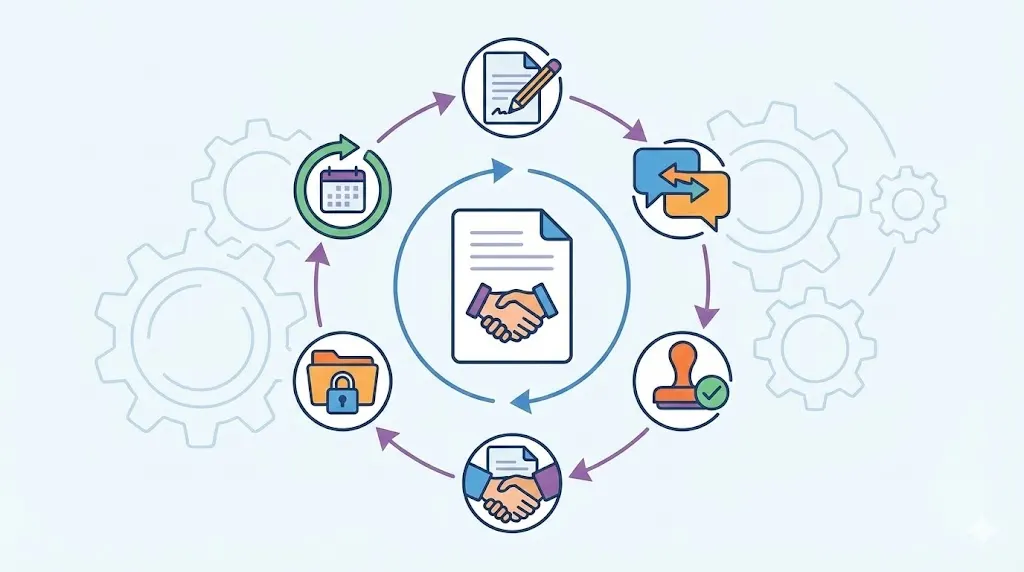
Use this contract lifecycle map to define ownership:
Approved draft: The owner confirms the final text and business details. The system locks the approved version for sending. Any later change starts a new review.
Signature: The system sends the contract to authorized signers. It records completed and pending signatures. Automatic reminders address stalled requests.
Active contract: The signed copy enters the central repository. Key parties, dates, and terms become searchable fields. The owner receives responsibility for follow-up.
Obligation tracking: The system records deliverables, reports, payments, and notice dates. Owners receive reminders before each duty. Completed actions remain part of the record.
Renewal: The system warns the owner before the renewal window. The business reviews performance, price, and future needs. The owner records the renewal or termination decision.
Amendment: A change links to the original agreement. Reviewers compare the amendment with the current terms. The repository keeps both records together.
Archival: Expired contracts move to a controlled archive. Access follows retention and permission rules. The record remains searchable for approved users.
Related articles: Enterprise Contract Lifecycle Management Software
Use AI Responsibly for Review and Obligation Tracking
AI can reduce repetitive work in contract management without a legal team. It can find dates, compare clauses, and create plain-language summaries.
The business must still check the results. AI may miss context, misunderstand a term, or present an uncertain answer with confidence.
Apply AI to Repetitive Contract Tasks
AI can extract parties, payment terms, renewal provisions, and key dates. It can also identify obligations and compare language with an approved template.
A small business might use AI to create a first review summary. Staff can then confirm each point against the source contract.
This process saves time without handing final judgment to a machine. It also gives owners a clearer starting point for review.
Protect Confidential Information
Contracts may contain customer data, prices, product plans, and trade secrets. Access should follow job duties and approved permissions.
Check how the software stores documents and handles AI processing. Review retention, deletion, encryption, backups, and third-party access.
Train staff not to paste confidential terms into unapproved public tools. A short internal rule can prevent serious data mistakes.
Combine Automation With Human Judgment
AI should prioritize attention, not approve risk. People remain responsible for decisions, approvals, and legal interpretation.
The business should verify extracted dates, summaries, and flagged clauses. A second review may help when the document affects major customers or suppliers.
Use this AI use policy to set practical boundaries:
Permitted tasks: AI may summarize clauses and extract dates, parties, and payment terms. It may compare drafts with approved templates. Staff must confirm every important result.
Prohibited assumptions: AI cannot decide that a contract is safe or legally valid. It cannot approve liability, data, or ownership changes. It cannot replace qualified counsel.
Human checks: Staff compare AI results with the original agreement. They confirm names, amounts, dates, and obligations. They record corrections before anyone relies on the summary.
Data protection: Staff use approved systems for confidential contracts. Permissions limit access to authorized users. The business reviews vendor security and retention practices.
Escalation: Unusual clauses or major risks move to a human reviewer. Legal triggers require qualified counsel. AI output never removes that requirement.
Related articles: Top 7 Free Contract Management Software in India (2026)
Measure the Process and Improve It Over Time
Contract operations improve when the business measures a few useful signals. Do not begin by organizing every old agreement at once.
Start with new contracts and the most important active agreements. Then expand the process as staff learn what works.
Track Speed, Visibility, and Completion
Measure the time from request to approved draft. Track approval delays, signature turnaround, and missing contract records.
Also track contract renewal visibility and owner assignment. These measures show whether contracts remain visible after signing.
A small scorecard can reveal simple fixes. For example, repeated intake delays may point to unclear required fields.
Review Exceptions and Repeated Negotiation Points
Repeated redlines show where templates or fallback positions need work. Missed obligations may show weak ownership or poor reminder timing.
Review rejected templates and delayed approvals each month. Ask whether the issue came from unclear language, missing information, or a missing rule.
Use this monthly contract operations scorecard:
Cycle time: The contract owner reviews average request-to-signature time. The owner looks for delays by workflow stage. Corrective action may include better intake fields.
Approval delays: The operations manager reviews pending approvals each month. The review identifies repeated bottlenecks and unclear authority. Corrective action may reset approval thresholds.
Signature completion: The contract owner checks open signature requests. The owner identifies stalled signers and weak reminders. Corrective action may change routing or signer instructions.
Renewal visibility: The finance or operations lead reviews upcoming renewals. The review confirms owners, dates, and business decisions. Corrective action may add earlier reminders.
Missing documents: The repository owner checks for absent signed copies and amendments. The review compares records with active business relationships. Corrective action may add a closing checklist.
Repeated redlines: A business reviewer groups common requested changes. The review checks whether fallback terms remain useful. Corrective action may update templates or seek counsel.
Ownership gaps: The process owner checks contracts without assigned owners. The review identifies inactive staff or unclear duties. Corrective action may transfer ownership and update permissions.
Related articles: Leading Contract Management Solutions for Pharma in 2026
Why Contract Management Software Matters
Contract management software brings templates, approvals, signatures, storage, reminders, and reports into one controlled workflow. This reduces administrative work for teams with limited staff capacity.
It also improves visibility after signing. Owners can find agreements, check status, and prepare for renewals without searching several systems.
Choose software that connects with email, customer relationship management, finance, and collaboration tools. These connections reduce duplicate entry and support adoption.
Prioritize permissions, searchable records, AI-assisted review, reminders, reporting, and a simple interface. Affordable CLM for small business should solve daily problems without creating a complex new project.
Contract technology improves consistency, but it does not replace qualified legal advice. Complex, unusual, or high-risk agreements still need proper legal review.
Central records: Store drafts, signed copies, amendments, and key details together. Search helps staff find the right contract quickly. Permissions protect sensitive information.
Workflow control: Route requests, approvals, and signatures through clear steps. Record decisions and status changes automatically. Owners can see stalled work without checking many inboxes.
Better tracking: Record obligations, renewal dates, and important deadlines. Send reminders before action becomes urgent. Reports show missing owners and incomplete records.
Practical adoption: Select tools that non-legal employees can learn quickly. Test common contracts before purchase. Confirm that the system supports existing email and business tools.
Volody's CLM Software supports contract management without a legal team through AI Contract Summaries, Approval Workflow Automation, and a Central Contract Repository. It can highlight obligations and renewal dates, route agreements for review, and keep signed records searchable in one place.
For example, a small agency can route a client agreement for approval, track signatures, and receive renewal reminders from one workflow.
Establish a controlled contract workflow with Volody's CLM Software to create, review, approve, and track agreements with greater speed and confidence.
FAQ
How can small businesses automate contract creation without a legal team?
Small businesses can use approved templates, reusable clauses, and auto-filled fields. Fillable forms can collect party details, prices, dates, and service terms. Workflow software can route drafts for approval and electronic signature. A lawyer should still review unusual, high-value, regulated, or heavily negotiated agreements.
How do templates and auto-filled fields reduce contract administration?
Templates remove repeated drafting and support consistent language. Auto-filled fields place client, pricing, dates, and other details into the correct sections. This reduces retyping and formatting mistakes. It also helps non-legal staff prepare routine contracts with less support from owners or managers.
How can small businesses track signatures, deadlines, obligations, and renewals?
Use a central repository with status fields, owners, dates, obligations, and renewal records. Electronic signature tracking shows which parties have signed and where work has stopped. Automated reminders support timely action. Regular reports can show upcoming renewals, incomplete duties, and missing documents.
Can non-legal employees safely collaborate on and approve contracts?
Yes, if the business sets approval rules and assigns contract owners. Staff can check commercial details, compare drafts with approved templates, and coordinate signatures. Role-based permissions can limit access by job duties. Legal counsel should review unusual risk, major changes, disputes, and regulated obligations.
What security controls should small businesses require from contract management software?
Look for role-based permissions, encryption, audit trails, secure backups, and access controls. Review how the provider handles confidential documents, AI processing, data retention, and deletion. Ask about third-party access and system recovery. The business should also set rules for sharing and downloading contracts.
How should a small business choose contract management software?
Prioritize simple setup, affordable pricing, templates, auto-filled fields, signatures, storage, reminders, and approval workflows. Integrations with email, customer systems, accounting, and collaboration tools can reduce duplicate work. Test common tasks with non-legal employees. Choose a tool they can use without extensive training.
About the Company

Volody AI CLM is an Agentic AI-powered Contract Lifecycle Management platform designed to eliminate manual contracting tasks, automate complex workflows, and deliver actionable insights. As a one-stop shop for all contract activities, it covers drafting, collaboration, negotiation, approvals, e-signature, compliance tracking, and renewals. Built with enterprise-grade security and no-code configuration, it meets the needs of the most complex global organizations. Volody AI CLM also includes AI-driven contract review and risk analysis, helping teams detect issues early and optimize terms. Trusted by Fortune 500 companies, high-growth startups, and government entities, it transforms contracts into strategic, data-driven business assets.




" height="216.72211px" id="FYO0bO80Y" transform="translate(3 6.105)" width="206.073px"/><path d="M 108.174 222 C 88.432 222 70.303 217.239 53.785 207.717 C 37.267 198.196 24.173 185.052 14.504 168.285 C 4.835 151.312 0 132.165 0 110.845 C 0 89.731 4.835 70.792 14.504 54.025 C 24.173 37.052 37.267 23.804 53.785 14.282 C 70.303 4.761 88.432 0 108.174 0 C 128.116 0 146.246 4.761 162.562 14.282 C 179.08 23.804 192.073 37.052 201.541 54.025 C 211.21 70.792 216.044 89.731 216.044 110.845 C 216.044 132.165 211.21 151.312 201.541 168.285 C 192.073 185.052 179.08 198.196 162.562 207.717 C 146.044 217.239 127.915 222 108.174 222 Z M 108.174 183.189 C 120.864 183.189 132.044 180.291 141.713 174.495 C 151.382 168.492 158.936 160.006 164.375 149.035 C 169.814 138.064 172.533 125.334 172.533 110.845 C 172.533 96.355 169.814 83.729 164.375 72.965 C 158.936 61.994 151.382 53.611 141.713 47.815 C 132.044 42.02 120.864 39.122 108.174 39.122 C 95.483 39.122 84.202 42.02 74.332 47.815 C 64.663 53.611 57.109 61.994 51.67 72.965 C 46.231 83.729 43.511 96.355 43.511 110.845 C 43.511 125.334 46.231 138.064 51.67 149.035 C 57.109 160.006 64.663 168.492 74.332 174.495 C 84.202 180.291 95.483 183.189 108.174 183.189 Z" fill="rgba(255, 255, 255, 0.12)" height="222px" id="aa1McFcE9" transform="translate(227.183 3)" width="216.04399999999998px"/><path d="M 42.302 182.257 L 111.799 182.257 L 111.799 216.722 L 0 216.722 L 0 0 L 42.302 0 Z" fill="rgba(255, 255, 255, 0.12)" height="216.72211px" id="yRq4AnrsX" transform="translate(477.721 6.105)" width="111.79899999999998px"/><path d="M 108.174 222 C 88.432 222 70.303 217.239 53.785 207.717 C 37.267 198.196 24.173 185.052 14.504 168.285 C 4.835 151.312 0 132.165 0 110.845 C 0 89.731 4.835 70.792 14.504 54.025 C 24.173 37.052 37.267 23.804 53.785 14.282 C 70.303 4.761 88.432 0 108.174 0 C 128.116 0 146.246 4.761 162.562 14.282 C 179.08 23.804 192.073 37.052 201.541 54.025 C 211.21 70.792 216.045 89.731 216.045 110.845 C 216.045 132.165 211.21 151.312 201.541 168.285 C 192.073 185.052 179.08 198.196 162.562 207.717 C 146.044 217.239 127.915 222 108.174 222 Z M 108.174 183.189 C 120.864 183.189 132.044 180.291 141.713 174.495 C 151.382 168.492 158.936 160.006 164.375 149.035 C 169.814 138.064 172.534 125.334 172.534 110.845 C 172.534 96.355 169.814 83.729 164.375 72.965 C 158.936 61.994 151.382 53.611 141.713 47.815 C 132.044 42.02 120.864 39.122 108.174 39.122 C 95.483 39.122 84.202 42.02 74.332 47.815 C 64.663 53.611 57.108 61.994 51.67 72.965 C 46.231 83.729 43.511 96.355 43.511 110.845 C 43.511 125.334 46.231 138.064 51.67 149.035 C 57.108 160.006 64.663 168.492 74.332 174.495 C 84.202 180.291 95.483 183.189 108.174 183.189 Z" fill="rgba(255, 255, 255, 0.12)" height="222px" id="mo8HQspQ0" transform="translate(609.155 3)" width="216.04500000000007px"/><path d="M 73.727 0 C 95.885 0 115.324 4.45 132.044 13.351 C 148.967 22.252 161.957 34.982 171.027 51.541 C 180.287 67.894 184.917 86.937 184.917 108.671 C 184.917 130.405 180.287 149.449 171.027 165.801 C 161.957 181.947 148.967 194.47 132.044 203.371 C 115.324 212.271 95.885 216.722 73.727 216.722 L 0 216.722 L 0 0 Z M 72.216 179.773 C 94.374 179.773 111.497 173.564 123.583 161.144 C 135.669 148.724 141.713 131.233 141.713 108.671 C 141.713 86.109 135.669 68.515 123.583 55.888 C 111.497 43.055 94.374 36.638 72.216 36.638 L 42.302 36.638 L 42.302 179.773 Z" fill="rgba(255, 255, 255, 0.12)" height="216.72211px" id="I3iXX5Hi_" transform="translate(859.693 6.105)" width="184.91699999999992px"/><path d="M 185.22 0 L 113.91 141.273 L 113.91 216.722 L 71.61 216.722 L 71.61 141.273 L 0 0 L 47.74 0 L 93.06 99.046 L 138.08 0 Z" fill="rgba(255, 255, 255, 0.12)" height="216.72211px" id="nzHyWC0_d" transform="translate(1061.78 6.105)" width="185.22000000000003px"/></svg>)