

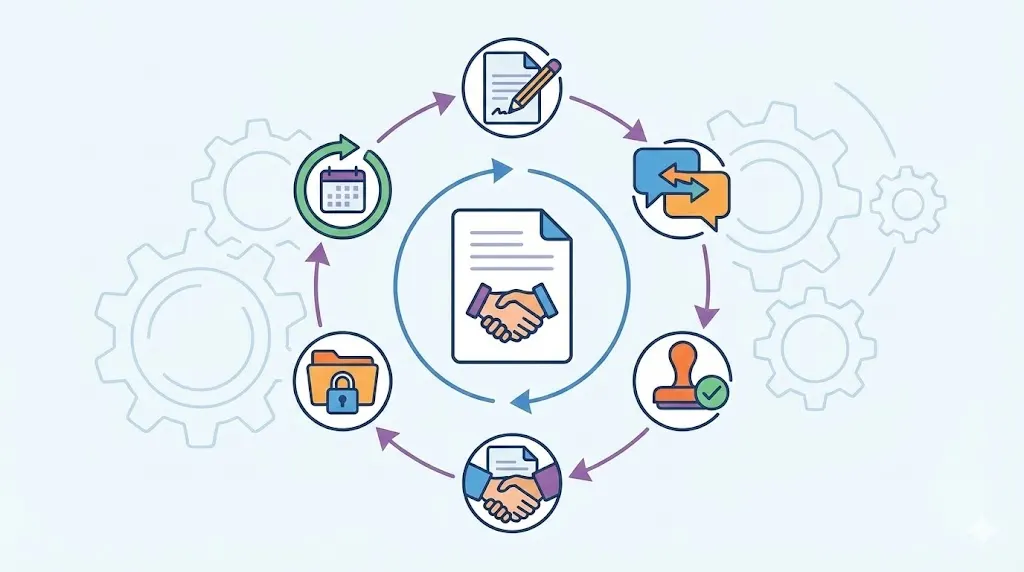
Contract changes demand coordinated governance across the organization. A single amendment can affect pricing, risk, compliance, delivery, and customer commitments across legal, sales, finance, procurement, security, and operations. A disciplined Contract Change Management framework gives every department a controlled path from request and review through approval, execution, and follow-through.
TL;DR
Define each contract change, its reason, urgency, owner, and affected teams before review begins.
Use clear roles, approval limits, version control, and records for every amendment.
Review commercial, legal, security, operational, and customer effects before approving changes.
Fix unclear ownership, scattered messages, incomplete reviews, slow approvals, and weak follow-through.
Standardize intake, use risk-based review, record decisions, and measure process results.
Contract management software connects records, workflows, approvals, systems, and post-change obligations.
Establishing a Cross Department Contract Change Framework
Define What Qualifies as a Contract Change
A contract change alters an agreed term, duty, right, or business result. It may affect one sentence or the whole commercial relationship. Teams need one shared definition before they build a change process.
Amendments change existing terms through signed documents. Renewals extend an agreement for another period. Extensions may add time, scope, or both. Pricing adjustments change rates, discounts, fees, or payment timing.
Scope changes add or remove products, regions, users, services, or deliverables. Waivers excuse a party from a specific duty. Corrections fix errors without changing the intended deal. Each category may need a different review path.
A minor spelling correction may need owner approval only. A new data use clause may need legal and security review. A price change may require finance, procurement, and business approval. Define these rules before requests arrive.
Assign Ownership Across the Contract Lifecycle
A contract data owner manages the business reason and expected result. Legal manages terms, risks, and the Contract Modification Process. Finance checks money, budgets, and payment effects. Procurement reviews suppliers and sourcing rules.
Security reviews data access, systems, and resilience duties. Operations confirms that teams can deliver the new promise. The business sponsor explains the commercial need. An authorized approver accepts, rejects, or escalates the request.
Role | Main responsibility | Typical decision |
|---|---|---|
Contract owner | Coordinates the request and outcome | Starts or pauses the change |
Legal | Reviews terms, liability, and enforceability | Accepts language or requests edits |
Finance | Reviews price, budget, and payment effects | Confirms financial approval |
Procurement | Reviews supplier and sourcing effects | Confirms supplier change |
Security | Reviews data and system duties | Approves security terms |
Operations | Confirms delivery capacity | Confirms practical execution |
Business sponsor | Confirms the business need | Recommends the change |
Authorized approver | Makes the final decision | Approves, rejects, or escalates |
This ownership model prevents informal conversations from becoming commitments. It also gives each request a clear next step. The owner should remain accountable after signature.
Create a Single Source of Contract Truth
A central record should hold the base agreement and every amendment. It should also hold approval notes, redlines, notices, and signed copies. Teams need the full history, not only the latest file.
Contract Version Control shows which draft came first. It also shows who changed the text and when. This record helps teams confirm which wording received approval. It reduces disputes about the governing version.
The record should link amendments to the original agreement. It should also connect renewals, extensions, statements of work, and related schedules. Searchable records help teams find these links before making another change.
A shared record also supports Contract Risk Management. Reviewers can see earlier exceptions, open obligations, and past negotiations. They can then make decisions with better context.
Related articles: Contract Administration: Scope, Roles, Operations
The Contract Change Management Workflow
Submit a Complete Change Request
Every change should begin with a clear Contract Change Request. A short email rarely gives reviewers enough facts. A structured form creates a better starting point.
Agreement details: Name the contract, parties, owner, and current version.
Requested change: Identify the clause and proposed new wording.
Business reason: Explain the need, expected result, and urgency.
Timing details: State the proposed effective date and key deadlines.
Impact details: Describe price, scope, systems, data, and delivery effects.
Stakeholders: Name affected teams, customers, suppliers, and approvers.
Supporting files: Add schedules, forecasts, notices, or business evidence.
The requestor should identify the preferred outcome. They should also explain what happens if the change fails. That detail helps reviewers weigh urgency and business exposure.
Review the Existing Agreement and Dependencies
Reviewers must first confirm the current contract language. They should check the base agreement, later amendments, and related schedules. They should not draft from an old local copy.
The review should check renewal dates and notice periods. It should also check service levels, pricing rules, termination rights, and notice methods. These terms may limit the proposed change.
Linked agreements can create hidden dependencies. A supplier change may affect a customer promise. A staffing change may affect a data processing agreement. A pricing change may affect a purchase order or invoice rule.
The owner should record these links before drafting. Reviewers can then assess the full change instead of one isolated clause.
Assess Commercial, Legal, and Operational Impact
A strong impact review asks more than, “Is this wording acceptable?” It asks whether the organization can deliver the new promise. It also tests whether the change creates new cost or risk.
Cost: Will the change alter price, budget, fees, or payment timing?
Risk: Will it change liability, remedies, insurance, or termination rights?
Compliance: Will it affect privacy, security, records, or industry duties?
Timing: Can teams meet the new dates, notice periods, or milestones?
Delivery: Can suppliers, staff, and systems support the change?
Relationships: Could the change affect customers, vendors, or internal trust?
Legal evaluates enforceability and liability. Finance reviews budgets and margins. Procurement checks supplier effects and purchase commitments. Security examines data duties and access controls.
Operations tests the change against real delivery work. The business owner confirms that the request still meets its goal. This broad review prevents a legal approval from hiding an operational failure.
Approve, Negotiate, Execute, and Link the Amendment
The owner sends the reviewed request through the Contract Approval Workflow. Each approver should see the change, impact notes, and prior decisions. The workflow should record approvals before external negotiation begins.
Negotiators then exchange redlines with the other party. They should save key comments and rejected language. Those records explain why the final text differs from the first proposal.
After agreement, legal completes the final check. Authorized signers then execute the amendment through approved signature methods. The owner confirms the effective date and informs affected teams.
The final record should link the signed amendment to the base agreement. It should preserve the approval trail and prior versions. It should also create any new obligations, dates, tasks, or system updates.
Related articles: How to Manage Risk Effectively with Contract Management
Departmental Roles in Contract Change Management
Legal and Compliance Review
Legal teams assess whether the new terms work with existing rights. They review liability, indemnity, warranties, remedies, and termination effects. They also check for conflicts with other contract terms.
Nonstandard language may need a deeper review. A new audit right may affect privacy or security duties. A changed notice clause may affect future enforcement. Legal should flag these effects before approval.
Compliance specialists should join when rules or records may change. Privacy teams should review personal data use or transfer. Regulatory teams should review changes tied to licensed work or restricted markets.
Legal should not own every decision alone. It should explain legal risk in plain language. Business leaders can then weigh that risk against value, timing, and delivery needs.
Finance and Procurement Coordination
Finance reviews price, discounts, credits, taxes, payment dates, and budget impact. It should also test whether the change affects revenue plans or forecast accuracy. Small rate changes can create large cost shifts over time.
Procurement reviews supplier terms and purchase commitments. It checks sourcing rules, approval limits, and vendor risk. It may also need to update purchase orders or supplier records.
These teams can identify effects hidden inside a legal request. A scope increase may need new funding. A renewal may change supplier concentration. A payment change may affect cash planning.
Finance and procurement should record their decisions in the shared change record. That record keeps commercial reasoning visible to later reviewers.
Security, Operations, and Business Owner Decision Rights
Security reviews data access, confidentiality, system links, and resilience duties. Operations checks staffing, delivery steps, service levels, and support needs. The business owner confirms the intended result and customer effect.
Decision rights should match risk and authority. A team may recommend a change without having power to approve it. Leaders should also know when a change needs escalation.
Reviewer | Reviews | Recommends | Escalates when |
|---|---|---|---|
Security lead | Data, access, and resilience | Security acceptance | New or high-risk data use appears |
Operations lead | Delivery, staffing, and service levels | Operational readiness | Capacity or service risk increases |
Business owner | Value, need, and customer effect | Business approval | The result differs from the request |
Finance lead | Cost, budget, and payment terms | Financial approval | Cost exceeds approved limits |
Legal lead | Wording, liability, and rights | Legal acceptance | Terms create unusual legal risk |
Executive approver | Overall value and exposure | Final decision | Value, risk, or scope exceeds limits |
This model separates review from final authority. It also gives leaders clear reasons for escalation. The contract owner should coordinate each decision.
Related articles: Contract Management Software for Growing Small Businesses
5 Key Challenges in Cross Department Contract Changes
1. Unclear Ownership and Approval Authority
Requests stall when no one owns the next step. Two teams may review the same clause while another team does nothing. The business then waits without knowing the reason.
Named contract owners solve part of this problem. Approval thresholds solve the rest. They should define who can approve price, scope, risk, and term changes.
The owner should also have a backup. Absence should not stop an urgent customer or supplier change. A clear escalation path keeps requests moving.
2. Fragmented Communication and Version Confusion
Requests often spread across email, chat, shared drives, and local files. Each channel may hold a different answer. Reviewers then struggle to identify the approved wording.
This problem weakens Contract Version Control. It also makes audit review harder. Teams may remember a discussion but lack proof of the final decision.
One controlled record should hold the request and its files. Teams should use consistent names and permissions. They should also limit editing after approval begins.
3. Incomplete Impact Assessment
A legal-only review can miss major business effects. The change may alter budgets, systems, staffing, supplier duties, or customer promises. Those effects can appear after signature.
A practical risk impact list should cover:
Financial impact: New costs, lost income, fees, credits, or budget needs.
Operational impact: New tasks, staffing needs, service levels, or delivery steps.
Compliance impact: Privacy, security, records, licensing, or policy duties.
Relationship impact: Customer trust, supplier pressure, or negotiation strain.
The request should name each affected area. A blank field should trigger a follow-up question. This simple rule improves the quality of review.
4. Slow Approval and Weak Post Execution Follow Through
Manual routing slows review when people cannot see the next owner. Repeated requests for missing context create more delay. Unclear escalation rules make urgent changes harder.
Problems can continue after signature. Teams may fail to update repositories, systems, or obligation records. They may also miss new deadlines or service duties.
That weakness can create renewal pressure and later disputes. An amendment is not complete until teams implement its terms. Owners should confirm each action and close the change only after validation.
Related articles: Contract Management Strategies: Key Dos and Don'ts
Best Practices for Reliable Contract Change Management
Standardize Intake and Documentation
A standard form makes each request easier to compare. It also reduces repeated questions during review. The form should guide requestors without requiring legal knowledge.
A useful sample intake field list includes:
Agreement name, parties, owner, and current version.
Clause number, requested wording, and change category.
Business reason, desired result, and urgency.
Price, scope, budget, data, and delivery effects.
Affected teams, external parties, and required approvers.
Proposed effective date, dependencies, and implementation tasks.
The form should allow attachments and plain language notes. It should also show the request status. Requestors need to know whether the change awaits review, negotiation, or signature.
Use Risk Based Review and Escalation
Not every change needs the same level of review. A small correction may follow a short path. A new liability term needs deeper review and stronger authority.
Risk may depend on value, contract type, jurisdiction, customer impact, or data use. Deviation from approved clauses also matters. The workflow should route higher-risk changes to the right specialists.
Clause guidance can speed common requests. Approved fallback clauses give negotiators safe alternatives. Escalation triggers should cover unusual liability, major price changes, new data use, and missed deadlines.
Review deadlines should match business urgency. However, urgency should not remove required controls. The process should record who approved any exception.
Communicate Decisions and Negotiation Context
A clear record should capture comments, redlines, decisions, and open issues. It should also show why the team chose the final wording. This context helps later reviewers avoid repeated work.
Stakeholders need timely updates. The contract owner should share the decision, effective date, and new duties. Each team should know what it must do next.
Good communication also supports Contract Software. People can work from one record instead of sending many attachments. That lowers the chance of hidden changes or missed approvals.
Audit and Improve the Process
Teams should review rejected requests and delayed approvals. They should look for repeated exceptions and missing intake data. These patterns show where the process needs better rules.
A continuous improvement scorecard can track:
Intake quality: Missing fields and repeat information requests.
Review flow: Delays, rework, and unclear ownership.
Change quality: Errors, disputes, and rejected amendments.
Execution quality: Completed updates and missed obligations.
User experience: Feedback from legal and business teams.
The scorecard should lead to action. Teams may revise templates, clause guidance, or approval rules. They may also train departments on common request errors.
Related articles: Contract Management Software for Finance: A Detailed Guide
Technology and Governance for Contract Change Visibility
Centralize Records and Version History
A contract management platform can connect agreements, amendments, approvals, and obligations. It can also store negotiation notes and related messages. This gives teams one reliable contract record.
Version history shows what changed, who changed it, and when. It helps reviewers compare drafts and confirm the final text. It also supports audit reviews when questions arise later.
A central repository should support search and access controls. Users should find records by party, owner, date, clause, or status. Permissions should protect sensitive terms while allowing needed access.
Automate Routing and Notifications
Workflow rules can assign requests by change type, risk, value, or department. They can also use contract owner, region, or jurisdiction. This reduces manual routing and missed handoffs.
Automated reminders keep reviewers aware of due dates. Escalation alerts help managers act on stalled requests. Deadline notices can also warn teams about effective dates and notice periods.
Automation should support judgment, not replace it. High-risk changes still need skilled review. The system should explain why it routed a request to each person.
Connect Contract Data With Business Systems
Contract data becomes more useful when it reaches operating systems. Integrations can connect CLM tools with ERP, CRM, HRIS, finance, procurement, and e-signature systems. Shared data helps teams implement approved changes.
Useful integration cases include:
A CRM update reflects a new customer price or service scope.
An ERP update applies approved payment or purchase terms.
A procurement update changes supplier records and purchase limits.
An HRIS update reflects changed workforce or benefit obligations.
An e-signature update confirms execution and stores the signed record.
These links reduce duplicate entry and manual follow-up. They also help teams spot mismatched records. Governance rules should define which system owns each data field.
Related articles: Atlanta Contract Management: Top AI CLM Solutions
Measuring and Maintaining Contract Change Performance
Organizations need measures that show both activity and results. Request volume shows workload, but it does not show quality. Outcome measures show whether changes were approved, applied, and monitored well.
Cycle time: Measure time from request submission to final decision.
Approval rework: Track requests returned for missing facts or unclear wording.
Exception rate: Review changes that bypassed standard rules or approvals.
Amendment volume: Compare changes by department, contract type, and reason.
Implementation completion: Confirm that teams finished every required update.
Post-change disputes: Track problems linked to unclear or missed changes.
Teams should review these measures by department. A high volume may show normal business activity. It may also show weak drafting, poor scope control, or unclear pricing rules.
Governance reviews should confirm current owners and approval limits. They should also check open obligations and upcoming renewals. Lessons learned should update forms, workflows, and clause guidance.
Related articles: Contract Migration: Expert Tips for Success
Why Contract Management Software Matters
Contract management software gives departments one place for intake, review, approval, negotiation, and execution. It also supports version control, audit records, and post-execution monitoring. This shared setting improves accountability and cross-team work.
A sound Contract Lifecycle Management program connects each change to its full business effect. It can track amendments, renewals, extensions, termination steps, and obligations. It can also show which teams must act after signature.
Volody's CLM Software supports this work through a central contract repository, approval workflow automation, and AI contract summaries. The repository helps teams find current agreements and prior versions. Automated routing sends requests to the right reviewers. AI summaries highlight obligations, renewal dates, and key risks.
For example, finance can review a price change while operations checks delivery duties. Legal can compare the amendment with earlier versions. The owner can then track approval, signature, and follow-up tasks in one record.
Explore a simpler way to create, review, approve, and track contracts with Volody's CLM Software.
FAQ
What is contract management software?
Contract management software manages agreements from drafting through renewal or termination. It stores contracts, versions, obligations, deadlines, and approval records in one place. Many tools also route reviews and connect with CRM, ERP, procurement, HRIS, and signature systems. This shared record helps departments work from current terms.
Who needs contract management software across an organization?
Legal, procurement, sales, finance, HR, security, and operations can all use it. Business owners also need access when their teams rely on contract duties. The software gives each group the right records and tasks. Permissions help protect sensitive terms while supporting cross-team work.
What are the key benefits of implementing CLM software?
CLM software improves visibility, approval control, version tracking, and deadline monitoring. Automated workflows reduce manual follow-up and show who owns each task. Central records also support audits and reduce conflicting files. Integrations help departments apply approved changes in daily business systems.
Who should approve a contract change?
The right approver depends on the change, risk, value, and business effect. Legal may review liability terms, while finance checks price and budgets. Security, procurement, and operations may also need approval. An approval matrix should set limits, escalation rules, and final signature authority.
What information should a contract change request include?
The request should name the agreement, affected clause, proposed wording, and business reason. It should also state urgency, effective date, stakeholders, financial effects, and dependencies. Security, privacy, and delivery impacts may need separate detail. Complete intake helps reviewers decide without repeated questions.
How can departments prevent conflicting contract versions?
Adopt one controlled repository, enforce clear permissions and naming rules, and link every amendment to the governing agreement. Preserve approval evidence, redlines, and signed copies together, then use workflow tools to direct teams to the current version.
About the Company

Volody AI CLM is an Agentic AI-powered Contract Lifecycle Management platform designed to eliminate manual contracting tasks, automate complex workflows, and deliver actionable insights. As a one-stop shop for all contract activities, it covers drafting, collaboration, negotiation, approvals, e-signature, compliance tracking, and renewals. Built with enterprise-grade security and no-code configuration, it meets the needs of the most complex global organizations. Volody AI CLM also includes AI-driven contract review and risk analysis, helping teams detect issues early and optimize terms. Trusted by Fortune 500 companies, high-growth startups, and government entities, it transforms contracts into strategic, data-driven business assets.





" height="216.72211px" id="FYO0bO80Y" transform="translate(3 6.105)" width="206.073px"/><path d="M 108.174 222 C 88.432 222 70.303 217.239 53.785 207.717 C 37.267 198.196 24.173 185.052 14.504 168.285 C 4.835 151.312 0 132.165 0 110.845 C 0 89.731 4.835 70.792 14.504 54.025 C 24.173 37.052 37.267 23.804 53.785 14.282 C 70.303 4.761 88.432 0 108.174 0 C 128.116 0 146.246 4.761 162.562 14.282 C 179.08 23.804 192.073 37.052 201.541 54.025 C 211.21 70.792 216.044 89.731 216.044 110.845 C 216.044 132.165 211.21 151.312 201.541 168.285 C 192.073 185.052 179.08 198.196 162.562 207.717 C 146.044 217.239 127.915 222 108.174 222 Z M 108.174 183.189 C 120.864 183.189 132.044 180.291 141.713 174.495 C 151.382 168.492 158.936 160.006 164.375 149.035 C 169.814 138.064 172.533 125.334 172.533 110.845 C 172.533 96.355 169.814 83.729 164.375 72.965 C 158.936 61.994 151.382 53.611 141.713 47.815 C 132.044 42.02 120.864 39.122 108.174 39.122 C 95.483 39.122 84.202 42.02 74.332 47.815 C 64.663 53.611 57.109 61.994 51.67 72.965 C 46.231 83.729 43.511 96.355 43.511 110.845 C 43.511 125.334 46.231 138.064 51.67 149.035 C 57.109 160.006 64.663 168.492 74.332 174.495 C 84.202 180.291 95.483 183.189 108.174 183.189 Z" fill="rgba(255, 255, 255, 0.12)" height="222px" id="aa1McFcE9" transform="translate(227.183 3)" width="216.04399999999998px"/><path d="M 42.302 182.257 L 111.799 182.257 L 111.799 216.722 L 0 216.722 L 0 0 L 42.302 0 Z" fill="rgba(255, 255, 255, 0.12)" height="216.72211px" id="yRq4AnrsX" transform="translate(477.721 6.105)" width="111.79899999999998px"/><path d="M 108.174 222 C 88.432 222 70.303 217.239 53.785 207.717 C 37.267 198.196 24.173 185.052 14.504 168.285 C 4.835 151.312 0 132.165 0 110.845 C 0 89.731 4.835 70.792 14.504 54.025 C 24.173 37.052 37.267 23.804 53.785 14.282 C 70.303 4.761 88.432 0 108.174 0 C 128.116 0 146.246 4.761 162.562 14.282 C 179.08 23.804 192.073 37.052 201.541 54.025 C 211.21 70.792 216.045 89.731 216.045 110.845 C 216.045 132.165 211.21 151.312 201.541 168.285 C 192.073 185.052 179.08 198.196 162.562 207.717 C 146.044 217.239 127.915 222 108.174 222 Z M 108.174 183.189 C 120.864 183.189 132.044 180.291 141.713 174.495 C 151.382 168.492 158.936 160.006 164.375 149.035 C 169.814 138.064 172.534 125.334 172.534 110.845 C 172.534 96.355 169.814 83.729 164.375 72.965 C 158.936 61.994 151.382 53.611 141.713 47.815 C 132.044 42.02 120.864 39.122 108.174 39.122 C 95.483 39.122 84.202 42.02 74.332 47.815 C 64.663 53.611 57.108 61.994 51.67 72.965 C 46.231 83.729 43.511 96.355 43.511 110.845 C 43.511 125.334 46.231 138.064 51.67 149.035 C 57.108 160.006 64.663 168.492 74.332 174.495 C 84.202 180.291 95.483 183.189 108.174 183.189 Z" fill="rgba(255, 255, 255, 0.12)" height="222px" id="mo8HQspQ0" transform="translate(609.155 3)" width="216.04500000000007px"/><path d="M 73.727 0 C 95.885 0 115.324 4.45 132.044 13.351 C 148.967 22.252 161.957 34.982 171.027 51.541 C 180.287 67.894 184.917 86.937 184.917 108.671 C 184.917 130.405 180.287 149.449 171.027 165.801 C 161.957 181.947 148.967 194.47 132.044 203.371 C 115.324 212.271 95.885 216.722 73.727 216.722 L 0 216.722 L 0 0 Z M 72.216 179.773 C 94.374 179.773 111.497 173.564 123.583 161.144 C 135.669 148.724 141.713 131.233 141.713 108.671 C 141.713 86.109 135.669 68.515 123.583 55.888 C 111.497 43.055 94.374 36.638 72.216 36.638 L 42.302 36.638 L 42.302 179.773 Z" fill="rgba(255, 255, 255, 0.12)" height="216.72211px" id="I3iXX5Hi_" transform="translate(859.693 6.105)" width="184.91699999999992px"/><path d="M 185.22 0 L 113.91 141.273 L 113.91 216.722 L 71.61 216.722 L 71.61 141.273 L 0 0 L 47.74 0 L 93.06 99.046 L 138.08 0 Z" fill="rgba(255, 255, 255, 0.12)" height="216.72211px" id="nzHyWC0_d" transform="translate(1061.78 6.105)" width="185.22000000000003px"/></svg>)