

Contract work slows down when teams depend on email, spreadsheets, and scattered files. Small delays then grow into missed deadlines, unclear ownership, and lost value. AI automation can connect these tasks and improve control. The first step is spotting the warning signs.
TL;DR
Seven warning signs reveal when manual contract workflows create delays, errors, risk, and poor visibility.
AI can improve intake, drafting, review, approvals, signing, renewals, and post-signature obligation tracking.
Scattered records and weak handoffs create contract process inefficiencies across legal, sales, finance, and procurement.
Central repositories, clause libraries, reminders, and approval rules create more reliable contract workflow automation.
Start with one painful workflow, then measure speed, accuracy, adoption, exceptions, and renewal visibility.
Contract management software connects automation, audit trails, human review, and usable contract data.
How AI Automation Changes Contract Operations
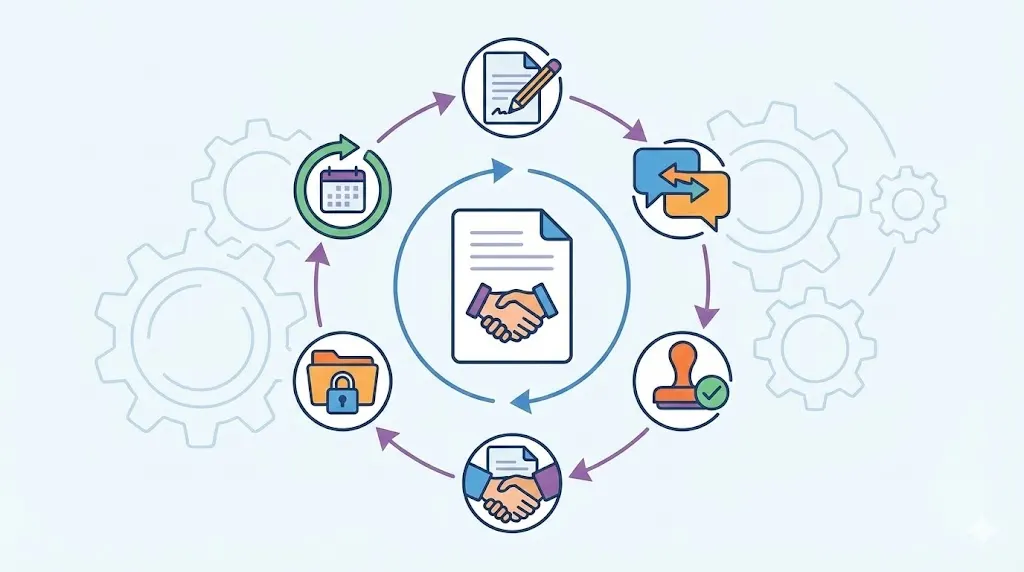
From manual coordination to connected workflows
Manual work often begins with an email request. Someone must read it, ask questions, and find the right template. AI can identify the request type and required details. It can then route the work to the right owner.
A connected workflow keeps each task in one place. It can assign legal, finance, procurement, or sales reviewers. It can also trigger reminders when work pauses. Everyone can see the current status and next action.
This reduces contract workflow automation gaps between departments. It also creates a clear record of each handoff. Teams spend less time asking where work stands.
AI assistance without removing human judgment
AI can create a first draft from an approved template. It can suggest clauses based on deal details and past terms. It can compare language against a company playbook. Legal teams still decide whether proposed language is acceptable.
The same approach applies during review. AI can flag unusual terms, missing protections, or risky changes. A lawyer then checks the finding and decides what happens next. This keeps final judgment with accountable people.
AI should support decisions, not make hidden decisions. Clear review points help teams manage sensitive contracts. They also build trust in automated contract renewal processes.
Where automation creates measurable value
Automation can shorten the time between request and signature. It can also reduce repeated data entry and missed follow-ups. Better records make contract searches faster. Clear ownership helps teams act before deadlines.
Value appears in several areas. Sales can answer customers sooner. Legal can spend more time on difficult negotiations. Finance can find payment terms without chasing files.
The strongest results come from connected steps. Intake, drafting, review, approval, and monitoring should share information. That design removes duplicate work and improves contract process optimization.
Related articles: What is Contract Automation? A Comprehensive Guide
The Seven Signals Your Contract Process Needs AI Automation
Intake problems and disconnected contract records
The first sign is scattered intake. Requests arrive through email, chat, calls, and shared documents. Each channel may hold different facts. Teams then spend time rebuilding the request.
Contracts may also sit in shared drives, spreadsheets, inboxes, and local folders. No one knows which file holds the latest version. Search becomes slow and uncertain. This creates early contract management bottlenecks.
Approval, review, and workload bottlenecks
The second sign is repeated waiting. A contract may need legal, finance, procurement, security, and executive review. Without clear rules, nobody knows who acts next. Approval delays then become normal.
The third sign is a growing legal queue. Routine checks consume time that complex matters need. Missing information sends requests back and forth. Contract volume rises faster than team capacity.
Weak control over contract information and obligations
The fourth sign is unreliable contract information. Staff enter the same data into several systems. Names, dates, and payment details may not match. Version uncertainty creates avoidable errors.
The fifth sign is weak obligation control. Teams miss notice periods, renewals, service duties, or price changes. Auto-renewal clause can continue without a useful review. Value then leaks from signed agreements.
Limited contract data for business decisions
The sixth sign is poor business visibility. Leaders cannot easily see cycle times, spend, or risky terms. Procurement may lack supplier commitments. Finance may lack dependable payment details.
The seventh sign is weak measurement. Teams cannot prove where delays begin or why they continue. They also struggle to measure return from process changes. Better data is needed before better decisions can follow.
Related articles: AI in Law: Smart Contracts & Legal Automation Tools
The Operational Challenges Behind Contract Automation Needs
Communication gaps across departments
Departments often use separate tools and different terms. Sales may call a request urgent. Legal may lack the business reason behind it. Procurement may not see later changes.
These gaps weaken handoffs. Stakeholders cannot see current status or assigned actions. They may review an outdated file. They may also repeat work already completed elsewhere.
A shared workflow creates one visible path. Each person sees the request, history, and next step. That visibility reduces confusion without removing specialist review.
Limited use of contract data
Contract data often remains trapped inside documents. Teams may know a term exists but cannot find it quickly. This limits forecasting, negotiation, and supplier management.
Structured data changes that picture. Systems can capture parties, dates, values, clauses, and obligations. Teams can then search and report across agreements.
This supports legal workflow automation beyond document handling. It helps teams find trends before they become problems. It also gives leaders better evidence for process decisions.
Related articles: Contract Automation: Embracing Legal Transformation
Practical Remedies for a More Reliable Contract Process
Standardize intake: Use one request form for every contract type.
Required fields should capture value, parties, dates, and business purpose. Request categories can send work to the correct queue. Missing information should block submission until someone completes it. This reduces back-and-forth and improves early review quality.
Centralize records: Store contracts, templates, and clauses in one controlled repository.
Use clear names, tags, and permissions for every record. Approved language should have an owner and review date. Search should cover scanned files and common document formats. Teams can then find current versions without checking several systems.
Automate approvals: Create approval rules for value, risk, and contract type.
The workflow should assign each reviewer automatically. Reminders should appear before work becomes overdue. Escalations should alert managers when approvals stall. Every action should remain visible in an audit trail.
Track deadlines: Record renewals, notice periods, milestones, and service duties.
Assign each deadline to a named business owner. Send reminders at useful points before action is due. Escalate unanswered reminders through the approval chain. This protects value after the contract receives a signature.
Related articles: Governing AI-Generated Contract Clauses at Enterprise Scale
Using AI Across the Contract Lifecycle
Drafting and clause selection
AI can create an initial draft from approved templates. It can use deal details to select relevant clauses. It can also suggest fallback language from a clause library.
This helps teams avoid starting with blank documents. It also supports more consistent terms across similar deals. A lawyer must still validate the draft before release.
Review and negotiation support
AI contract review can compare a counterparty draft with company standards. It can flag unusual language, missing protections, and changed obligations. It can also suggest redlines for routine deviations.
Summaries help reviewers understand long contracts faster. They can show key dates, duties, risks, and payment terms. People still need to confirm whether the findings fit the deal.
Execution and signature coordination
After approval, automation can route the final document for signature. It can show who has signed and who still needs to act. Reminders reduce administrative follow-up.
Status updates can also reach sales, legal, and finance. This prevents teams from relying on separate messages. A visible signing stage keeps the process moving.
Monitoring and obligation management
After signature, AI can find dates and obligations in final contracts. It can assign duties to responsible owners. It can then alert those owners before action is due.
Users can ask questions about stored agreements. Summaries can explain renewal rules or service commitments. These tools support monitoring without replacing business judgment.
Related articles: Using AI to Predict Legal Bottlenecks
Implementing AI Automation Responsibly
Start with the most painful repetitive workflow
Begin with one process that causes clear pain. Good options include standard sales contracts, supplier renewals, or routine reviews. The work should happen often enough to produce useful evidence.
Define the current steps before changing them. Record approval delays, rework, search time, and missed deadlines. Then set practical targets for the pilot. A narrow scope makes testing easier.
Prepare data, policies, and permissions
Clean records improve every automated result. Remove duplicate files and identify current versions. Set common fields for parties, dates, values, and contract types.
Access rules should match each person’s role. Retention rules should define how long records remain available. Policies should explain when AI may suggest language or summarize terms. They should also explain when human review is required.
Build human review into high risk decisions
High-risk contracts need clear approval checkpoints. These include unusual clauses, major obligations, legal interpretations, and external messages. Automation should pause when a case falls outside approved rules.
Track cycle time, errors, approval delays, adoption, and exceptions. Also track renewal visibility and review accuracy. These measures show whether the process truly improved. They also reveal where people need more training.
Related articles: Unlock Contract Data Extraction for Smarter AI Insights
Choosing the Right Contract Automation Capabilities
Match capabilities to process pain points
Start with the warning signs your team can prove. Scattered records point toward central storage and search. Slow approvals point toward routing and reminders. Missed renewals point toward obligation tracking.
Do not buy features without a clear use case. Each capability should address a known delay or risk. Owners should agree on the desired result. This keeps contract automation solutions focused and useful.
Distinguish AI assistance from rule based automation
Rules work well for predictable events. They can route a request by value or send renewal reminders. They can also require approval for certain contract types.
AI works better with varied language and documents. It can summarize terms, compare clauses, and suggest contextual changes. Strong systems combine both approaches instead of treating them as substitutes.
Connections also matter. Useful integrations may include email, document storage, CRM, procurement, finance, and identity systems. Audit logs and role-based access controls protect the process. These links prevent another set of disconnected tools.
Related articles: Leading Contract Management Solutions for Logistics in 2026
Why Contract Management Software Matters
Contract management software brings records, workflows, and deadlines together. It can support intake, approvals, reminders, drafting, review, and obligation tracking. This creates a dependable source of contract data.
Volody's CLM Software supports AI Contract Review, AI Contract Summaries, and Approval Workflow Automation. It can flag risky language, highlight obligations, and route work between reviewers. These features help teams address scattered records, slow approvals, and missed deadlines.
For example, a supplier renewal can surface its notice date and key risks. The system can then alert procurement and route approval to finance.
Visibility: Central records improve search, reporting, and accountability.
Control: Approval rules and audit trails show who acted and when.
Follow-through: Reminders help owners manage renewals and obligations.
The right tool does not remove ownership. It gives owners better information and clearer actions. Human review remains essential for unusual or high-risk terms.
See how AI-powered contract management can streamline intake, review, approvals, renewals, and obligation tracking while keeping people in control today. check out Volody's CLM Software.
FAQ
What problems does CLM software solve?
CLM software solves scattered storage, slow approvals, weak version control, and missed obligations. It puts contract records, workflows, and reminders in one place. Teams can find terms and deadlines faster. It also creates an audit trail, which helps legal, finance, procurement, and business leaders track responsibility.
What is contract automation software?
Contract automation software uses templates, rules, workflows, and AI to manage contract tasks. It can support intake, drafting, review, approvals, signing, storage, and renewals. The tool reduces repeated administration and helps teams follow consistent steps. Legal professionals still decide how unusual or high-risk terms should proceed.
Is AI contract review the same as CLM?
No, AI review and CLM serve different purposes. AI review examines language, compares clauses, and flags unusual terms before signature. CLM manages the wider contract lifecycle, including intake, storage, approvals, renewals, and obligations. Many CLM tools include AI review as one part of their wider service.
What is the difference between pre-signature AI review and post-execution CLM?
Pre-signature AI review supports drafting and negotiation before signing. It can compare language, suggest changes, and summarize risks. Post-execution CLM manages signed agreements and their continuing duties. It tracks renewals, dates, owners, and obligations after the agreement becomes active.
How secure is AI contract automation?
Security depends on the provider, system design, and access controls. Buyers should review encryption, permissions, retention, authentication, and audit records. They should also ask whether customer data trains outside models. Sensitive work should include human approval and clear handling rules for exceptions.
How long does it take to implement contract automation?
Implementation time depends on data quality, workflow scope, integrations, and approval needs. A focused pilot usually starts sooner than a full lifecycle rollout. Choose one defined process and set clear measures first. Expand only after testing accuracy, adoption, security, and control.
About the Company

Volody AI CLM is an Agentic AI-powered Contract Lifecycle Management platform designed to eliminate manual contracting tasks, automate complex workflows, and deliver actionable insights. As a one-stop shop for all contract activities, it covers drafting, collaboration, negotiation, approvals, e-signature, compliance tracking, and renewals. Built with enterprise-grade security and no-code configuration, it meets the needs of the most complex global organizations. Volody AI CLM also includes AI-driven contract review and risk analysis, helping teams detect issues early and optimize terms. Trusted by Fortune 500 companies, high-growth startups, and government entities, it transforms contracts into strategic, data-driven business assets.




" height="216.72211px" id="FYO0bO80Y" transform="translate(3 6.105)" width="206.073px"/><path d="M 108.174 222 C 88.432 222 70.303 217.239 53.785 207.717 C 37.267 198.196 24.173 185.052 14.504 168.285 C 4.835 151.312 0 132.165 0 110.845 C 0 89.731 4.835 70.792 14.504 54.025 C 24.173 37.052 37.267 23.804 53.785 14.282 C 70.303 4.761 88.432 0 108.174 0 C 128.116 0 146.246 4.761 162.562 14.282 C 179.08 23.804 192.073 37.052 201.541 54.025 C 211.21 70.792 216.044 89.731 216.044 110.845 C 216.044 132.165 211.21 151.312 201.541 168.285 C 192.073 185.052 179.08 198.196 162.562 207.717 C 146.044 217.239 127.915 222 108.174 222 Z M 108.174 183.189 C 120.864 183.189 132.044 180.291 141.713 174.495 C 151.382 168.492 158.936 160.006 164.375 149.035 C 169.814 138.064 172.533 125.334 172.533 110.845 C 172.533 96.355 169.814 83.729 164.375 72.965 C 158.936 61.994 151.382 53.611 141.713 47.815 C 132.044 42.02 120.864 39.122 108.174 39.122 C 95.483 39.122 84.202 42.02 74.332 47.815 C 64.663 53.611 57.109 61.994 51.67 72.965 C 46.231 83.729 43.511 96.355 43.511 110.845 C 43.511 125.334 46.231 138.064 51.67 149.035 C 57.109 160.006 64.663 168.492 74.332 174.495 C 84.202 180.291 95.483 183.189 108.174 183.189 Z" fill="rgba(255, 255, 255, 0.12)" height="222px" id="aa1McFcE9" transform="translate(227.183 3)" width="216.04399999999998px"/><path d="M 42.302 182.257 L 111.799 182.257 L 111.799 216.722 L 0 216.722 L 0 0 L 42.302 0 Z" fill="rgba(255, 255, 255, 0.12)" height="216.72211px" id="yRq4AnrsX" transform="translate(477.721 6.105)" width="111.79899999999998px"/><path d="M 108.174 222 C 88.432 222 70.303 217.239 53.785 207.717 C 37.267 198.196 24.173 185.052 14.504 168.285 C 4.835 151.312 0 132.165 0 110.845 C 0 89.731 4.835 70.792 14.504 54.025 C 24.173 37.052 37.267 23.804 53.785 14.282 C 70.303 4.761 88.432 0 108.174 0 C 128.116 0 146.246 4.761 162.562 14.282 C 179.08 23.804 192.073 37.052 201.541 54.025 C 211.21 70.792 216.045 89.731 216.045 110.845 C 216.045 132.165 211.21 151.312 201.541 168.285 C 192.073 185.052 179.08 198.196 162.562 207.717 C 146.044 217.239 127.915 222 108.174 222 Z M 108.174 183.189 C 120.864 183.189 132.044 180.291 141.713 174.495 C 151.382 168.492 158.936 160.006 164.375 149.035 C 169.814 138.064 172.534 125.334 172.534 110.845 C 172.534 96.355 169.814 83.729 164.375 72.965 C 158.936 61.994 151.382 53.611 141.713 47.815 C 132.044 42.02 120.864 39.122 108.174 39.122 C 95.483 39.122 84.202 42.02 74.332 47.815 C 64.663 53.611 57.108 61.994 51.67 72.965 C 46.231 83.729 43.511 96.355 43.511 110.845 C 43.511 125.334 46.231 138.064 51.67 149.035 C 57.108 160.006 64.663 168.492 74.332 174.495 C 84.202 180.291 95.483 183.189 108.174 183.189 Z" fill="rgba(255, 255, 255, 0.12)" height="222px" id="mo8HQspQ0" transform="translate(609.155 3)" width="216.04500000000007px"/><path d="M 73.727 0 C 95.885 0 115.324 4.45 132.044 13.351 C 148.967 22.252 161.957 34.982 171.027 51.541 C 180.287 67.894 184.917 86.937 184.917 108.671 C 184.917 130.405 180.287 149.449 171.027 165.801 C 161.957 181.947 148.967 194.47 132.044 203.371 C 115.324 212.271 95.885 216.722 73.727 216.722 L 0 216.722 L 0 0 Z M 72.216 179.773 C 94.374 179.773 111.497 173.564 123.583 161.144 C 135.669 148.724 141.713 131.233 141.713 108.671 C 141.713 86.109 135.669 68.515 123.583 55.888 C 111.497 43.055 94.374 36.638 72.216 36.638 L 42.302 36.638 L 42.302 179.773 Z" fill="rgba(255, 255, 255, 0.12)" height="216.72211px" id="I3iXX5Hi_" transform="translate(859.693 6.105)" width="184.91699999999992px"/><path d="M 185.22 0 L 113.91 141.273 L 113.91 216.722 L 71.61 216.722 L 71.61 141.273 L 0 0 L 47.74 0 L 93.06 99.046 L 138.08 0 Z" fill="rgba(255, 255, 255, 0.12)" height="216.72211px" id="nzHyWC0_d" transform="translate(1061.78 6.105)" width="185.22000000000003px"/></svg>)