

Manual contract management can support a small, stable contract portfolio, but it quickly becomes a liability as teams, workflows, and obligations expand. This guide identifies the operational signals that indicate your process has reached its limits and outlines a practical path to centralized, automated contract management.
TL;DR
Manual contract management fails when files, approvals, owners, and renewal dates become scattered across teams.
Version confusion, slow approvals, missed renewals, and weak records signal serious process strain.
Contract management software centralizes documents, automates steps, and improves visibility for growing businesses.
Start with clear workflows, approval rules, templates, permissions, integrations, and reporting needs.
A phased rollout should begin with key contracts, clean records, and simple user training.
Track speed, search time, renewal coverage, approval delays, and adoption after launch.
When Manual Contract Work Starts Breaking Down
Scattered storage creates operational blind spots
Many small businesses store contracts in several places. Files sit in inboxes, shared drives, desktop folders, and paper cabinets. Each location may hold a different version or related email thread.
This setup makes ownership unclear. A sales lead may hold the signed copy, while finance keeps payment details. Operations may track service duties in a separate spreadsheet.
People then spend time asking basic questions. Where is the final agreement? Who must act next? Which renewal date applies? Manual contract management becomes risky when answers depend on personal memory. A centralized contract repository for businesses helps organize agreements, while better contract organization for growing enterprises improves visibility and control as contract volumes increase.
Scattered storage also affects customer service. A team member may need a pricing term during a customer call. If that term sits inside an old email, the team cannot respond with confidence.
Version confusion undermines accuracy
Contracts often pass through many hands before signature. One person edits a Word file, another adds comments, and someone else saves a new copy. File names may not show which document includes the latest changes.
This creates a serious review risk. A team might approve old pricing, missing clauses, or outdated service terms. The final signed contract may also differ from the version discussed by key stakeholders.
Clear naming helps, but names alone cannot control a busy process. Teams need one trusted record for drafts, approvals, signatures, and final agreements. They also need a visible history of major changes.
Delayed access slows everyday decisions
A contract holds more than legal wording. It may contain prices, payment dates, service levels, renewal rules, notice periods, and delivery duties.and important details that influence ongoing legal work
Without a searchable repository, staff search through folders and messages. That work delays quotes, customer replies, invoices, and renewal decisions. It also pulls skilled staff away from sales, finance, and operations work.
These problems often appear gradually. One missing document may seem harmless. Repeated searches, however, show that the process no longer supports the business.
Related articles: Contract Amendment Management Without Losing Key Terms
Four Signs Your Business Has Outgrown Manual Contract Management
1. Approvals depend on email chasing
Email can support simple approvals. It becomes weak when several people must review one agreement. Messages can get buried, forwarded, or sent without the latest document.
Approval ownership may also remain unclear. A sales manager may expect finance to approve pricing. Finance may wait for a leader to approve payment terms. No one sees the full delay.
This creates a slow and uneven contract process. Urgent deals receive repeated reminders, while less visible requests remain untouched. Customers then wait longer for answers or signatures.
Contract process automation creates clear routes for each request. It can send work to the right person, show the current status, and remind owners about pending actions.
2. Renewals and obligations are difficult to track
Renewal dates often sit in calendars or personal spreadsheets. Those tools depend on one person entering the right date and acting at the right time.
A missed notice period can trigger an unwanted auto-renewal. A missed customer renewal can also reduce revenue. The business may lose the chance to adjust prices, change terms, or end a weak relationship.
Contracts also create duties beyond renewal. A vendor may require insurance records. A customer may expect reports, service levels, or delivery milestones. Manual tracking makes these duties easy to overlook.
A central system can connect each date and duty with an owner. It can also send reminders before action becomes urgent.
3. Contract requests are consuming too much staff time
Small teams often repeat the same work across many agreements. Staff copy old terms, enter the same details, search for templates, and send similar follow-up messages.
Founders may review routine contracts late at night. Sales staff may wait for legal advice on standard terms. Operations teams may search for payment or service details.
This work has a clear cost, even without a major contract error. Time spent on low-value tasks reduces time for customers, planning, and growth.
Templates, guided forms, and automated routing can remove much of this repeated effort. They also help staff follow the same process each time.
4. Collaboration becomes harder as the business grows
Growth adds more reviewers and more contract law types. Sales, finance, procurement, operations, leadership, and outside advisers may all join one deal.
Each group asks different questions. Finance checks payment terms. Sales checks commercial promises. Operations checks delivery duties. Leadership checks risk and business value.
Manual contract management struggles when these reviews happen in separate channels. Comments become hard to follow, and responsibility shifts between people.
A shared workflow gives every group a clear role. It also keeps the business moving without giving every user full control.
Related articles: Contract Management Software for Finance: A Detailed Guide
The Business Impact of Staying Manual
Administrative costs accumulate quietly
Manual work rarely appears as one large expense. It appears through small delays, repeated searches, and unnecessary review cycles.
A staff member may spend ten minutes finding a contract. Another person may spend twenty minutes confirming its renewal terms. These tasks repeat across customers, vendors, and partners.
The same pattern affects drafting. Teams may rebuild a document because they cannot find the approved template. They may also review a clause that another person already approved.
Over time, these tasks reduce capacity. The business may need more staff before it needs more revenue support. That cost can remain hidden inside normal work.
Revenue and cash flow remain exposed
Contracts often control when the business earns and collects money. Slow signatures can delay a customer start date. Incorrect payment terms can delay invoices or create disputes.
Missed renewals create another risk. A customer may leave because no one contacted them in time. A vendor may renew at an unwanted rate because the notice deadline passed.
Manual processes also limit spend visibility. Finance may not see all vendor commitments, while leaders may lack a full view of customer value.
The following cause-and-effect view shows how these weaknesses spread:
Scattered records: Staff spend more time searching for terms and signed agreements. Customers receive slower answers during important decisions. Leaders also lack a trusted view of contract activity.
Email approvals: Requests wait in personal inboxes without clear owners. Deals may miss planned start dates or customer deadlines. Repeated follow-ups also reduce staff focus.
Calendar reminders: Dates depend on personal entries and manual updates. Missed notices can cause auto-renewals, lost revenue, or unplanned costs. The business may discover the issue too late.
Duplicate documents: Reviewers may work from different terms or outdated drafts. This increases correction work and weakens confidence. Customers may notice inconsistent promises.
Weak audit records: Managers cannot easily confirm who approved key terms. Disputes then take longer to investigate. The business may struggle to explain its decisions.
Related articles: How to Manage Risk Effectively with Contract Management
Build a Reliable Contract Workflow Before Choosing Software
Standardize intake and contract creation
Start with a clear request process. Staff should provide the customer, contract type, value, dates, and special terms. This information gives reviewers enough context from the start.
Approved templates reduce unnecessary drafting. They also help teams use consistent language for common deals. A template should still allow controlled changes when a deal needs different terms.
Structured data matters after signature. Names, dates, prices, renewal rules, and owners should follow common formats. Consistent fields make records easier to search and report.
Do not automate a confusing process first. Write down the current steps, remove needless handoffs, and define the desired path. Then choose tools that support that path.
Clarify review and approval responsibilities
Each contract type needs a clear owner. That person manages the request, gathers details, and confirms completion. Other reviewers should have defined roles, not open-ended access.
Approval rules should match business risk. A standard vendor agreement may need one review. A high-value customer deal may need finance and leadership approval.
Businesses should also define exception handling. A changed payment term, unusual liability clause, or special renewal rule may require extra review.
These rules reduce guesswork. They also prevent every contract from reaching the same senior person. Clear limits help small teams move quickly while keeping important controls.
Centralize execution and post-signature management
The signed agreement should enter one controlled record. That record should include the final file, key details, approval history, and responsible owner.
Access permissions should match each person’s role. Sales may need customer terms, while finance may need payment details. External advisers may need limited access for specific reviews.
Post-signature work deserves equal attention. The process should track renewals, duties, amendments, and notice dates. A contract is not finished when someone signs it.
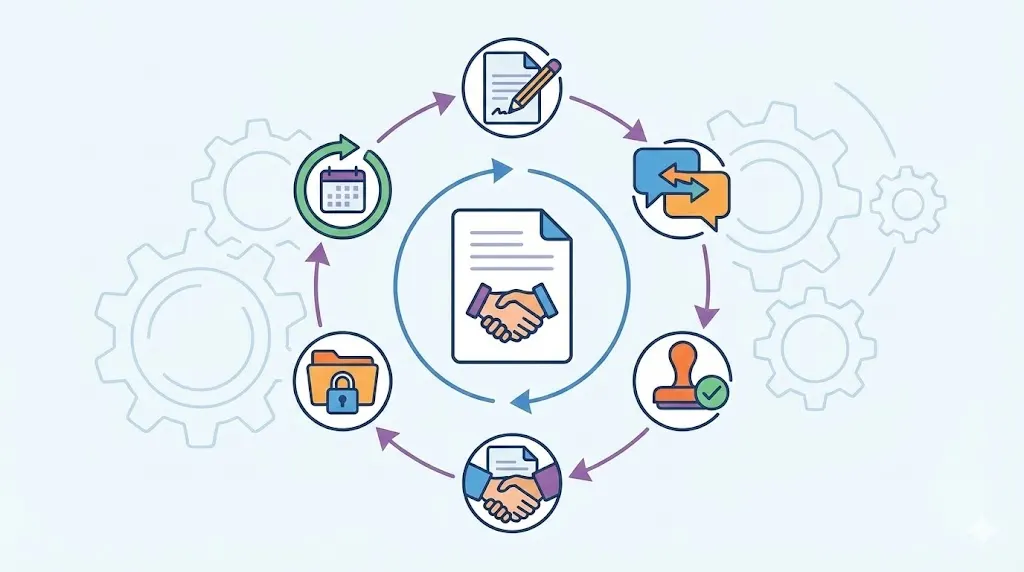
A reliable workflow can follow this sequence:
Request: A team member submits contract details and business needs.
Draft: The owner selects an approved template and adds required terms.
Review: Assigned teams check legal, financial, operational, and commercial points.
Approval: Authorized people approve the deal or return specific changes.
Signature: The parties sign the approved version through a controlled process.
Storage: The final agreement and key fields enter the central record.
Monitoring: Owners receive reminders for renewals, duties, and later changes.
Related articles: Top 5 Contract Obligation Management Software in UAE 2026
What to Look for in a Contract Management System
Core capabilities for small business workflows
Small businesses need useful control, not unnecessary complexity. The system should support templates, document creation, search, storage, and approval routing.
It should also send reminders for renewals and important duties. Users need a simple way to see pending work, completed approvals, and upcoming dates.
Audit trails show who changed, reviewed, approved, or signed a contract. This record supports better accountability and faster issue reviews. Reporting can show delays, contract types, owners, and renewal activity.
Electronic signatures can shorten the final step. They also reduce the need to print, scan, and email documents. The system should keep the signed copy with the related approval record.
Before choosing a tool, separate essential needs from useful extras:
Essential capabilities: Central storage, search, templates, permissions, approval routing, reminders, and audit records. These features address the main manual contract management challenges.
Useful enhancements: CRM links, finance connections, Word support, dashboards, and guided request forms. These features can improve adoption and reduce duplicate entry.
Unnecessary complexity: Features that require heavy administration or serve processes the business does not use. Extra controls can slow work when the team lacks a clear need.
Future fit: Support for more users, contract types, approval paths, and business systems. The tool should support growth without forcing a complete process change later.
Integrations and usability determine adoption
A contract system must fit the tools people already use. CRM connections can bring customer details into a request. Finance links can support payment review and vendor tracking.
Productivity tools also affect daily use. Teams may adopt a system faster when they can review contracts from familiar workspaces. Identity connections can simplify login and access control.
Ease of use matters just as much. Non-legal users should understand where to start, what to complete, and who reviews the request.
Ask users to test common scenarios before buying. Let sales create a customer contract. Let finance review payment terms. Let operations find a signed agreement and its duties.
Related articles: Leading Contract Management Software For Enterprises
Implement the Transition Without Disrupting Operations
Start with the highest-value contract types
Do not move every document on the first day. Start with contract types that create frequent work or carry meaningful risk.
Customer agreements often make a strong starting point. Vendor contracts, employment agreements, and partnership deals may follow. Choose types with repeatable terms and clear owners.
This approach creates a focused test. The team can improve templates, rules, and reminders before adding more categories.
It also builds trust. Users see direct value when the new process solves a problem they face each week.
Clean and organize existing agreements
Create an inventory before moving files. Record the contract type, parties, start date, end date, owner, and renewal status.
Remove duplicates where possible. Keep important historical versions when they support legal or business needs. Do not migrate every old file without a reason.
Review missing information carefully. A contract without an owner or renewal date may need manual research. Mark uncertain records rather than adding guesses.
Prioritize active agreements and upcoming events. Older contracts can move later when they still affect duties, payments, or customer relationships.
Create governance rules that fit the team
Governance means the rules that keep contract work consistent. Small businesses need rules that people can follow without a large support team.
Set naming standards for files and records. Define who can create templates, approve exceptions, change terms, and close contracts.
Permissions should protect sensitive agreements without blocking normal work. Retention rules should explain when records stay available and when they can be archived.
Assign one owner for each contract group. Ownership should include renewal checks, obligation follow-up, and record updates. Shared responsibility often means no one acts.
Train users around real workflows
Training works best when it reflects daily work. Show sales how to request a contract. Show finance how to review terms. Show leaders how to approve exceptions.
Short sessions can cover one role at a time. Use real templates and common examples. Avoid a long technical demonstration with no clear business task.
Create simple guidance for unusual cases. Users should know when to ask for legal help or senior approval. They should also know how to correct missing data.
A phased rollout keeps the change manageable:
Prepare: Map current work, choose contract types, and define success measures.
Migrate: Clean active records, capture key fields, and load approved templates.
Launch: Start with one team or workflow, then watch early use closely.
Train: Give each role short practice sessions and clear support routes.
Review: Fix process gaps, add useful contract types, and improve reports.
Related articles: Hospitality Contract Management: Best Practices
Measure Whether the New Process Is Working
Track speed from request to signature
Turnaround time shows whether the new workflow removes delay. Measure the time from the initial request through final signature.
Review the full path, not just the final step. A contract may wait before drafting, during legal review, or with an approver.
Compare similar contract types where possible. A standard customer agreement should not follow the same path as a complex partnership deal.
Speed should not replace quality. Faster work helps only when teams still use approved terms and complete required reviews.
Monitor visibility into renewals and obligations
A useful system should show upcoming renewals and assigned owners. It should also show whether owners opened, completed, or missed each action.
Review renewals coverage across active agreements. Missing dates or owners indicate data problems that need attention.
Track duties after signature as well. A contract may require reports, payments, deliveries, or service reviews. Each duty should have a person and a due date.
Good visibility helps teams act early. It gives them time to negotiate, budget, fix problems, or end a relationship properly.
Evaluate adoption and process quality
A system delivers value only when people use it. Review search time, template use, approval delays, and exception rates.
Low template use may show that templates do not fit real deals. Long approval times may show unclear rules or overloaded reviewers.
User participation also matters. If teams keep storing contracts in personal folders, the central record will remain incomplete.
Use a practical scorecard to connect activity with business results:
Request to signature time: Shows whether drafting and approval steps move faster. A lower time can support quicker deals and earlier revenue.
Average search time: Shows whether staff can find reliable records quickly. Less search work gives teams more time for customers and operations.
Renewal coverage: Shows how many active agreements have known dates and owners. Higher coverage reduces surprise renewals and missed opportunities.
Approval bottlenecks: Shows where requests wait longest. The pattern can reveal unclear rules, poor routing, or limited reviewer capacity.
Template usage: Shows whether staff follow approved drafting paths. Strong use can improve consistency and reduce avoidable review work.
Obligation completion: Shows whether teams manage duties after signature. Better completion supports service quality, revenue protection, and customer trust.
Related articles: Why Contract Management Software Demand Is Skyrocketing Now
Why Contract Management Software Matters
Contract management software gives small businesses one controlled place for contract work. It can centralize records, automate repeated steps, and keep owners aware of upcoming actions.
The right tool should match contract volume, team size, approval complexity, and growth plans. It should also fit existing systems without adding heavy daily work.
Volody's CLM Software supports AI Contract Review, Approval Workflow Automation, and Obligation Management. It can flag risky or missing terms, route agreements to the right approvers, and track renewals and contract duties.
For example, a growing services firm can review customer terms, route exceptions to finance, and receive renewal reminders from one system.
Centralize drafting, review, approval, storage, and renewal tracking.
Reduce searches, follow-ups, manual entry, and missed contract dates.
Improve accountability while supporting sales, finance, operations, and leadership.
Replace fragmented contract work with a faster, more controlled workflow. Explore Volody's CLM Software to centralize agreements, automate approvals, and manage renewals with confidence.
FAQ
How many contracts can a small business manage manually?
There is no fixed limit because contract complexity matters as much as volume. A business with fewer agreements may still need software when several people approve them. Frequent renewals, varied contract types, and many stakeholders increase the need for structure. A single owner may manage a simple set manually, but shared responsibility changes the tipping point.
Can small businesses adopt contract management software without a legal department?
Yes, small businesses can use contract software without an internal legal team. Operations, finance, sales, and leadership can follow templates, permissions, and approval rules. External lawyers can review only unusual or high-risk terms. This setup keeps routine work moving while directing specialist help toward contracts that need it.
What should a small business migrate into a contract management system first?
Start with active agreements, approved templates, and contracts with upcoming renewals. Add high-value deals and agreements with important payment or service duties. Include records tied to customer commitments, vendor costs, or compliance needs. Older documents can move later when they still affect current work or business decisions.
How does contract management software reduce missed renewal deadlines?
The system stores renewal dates, notice periods, owners, and related contract details in one record. Automated reminders can reach owners before action becomes urgent. Renewal calendars and reports help managers review upcoming work across teams. This approach reduces reliance on personal calendars, memory, and disconnected spreadsheets.
Is contract management software secure enough for sensitive business agreements?
It can be secure when the provider uses strong access controls, encryption, backups, and audit records. Permissions should limit each user to the contracts needed for their role. Businesses should also review retention rules and security documents before buying. Regular access reviews help remove old users and reduce unwanted exposure.
How long does it take to move from manual contract management to software?
The timeline depends on contract volume, record quality, workflow complexity, and user needs. Integrations and permission rules can also affect the work involved. A phased rollout usually reduces disruption and gives teams time to learn. Starting with active contracts and common templates can help the business show value sooner.
About the Company

Volody AI CLM is an Agentic AI-powered Contract Lifecycle Management platform designed to eliminate manual contracting tasks, automate complex workflows, and deliver actionable insights. As a one-stop shop for all contract activities, it covers drafting, collaboration, negotiation, approvals, e-signature, compliance tracking, and renewals. Built with enterprise-grade security and no-code configuration, it meets the needs of the most complex global organizations. Volody AI CLM also includes AI-driven contract review and risk analysis, helping teams detect issues early and optimize terms. Trusted by Fortune 500 companies, high-growth startups, and government entities, it transforms contracts into strategic, data-driven business assets.





" height="216.72211px" id="FYO0bO80Y" transform="translate(3 6.105)" width="206.073px"/><path d="M 108.174 222 C 88.432 222 70.303 217.239 53.785 207.717 C 37.267 198.196 24.173 185.052 14.504 168.285 C 4.835 151.312 0 132.165 0 110.845 C 0 89.731 4.835 70.792 14.504 54.025 C 24.173 37.052 37.267 23.804 53.785 14.282 C 70.303 4.761 88.432 0 108.174 0 C 128.116 0 146.246 4.761 162.562 14.282 C 179.08 23.804 192.073 37.052 201.541 54.025 C 211.21 70.792 216.044 89.731 216.044 110.845 C 216.044 132.165 211.21 151.312 201.541 168.285 C 192.073 185.052 179.08 198.196 162.562 207.717 C 146.044 217.239 127.915 222 108.174 222 Z M 108.174 183.189 C 120.864 183.189 132.044 180.291 141.713 174.495 C 151.382 168.492 158.936 160.006 164.375 149.035 C 169.814 138.064 172.533 125.334 172.533 110.845 C 172.533 96.355 169.814 83.729 164.375 72.965 C 158.936 61.994 151.382 53.611 141.713 47.815 C 132.044 42.02 120.864 39.122 108.174 39.122 C 95.483 39.122 84.202 42.02 74.332 47.815 C 64.663 53.611 57.109 61.994 51.67 72.965 C 46.231 83.729 43.511 96.355 43.511 110.845 C 43.511 125.334 46.231 138.064 51.67 149.035 C 57.109 160.006 64.663 168.492 74.332 174.495 C 84.202 180.291 95.483 183.189 108.174 183.189 Z" fill="rgba(255, 255, 255, 0.12)" height="222px" id="aa1McFcE9" transform="translate(227.183 3)" width="216.04399999999998px"/><path d="M 42.302 182.257 L 111.799 182.257 L 111.799 216.722 L 0 216.722 L 0 0 L 42.302 0 Z" fill="rgba(255, 255, 255, 0.12)" height="216.72211px" id="yRq4AnrsX" transform="translate(477.721 6.105)" width="111.79899999999998px"/><path d="M 108.174 222 C 88.432 222 70.303 217.239 53.785 207.717 C 37.267 198.196 24.173 185.052 14.504 168.285 C 4.835 151.312 0 132.165 0 110.845 C 0 89.731 4.835 70.792 14.504 54.025 C 24.173 37.052 37.267 23.804 53.785 14.282 C 70.303 4.761 88.432 0 108.174 0 C 128.116 0 146.246 4.761 162.562 14.282 C 179.08 23.804 192.073 37.052 201.541 54.025 C 211.21 70.792 216.045 89.731 216.045 110.845 C 216.045 132.165 211.21 151.312 201.541 168.285 C 192.073 185.052 179.08 198.196 162.562 207.717 C 146.044 217.239 127.915 222 108.174 222 Z M 108.174 183.189 C 120.864 183.189 132.044 180.291 141.713 174.495 C 151.382 168.492 158.936 160.006 164.375 149.035 C 169.814 138.064 172.534 125.334 172.534 110.845 C 172.534 96.355 169.814 83.729 164.375 72.965 C 158.936 61.994 151.382 53.611 141.713 47.815 C 132.044 42.02 120.864 39.122 108.174 39.122 C 95.483 39.122 84.202 42.02 74.332 47.815 C 64.663 53.611 57.108 61.994 51.67 72.965 C 46.231 83.729 43.511 96.355 43.511 110.845 C 43.511 125.334 46.231 138.064 51.67 149.035 C 57.108 160.006 64.663 168.492 74.332 174.495 C 84.202 180.291 95.483 183.189 108.174 183.189 Z" fill="rgba(255, 255, 255, 0.12)" height="222px" id="mo8HQspQ0" transform="translate(609.155 3)" width="216.04500000000007px"/><path d="M 73.727 0 C 95.885 0 115.324 4.45 132.044 13.351 C 148.967 22.252 161.957 34.982 171.027 51.541 C 180.287 67.894 184.917 86.937 184.917 108.671 C 184.917 130.405 180.287 149.449 171.027 165.801 C 161.957 181.947 148.967 194.47 132.044 203.371 C 115.324 212.271 95.885 216.722 73.727 216.722 L 0 216.722 L 0 0 Z M 72.216 179.773 C 94.374 179.773 111.497 173.564 123.583 161.144 C 135.669 148.724 141.713 131.233 141.713 108.671 C 141.713 86.109 135.669 68.515 123.583 55.888 C 111.497 43.055 94.374 36.638 72.216 36.638 L 42.302 36.638 L 42.302 179.773 Z" fill="rgba(255, 255, 255, 0.12)" height="216.72211px" id="I3iXX5Hi_" transform="translate(859.693 6.105)" width="184.91699999999992px"/><path d="M 185.22 0 L 113.91 141.273 L 113.91 216.722 L 71.61 216.722 L 71.61 141.273 L 0 0 L 47.74 0 L 93.06 99.046 L 138.08 0 Z" fill="rgba(255, 255, 255, 0.12)" height="216.72211px" id="nzHyWC0_d" transform="translate(1061.78 6.105)" width="185.22000000000003px"/></svg>)