

As your business grows, contracts quickly spread across inboxes, shared drives, paper files, and personal devices. A disciplined contract management system gives your team reliable access to every agreement, clear ownership of key obligations, and control over critical dates. This guide explains how to build that system step by step.
TL;DR
Audit every contract, attachment, amendment, and renewal record before changing your storage process.
Store agreements in one secure repository with clear names, tags, folders, and searchable contract metadata.
Fix growth problems such as missing records, unclear owners, missed deadlines, duplicate versions, and broad access.
Use approved templates, review rules, and approval paths for routine and higher-risk business agreements.
Track renewals, notice periods, payments, duties, and retention needs with reminders and named owners.
Choose contract management software when manual tools create delays, errors, weak reporting, or access risks.
Audit Your Existing Contracts First
Start with a full audit before building a new contract system. An audit means checking what exists, where it sits, and what information it contains.
Do not begin by creating new folders. First, gather every record that could affect your business. This includes signed contracts, drafts, attachments, amendments, schedules, notices, and related emails.
The goal is a reliable starting inventory. Without one, you may move incomplete records into a new system and create fresh confusion.
Gather Contracts from Every Source
Search company email accounts first. Look for signed agreements, approval messages, renewal notices, and attached schedules. Search by customer name, supplier name, project name, and common terms such as “agreement” or “renewal.”
Check shared drives and team folders next. Include finance, sales, procurement, operations, human resources, and legal folders. Each team may hold a different version of the same business agreement.
Review e-signature platforms and online signing accounts. These services may contain the final signed copy, while email contains earlier drafts. Save the signed version and its signing record when available.
Ask staff to check personal devices and local folders. Employees may have stored contracts on laptops or phones. Set a clear deadline for returning those files to the business archive.
Finally, inspect filing cabinets and storage boxes. Scan paper contracts into searchable PDFs. Check every page before saving the file, including signature pages, schedules, and exhibits.
Classify Status and Missing Information
Mark each record as active, expired, superseded, incomplete, or missing. An active contract still creates rights or duties for the business. An expired contract may still matter for disputes, taxes, or later audits.
A superseded contract has been replaced by a newer agreement or amendment. Keep it for context, but do not present it as the current version. Model Clauses can help maintain consistent wording across updated agreements. An incomplete record needs more pages, signatures, or supporting documents.
Record the contract owner during this review. The owner may work in sales, finance, procurement, operations, or people management. Ownership should reflect the work required, not only the person who signed.
Use this diagnostic checklist during the audit:
Contract source: Record where the agreement came from and who supplied it. Note whether the source was email, paper, a shared drive, or another system.
Agreement type: Identify the document as a customer, supplier, lease, employment, contractor, or partnership agreement.
Parties: Record the legal names of all parties, including trading names when they help staff search.
Status: Mark the record active, expired, superseded, incomplete, or missing. Add a short reason for each status.
Owner: Name the person responsible for dates, duties, questions, and future updates.
Key dates: Capture the start, end, renewal, notice, payment, and review dates.
Supporting files: Check for amendments, schedules, statements of work, notices, and related correspondence.
Missing information: Record gaps, then assign a person and due date for each follow-up.
Keep the audit record even after filing contracts. It shows what you checked and what remains unresolved. It also gives your business a useful baseline for future reviews.
Related articles: Contract Amendment Management Without Losing Key Terms
Create One Reliable Contract Repository
A central contract repository gives your business one dependable place for agreements. It reduces repeated searches and limits reliance on one employee’s memory or laptop.
The repository may be a secure document system, shared drive, or contract management platform. The right choice depends on contract volume, risk, team size, and reporting needs.
Small businesses often start with shared folders and spreadsheets. That can work for a while. Problems appear when staff create private folders, overwrite files, or forget to update dates.
Choose a Repository That Can Scale
Choose a repository with strong access controls. Staff should see only the records needed for their work. Editing, approval, signing, and administration should have separate permissions.
Search matters just as much as storage. Users should find a contract by party, type, project, date, or keyword. Scanned paper files need optical character recognition, which makes image-based text searchable.
Version history helps staff see what changed. It also reduces the risk of using an old draft. The system should preserve earlier versions without placing them beside the final copy without clear labels.
Backups protect against device loss, mistakes, and system failure. Confirm how often backups run and how the business can restore records. Ask whether the provider records access and file changes.
Access continuity also matters. If an employee leaves, the business must retain the records they managed. Store contracts in business-controlled accounts, not private mailboxes or personal cloud drives.
Use these repository requirements when comparing options:
Access control: Set permissions by role, department, record type, and business need.
Search: Find files through names, tags, full text, parties, dates, and contract types.
Version history: Keep earlier drafts and signed copies with clear status labels.
Backups: Protect files from accidental deletion, device loss, and system outages.
Audit visibility: Show who opened, changed, approved, signed, or removed a record.
Access continuity: Keep records available when staff change roles or leave the business.
Connect Amendments to the Original Agreement
Never store an amendment as an unrelated file. Link it to the original contract and show the date of the change. This keeps the full business relationship together.
Apply the same rule to renewals, statements of work, schedules, and formal notices. These documents may change prices, duties, dates, service levels, or termination rights.
Keep the signed original intact. Add later changes beside it rather than replacing it. A replacement file can hide what the parties agreed at an earlier stage.
Record a short change summary for each amendment. State which section changed and whether the amendment changed dates or obligations. This helps staff understand the current position without reading every file first.
Set Clear Retention and Archiving Rules
Separate active contracts from archived records without breaking their links. An expired contract may still support a tax position, explain a payment, or help defend a claim.
Retention rules should reflect applicable state deadlines and IRS recordkeeping periods. They should also consider industry duties, dispute risks, tax needs, and related records. Ask qualified legal or accounting advisers when the correct period is unclear.
Do not delete files because the end date passed. Review the record against your retention policy first. When deletion is allowed, record what was removed and when.
Review the policy when laws, services, or business risks change. A clear rule prevents random storage decisions. It also gives staff confidence when deciding whether an old contract belongs in the archive.
Related articles: How can Pharmaceutical Industry Benefit from CLM Software
Make Contracts Easy to Find and Understand
Organizing business contracts requires more than placing them in one folder. People must also understand how names, folders, tags, and metadata work together.
Metadata means structured information stored about a file. It can include the counterparty, contract type, owner, value, dates, and status.
Good metadata turns contract document management into a usable system. Staff can filter records, prepare reports, and find agreements without opening every file.
Establish Naming and Folder Conventions
Use a short naming pattern that staff can repeat. One practical format is:
`Counterparty_Agreement-Type_Status_YYYY-MM-DD`
For example, use `Northstar_Supplier-Agreement_Active_2026-04-15`. The name identifies the other party, document type, status, and date.
Avoid names such as `final`, `final2`, or `latest version`. Those labels create doubt when several people edit files. Use a clear status and date instead.
Keep folders simple and stable. Organise first by business area or contract type, then use metadata for finer searches. Deep folder trees slow people down and encourage private storage.
Write the naming rule in a short internal guide. Include two or three real examples. Apply the rule to new files and older files during regular clean-up.
Capture Searchable Contract Metadata
Record the fields that support daily work and future reviews. The right fields will vary by agreement type, but several fields apply widely.
For customer agreements, record the customer, account owner, service, value, start date, renewal date, and notice date. For supplier agreements, add purchase owner, payment terms, service levels, and insurance needs.
Employment and contractor records need stronger access controls. Record the worker, role, start date, end date, manager, and review date. Store sensitive pay or personal data only where authorised staff can access it.
Lease records may need the site, landlord, rent review date, break date, and repair duties. Partnership records may need contribution duties, decision rights, ownership terms, and exit rights.
A shared field set might include:
Contract type
Counterparty
Department
Contract owner
Effective date
Expiry date
Renewal terms
Contract value
Governing law
Current status
Parent contract
Next action
Do not create fields that nobody uses. Too many fields reduce data quality. Start with useful information, then add fields when a real reporting or control need appears.
Related articles: Real Estate Contract Management Software: A Detailed Guide
Solve the Operational Challenges That Appear During Growth
Small business contract management becomes harder as transaction volume rises. The founder may once have known every agreement, deadline, and exception.
That approach fails when more staff, customers, suppliers, and projects enter the business. A practical process assigns work to named owners and uses shared rules.
The following challenge-to-remedy matrix helps turn common failures into clear actions:
Missing or scattered agreements: Create one contract inventory and one intake process. Ask each team to submit contracts through that process. Assign an owner to chase missing records and confirm the final signed copy. Review the inventory during each monthly contract check.
Missed renewals and notice periods: Record every key date in a central register. Set reminders early enough for negotiation, cancellation, or budget review. Assign each date to a named owner with a clear next action. Finance or operations should confirm completion, not just assume it.
Slow reviews and inconsistent risk decisions: Set approval levels for routine, unusual, and high-risk terms. Provide approved fallback clauses for common negotiations. Escalate only terms outside the agreed limits. Legal or senior leaders can then focus on material risks.
Version confusion: Give each file a clear status and date. Keep drafts, signed copies, and amendments in linked records. Limit editing after signature and protect the final copy. Staff should never guess which file controls.
Uncontrolled access: Apply role-based permissions to sensitive contracts. Separate viewing, editing, approving, signing, and administration rights. Review access after role changes and departures. Remove private copies from personal devices where possible.
Founder dependency: Move contract ownership into team roles and written procedures. Name backup owners for important agreements. Store all records in business-controlled systems. This keeps work moving when one person is absent.
The process should feel practical, not heavy. A small supplier renewal may need one owner and one approval. A major customer agreement may need finance, operations, and executive review.
Related articles: Contract Management Software for Government Sector
Track Key Dates, Obligations, and Ownership
A contract is more than a stored document. It creates dates, duties, payments, rights, and choices that staff must act on.
Create an obligations register alongside the contract archive. An obligations register is a structured record of work that each agreement requires.
Include effective dates, expiry dates, renewal windows, notice deadlines, payment milestones, insurance duties, and service levels. Add reporting duties, delivery dates, review meetings, and termination rights where relevant.
Record the Dates That Drive Decisions
Record dates that require action, not only dates printed on the first page. A notice deadline may arrive months before the final contract date.
Capture recurring duties too. These may include monthly reports, quarterly reviews, annual certificates, service checks, and insurance renewals.
For each item, record the date, duty, owner, lead time, status, and next action. Lead time shows when reminders should begin. A renewal may need review several months before the notice deadline.
Use alerts instead of relying on memory or a spreadsheet alone. Spreadsheets can help early on, but they depend on manual updates. Missed updates create silent risk.
Assign Accountability Beyond the Legal Team
Legal staff may explain terms, but other teams often perform the work. Finance may own payments, price changes, and tax records.
Sales may own customer renewals and notice decisions. Procurement may manage suppliers, insurance documents, and service failures. Operations may track delivery levels and reporting duties.
People teams may manage employment terms, reviews, and worker records. Assign one primary owner for each obligation. Add a backup owner for high-risk or time-sensitive duties.
Make ownership visible in the repository. Staff should not need to ask the founder who handles a renewal. Clear ownership also supports better handovers when roles change.
Review the Register at a Regular Cadence
Set a review rhythm based on contract volume, risk, and renewal frequency. A small business may review key dates each month and conduct a deeper quarterly check.
High-volume teams may need a weekly review of upcoming actions. Low-volume teams can still review the next ninety days. The schedule matters less than consistent follow-through.
Use each review to confirm dates, owners, status, and next actions. Check whether an amendment changed the original deadline. Remove completed tasks only after recording the result.
A useful calendar entry uses this format:
`Date | Obligation | Owner | Lead time | Status | Next action`
For example:
`2026-09-01 | Insurance certificate due | Operations | 45 days | Open | Request updated certificate`
This format supports simple reviews and clear handovers. It also gives leaders a quick view of contract work that needs attention.
Related articles: Leading Contract Management Solutions for Pharma in 2026
Standardise Templates and Approval Workflows
Reusable templates make routine agreements faster and more consistent. They also make unusual changes easier to spot during review.
Start with agreements the business uses often. Common examples include customer terms, supplier agreements, confidentiality agreements, employment contracts, contractor agreements, and partnership documents.
Templates should contain required clauses and approved fallback positions. A fallback clause is an accepted alternative used during negotiation. It helps staff respond without inventing new wording each time.
Build Templates Around Common Transactions
Review which agreements consume the most time. Start with the highest-volume types that have stable terms and clear owners.
Give each template a name, version, owner, and review date. Remove old templates from active use. Otherwise, staff may select an outdated form by mistake.
Add short instructions near complex clauses. Explain when staff may use the template and when they need specialist advice. Keep the guidance practical and easy to follow.
Do not force every deal into a standard form. A template supports routine work, but unusual risk still needs careful review. Record approved changes so future users can understand the accepted position.
Define Review and Approval Rules
Document who may request, edit, approve, sign, and store each contract. These roles may belong to different people.
Set approval thresholds based on value, risk, data access, liability, term length, and unusual wording. A routine low-risk agreement may need one manager. A high-risk deal may need finance, operations, and senior approval.
Include escalation rules for unlimited liability, unusual indemnities, data issues, automatic renewals, and major service promises. Staff should know when to stop and ask for help.
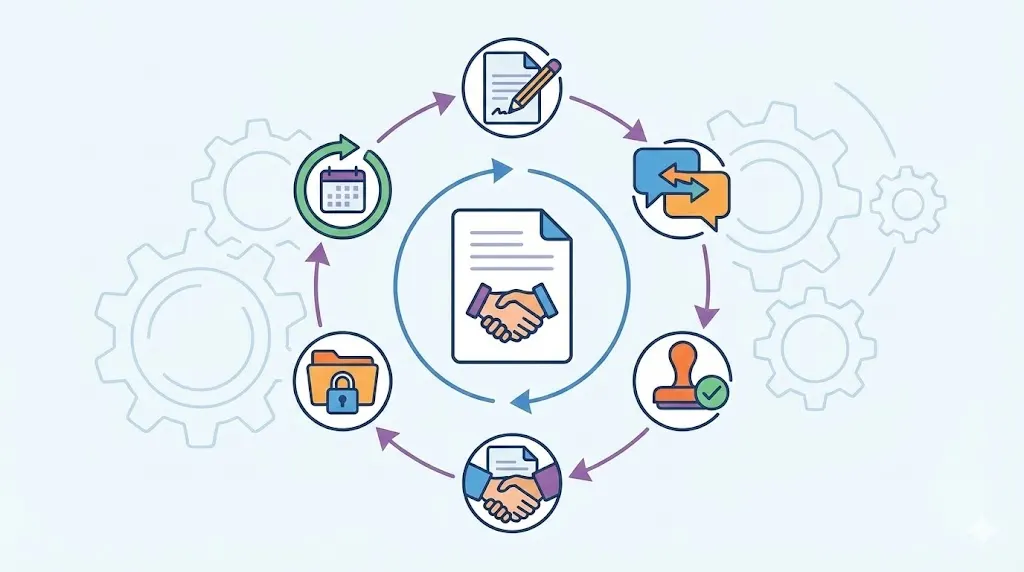
Use this workflow sequence for each agreement:
Request → template selection → business review → risk review → approval → signature → storage → monitoring
Record each step in the contract system or intake form. This creates visibility without forcing every employee to send status emails.
Related articles: ContractWorks Overview: Cost, Features, and Alternative CLM
Know When Manual Organisation Is No Longer Enough
Manual tools can support an early contract process. A shared drive, spreadsheet, and calendar may work when the business has few agreements.
The risk grows when staff spend more time searching than managing. Problems also appear when nobody can confirm which copy is current.
Watch for these warning signs:
Rising contract volume: Staff cannot keep the inventory current as new agreements arrive. Files appear in several folders with different names. The team needs one intake path and stronger search.
Missed deadlines: Renewals, notice dates, or payments are discovered late. Owners rely on memory or scattered calendar entries. Automated reminders can create earlier and clearer prompts.
Approval delays: Contracts wait in inboxes without visible status. Managers cannot see who must act next. A workflow can route reviews and send reminders.
Weak reporting: Leaders cannot answer basic questions about value, expiry, risk, or ownership. Manual reports take too long to prepare. Structured metadata can provide faster answers.
Access risks: Everyone can view sensitive records, or no one knows who has access. Departing staff may retain files. Role-based controls and access reviews reduce this risk.
Limited team capacity: One person spends hours naming files, chasing signatures, and updating dates. A dedicated system can reduce repeated manual work. Staff can then focus on negotiation and business decisions.
These signals do not mean software will solve every process problem. Clean data, clear ownership, and agreed rules still matter. Software works best after the business understands its contract process.
Related articles: Contract Management Software for Media and Entertainment
Why Contract Management Software Matters
Contract management software provides a structured home for agreements and related work. It can combine searchable records, deadline alerts, approvals, permissions, amendment links, and reports.
The best time to adopt it is before manual errors create serious harm. Start with clean contract data, named owners, and agreed naming rules. Then configure the system around real business needs.
Volody's CLM Software supports small business contract management through AI Contract Summaries, AI Metadata Extraction, and Obligation Management. It can highlight obligations and renewal dates, extract parties and payment terms, and track deliverables or commitments in one place.
For example, a small supplier can have its signed agreement, payment terms, renewal date, and insurance duty recorded together. The owner can then receive reminders before each required action.
Centralised records: Keep contracts, attachments, metadata, and lifecycle activity in one controlled workspace. Staff can search records without asking one employee for help. This supports stronger contract storage and management as teams grow.
Automated reminders: Create prompts for renewals, notice periods, approvals, payments, and obligations. Reminders reduce manual follow-up and support contract tracking for small businesses. Owners can act before a deadline becomes urgent.
Clear oversight: Use permissions, searchable records, workflow views, and audit history. Managers can see progress without opening every file. The business also gains better control over access and version changes.
Take control of your growing contract portfolio with Volody's CLM Software. Centralise agreements, automate key dates, and give every owner clear visibility into the work that matters.
FAQ
How do you organize contracts for a small business?
Start by gathering contracts from email, shared drives, paper files, personal devices, and signing platforms. Store them in one searchable repository with consistent names, categories, tags, and metadata. Link amendments to their original agreements. Track owners, renewal dates, notice periods, obligations, and retention needs in a shared register.
How long should a small business keep its contracts?
There is no single period for every contract. Set retention rules around applicable state deadlines, IRS recordkeeping periods, tax needs, dispute risks, and industry duties. Keep expired agreements while they may support claims, audits, or later questions. Confirm the final policy with qualified legal or accounting advice.
How can a business track contract renewal and notice dates?
Record renewal dates, notice deadlines, end dates, and related duties in one register. Assign every item to a named owner and set reminders before action is required. Review the contract calendar on a regular schedule. Update the record whenever an amendment or renewal changes the original terms.
Where should small businesses store contracts securely?
Store contracts in a business-controlled digital repository with permissions, backups, search, and version history. Scan paper agreements into searchable PDFs before filing them. Keep active and archived records separate, while preserving their links. Avoid relying on personal devices, private mailboxes, or one employee’s local folder.
What should a business do if a signed contract is lost?
Search email, shared drives, paper files, signing platforms, personal devices, and records held by the other party. Ask the counterparty for a signed copy when needed. Preserve all related amendments and attachments. Once recovered, save the file centrally, record its metadata, and review why it was missed.
How should contract amendments be organised with the original agreement?
Store every amendment beside a clear link to its parent contract. Use names and metadata that identify the original agreement and change date. Keep the signed original intact and preserve earlier versions. Record which terms changed, including any changes to dates, prices, duties, or renewal rights.
Who should have access to small business contracts?
Access should match each person’s role and need to know. Use separate permissions for viewing, editing, approving, signing, and system administration. Apply stronger controls to employment, pricing, and sensitive customer records. Review permissions after role changes and remove access promptly when staff or contractors leave.
About the Company

Volody AI CLM is an Agentic AI-powered Contract Lifecycle Management platform designed to eliminate manual contracting tasks, automate complex workflows, and deliver actionable insights. As a one-stop shop for all contract activities, it covers drafting, collaboration, negotiation, approvals, e-signature, compliance tracking, and renewals. Built with enterprise-grade security and no-code configuration, it meets the needs of the most complex global organizations. Volody AI CLM also includes AI-driven contract review and risk analysis, helping teams detect issues early and optimize terms. Trusted by Fortune 500 companies, high-growth startups, and government entities, it transforms contracts into strategic, data-driven business assets.





" height="216.72211px" id="FYO0bO80Y" transform="translate(3 6.105)" width="206.073px"/><path d="M 108.174 222 C 88.432 222 70.303 217.239 53.785 207.717 C 37.267 198.196 24.173 185.052 14.504 168.285 C 4.835 151.312 0 132.165 0 110.845 C 0 89.731 4.835 70.792 14.504 54.025 C 24.173 37.052 37.267 23.804 53.785 14.282 C 70.303 4.761 88.432 0 108.174 0 C 128.116 0 146.246 4.761 162.562 14.282 C 179.08 23.804 192.073 37.052 201.541 54.025 C 211.21 70.792 216.044 89.731 216.044 110.845 C 216.044 132.165 211.21 151.312 201.541 168.285 C 192.073 185.052 179.08 198.196 162.562 207.717 C 146.044 217.239 127.915 222 108.174 222 Z M 108.174 183.189 C 120.864 183.189 132.044 180.291 141.713 174.495 C 151.382 168.492 158.936 160.006 164.375 149.035 C 169.814 138.064 172.533 125.334 172.533 110.845 C 172.533 96.355 169.814 83.729 164.375 72.965 C 158.936 61.994 151.382 53.611 141.713 47.815 C 132.044 42.02 120.864 39.122 108.174 39.122 C 95.483 39.122 84.202 42.02 74.332 47.815 C 64.663 53.611 57.109 61.994 51.67 72.965 C 46.231 83.729 43.511 96.355 43.511 110.845 C 43.511 125.334 46.231 138.064 51.67 149.035 C 57.109 160.006 64.663 168.492 74.332 174.495 C 84.202 180.291 95.483 183.189 108.174 183.189 Z" fill="rgba(255, 255, 255, 0.12)" height="222px" id="aa1McFcE9" transform="translate(227.183 3)" width="216.04399999999998px"/><path d="M 42.302 182.257 L 111.799 182.257 L 111.799 216.722 L 0 216.722 L 0 0 L 42.302 0 Z" fill="rgba(255, 255, 255, 0.12)" height="216.72211px" id="yRq4AnrsX" transform="translate(477.721 6.105)" width="111.79899999999998px"/><path d="M 108.174 222 C 88.432 222 70.303 217.239 53.785 207.717 C 37.267 198.196 24.173 185.052 14.504 168.285 C 4.835 151.312 0 132.165 0 110.845 C 0 89.731 4.835 70.792 14.504 54.025 C 24.173 37.052 37.267 23.804 53.785 14.282 C 70.303 4.761 88.432 0 108.174 0 C 128.116 0 146.246 4.761 162.562 14.282 C 179.08 23.804 192.073 37.052 201.541 54.025 C 211.21 70.792 216.045 89.731 216.045 110.845 C 216.045 132.165 211.21 151.312 201.541 168.285 C 192.073 185.052 179.08 198.196 162.562 207.717 C 146.044 217.239 127.915 222 108.174 222 Z M 108.174 183.189 C 120.864 183.189 132.044 180.291 141.713 174.495 C 151.382 168.492 158.936 160.006 164.375 149.035 C 169.814 138.064 172.534 125.334 172.534 110.845 C 172.534 96.355 169.814 83.729 164.375 72.965 C 158.936 61.994 151.382 53.611 141.713 47.815 C 132.044 42.02 120.864 39.122 108.174 39.122 C 95.483 39.122 84.202 42.02 74.332 47.815 C 64.663 53.611 57.108 61.994 51.67 72.965 C 46.231 83.729 43.511 96.355 43.511 110.845 C 43.511 125.334 46.231 138.064 51.67 149.035 C 57.108 160.006 64.663 168.492 74.332 174.495 C 84.202 180.291 95.483 183.189 108.174 183.189 Z" fill="rgba(255, 255, 255, 0.12)" height="222px" id="mo8HQspQ0" transform="translate(609.155 3)" width="216.04500000000007px"/><path d="M 73.727 0 C 95.885 0 115.324 4.45 132.044 13.351 C 148.967 22.252 161.957 34.982 171.027 51.541 C 180.287 67.894 184.917 86.937 184.917 108.671 C 184.917 130.405 180.287 149.449 171.027 165.801 C 161.957 181.947 148.967 194.47 132.044 203.371 C 115.324 212.271 95.885 216.722 73.727 216.722 L 0 216.722 L 0 0 Z M 72.216 179.773 C 94.374 179.773 111.497 173.564 123.583 161.144 C 135.669 148.724 141.713 131.233 141.713 108.671 C 141.713 86.109 135.669 68.515 123.583 55.888 C 111.497 43.055 94.374 36.638 72.216 36.638 L 42.302 36.638 L 42.302 179.773 Z" fill="rgba(255, 255, 255, 0.12)" height="216.72211px" id="I3iXX5Hi_" transform="translate(859.693 6.105)" width="184.91699999999992px"/><path d="M 185.22 0 L 113.91 141.273 L 113.91 216.722 L 71.61 216.722 L 71.61 141.273 L 0 0 L 47.74 0 L 93.06 99.046 L 138.08 0 Z" fill="rgba(255, 255, 255, 0.12)" height="216.72211px" id="nzHyWC0_d" transform="translate(1061.78 6.105)" width="185.22000000000003px"/></svg>)