

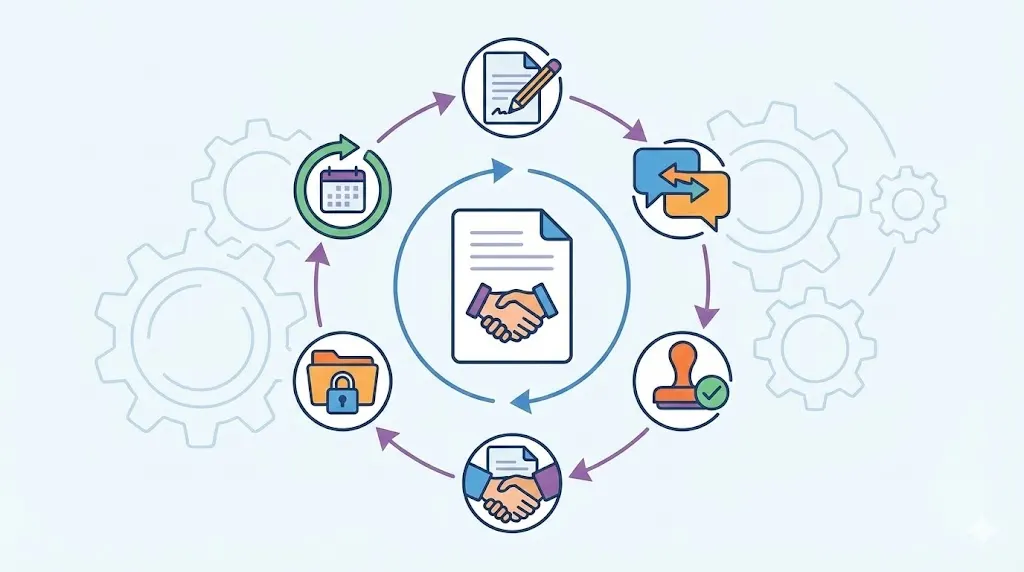
E-signature software has become a strategic advantage for businesses seeking faster execution, lower administrative overhead, and stronger operational control. By replacing paper-based signing with structured digital workflows, teams can send, sign, track, and store documents from virtually anywhere. The result is a more responsive business that can move opportunities, customers, and critical decisions forward with greater consistency.
TL;DR
E-signature software speeds approvals, sales transactions, onboarding, procurement, and contract completion.
Digital signing lowers paper, printing, mailing, storage, and administrative costs across frequent business documents.
Mobile access lets customers, employees, partners, and suppliers sign from almost anywhere.
Clear workflows, reminders, and status tracking improve customer service and reduce stalled documents.
Authentication, encryption, audit trails, and permissions strengthen secure document signing and accountability.
Templates, integrations, and automation help growing businesses manage higher document volumes efficiently.
Faster Workflows From Creation to Completion
E-signature software shortens the path from document creation to final completion. It removes several manual handoffs that slow ordinary business work.
A team can prepare a document, route it for review, and request signatures online. Signers receive clear instructions and can complete the process without printing anything. This approach supports sales, onboarding, procurement, finance, and internal approvals.
Faster electronic document signing can also improve cash flow. Completed agreements allow teams to begin work, deliver services, or send invoices sooner. The benefit depends on document volume and workflow design. Still, removing avoidable waiting can create meaningful operating gains.
Removing Delays From Manual Signing
Paper signing creates delays at many points. Someone must print the file, find the right signer, and scan the completed pages.
Mail and courier services add more waiting time. In-person meetings can delay simple approvals. Faxing may also create poor copies, missing pages, or unclear signatures.
Business e-signature software routes documents to the right people automatically. It can send signatures in sequence or at the same time. Automated reminders keep requests visible when a signer waits too long.
For example, a sales agreement can move from a sales manager to legal review. It can then reach the customer without manual email chains. Each step remains visible to the team.
Supporting Faster Sales and Onboarding
Sales teams often lose momentum after a buyer agrees to move forward. A delayed order form or service agreement can leave that deal unfinished.
Online contract signing helps buyers complete documents during the same conversation. Customers can sign from a phone, tablet, or computer. Sales teams can then move the account into delivery or support.
The same process helps with customer onboarding. A signed services agreement gives operations teams permission to start work. It also gives finance a clear record for billing.
Human resources teams can use electronic signature software for businesses during hiring. New employees can complete offer letters, policy forms, and tax documents remotely. This reduces waiting before their first day.
Tracking Progress From Preparation to Completion
Status tracking shows where each document sits. Teams can see whether a file was sent, viewed, signed, declined, or completed.
That visibility helps managers find stalled requests. They can contact the right person instead of asking every department for updates. It also reduces repeated messages and uncertain handoffs.
A complete record confirms when all parties finished signing. The final file can then move into approved storage. Teams can use contract search to find that record later during audits, renewals, or customer questions.
This tracking also supports better planning. Managers can see common delays across sales, finance, or procurement. They can then improve the workflow instead of accepting delay as normal.
Related articles: Enterprise Contract Lifecycle Management Software
Lower Operating Costs and Better Resource Allocation
E-signatures can reduce direct paperwork costs and hidden administrative work. The size of the benefit depends on document volume, delivery needs, and process design.
A company signing hundreds of documents may avoid many small expenses. A smaller company may see larger gains from recovered staff time. Both groups should review current costs before choosing a tool.
The business case should include more than paper and postage. Teams should also review follow-up time, filing work, corrections, and storage needs. This gives leaders a more realistic view of possible value.
Reducing Paper, Printing, and Delivery Expenses
Paper-based signing uses supplies at several stages. Documents need paper, toner, printer access, envelopes, and postage.
Some agreements also require courier delivery. Others require repeated printing after small changes. Physical copies need cabinets, rooms, and careful filing.
A move to digital contracting reduces many of these steps. Teams send one digital file instead of several paper copies. Signers complete the same document without printing or scanning.
These savings can build across frequent documents. Common examples include sales orders, supplier forms, employee records, and client agreements. Results will vary based on volume and existing process costs.
Digital files also reduce duplicate storage. Teams can apply naming rules and access controls from the start. That makes records easier to find and less costly to maintain.
Recovering Employee Time
Administrative follow-up often crosses several departments. Sales may chase customers, while legal checks status and operations waits.
Finance teams may search email for completed forms. Human resources may manage paper files for new employees. These tasks consume time without improving the agreement itself.
E-signature automation can return some of that time. Reminders go to signers without manual messages. Completion alerts can reach owners as soon as documents finish.
Staff can then focus on customer work, analysis, service delivery, and risk review. The value grows when many employees handle similar documents. Leaders should measure time before and after each workflow change.
Related articles: How to Manage Risk Effectively with Contract Management
A More Convenient Experience for Customers and Employees
Signing should feel simple, clear, and timely. Customers often judge a business by how easy it is to complete basic tasks.
Moving from wet-ink signatures to electronic document signing removes several common points of friction. People do not need a printer, scanner, fax machine, or office visit. They can sign when the document fits their schedule.
That convenience supports stronger relationships. It also helps distributed teams work without unnecessary travel. A well-designed workflow should remain easy while still protecting sensitive information.
Signing Across Devices and Locations
Mobile-friendly signing supports people who work away from an office. Customers may sign from home, a job site, or an airport.
Employees may need to approve documents while traveling. Partners may work across different cities or time zones. Online signing from any device keeps work moving across those settings.
A responsive signing page should work on common phones, tablets, and computers. Signers should not need special software or complex setup. Clear prompts also help people finish without support calls.
Businesses should test the full experience before launch. A process that works on a desktop may feel difficult on a small screen. Mobile testing can expose missing fields, poor text size, or confusing steps.
Making Documents Easier to Complete
Clear documents reduce mistakes and incomplete submissions. Guided fields show signers where to initial, sign, date, or add information.
Reusable templates can keep common forms consistent. They also reduce the chance of missing a required field. Teams can update one approved template instead of editing many files.
Automated reminders support people who need more time. Messages can explain what remains unfinished. They can also include a direct path back to the document.
These features help customers complete business document signing with less effort. They also reduce support requests for internal teams. Better instructions create a smoother process without removing human help when needed.
Building Trust Through Responsiveness
Fast responses can signal that a business is organized. Prompt document delivery shows customers that the next step matters.
Accurate status updates add more confidence. Customers should know whether their document was sent, viewed, or completed. Employees should receive the same clarity for internal requests.
Secure document signing also supports trust. Signers expect their information to remain protected during the process. Authentication, access controls, and secure storage help support that expectation.
A reliable process can strengthen repeat business. Customers remember simple experiences when they compare suppliers. Faster replies may also help teams respond before a buyer loses interest.
Related articles: How to Build Centralized Contract Repository for Businesses
Stronger Collaboration Across Teams and Locations
Digital signing connects departments through contract collaboration around one shared process. Teams can review the same document without passing paper between offices.
Central records reduce confusion about the latest version. Permissions can limit access to sensitive agreements. Owners can see what needs action and what already finished.
This visibility supports accountability without creating constant meetings. It also helps remote teams work from the same information. Good workflow design remains essential, because software cannot fix unclear ownership.
Coordinating Internal Approvals
Routing rules can send documents to reviewers in a planned order. Legal may review terms before finance confirms payment details.
Some approvals can happen at the same time. Procurement, operations, and finance may each check different parts. Parallel review can shorten the total approval period.
A workflow can also automate the approval process and block signing until required reviews finish. This protects the business from sending incomplete or unapproved documents. It creates a clear record of each decision.
For example, a supplier agreement may need procurement and legal approval. Finance may then confirm the payment terms. The supplier receives the final document only after those steps finish.
Supporting Distributed Teams
Remote employees should not wait for paper copies or office visits. Digital signing lets them review and complete documents wherever they work.
This helps companies with multiple branches and home-based teams. It also supports contractors who do not use company offices. Everyone can follow the same process through a shared system.
Teams can collaborate across time zones without arranging a single meeting. Each person receives the document when their step begins. This keeps work moving while respecting different schedules.
Remote access also supports business continuity. Employees can continue signing during travel, office moves, or temporary closures. The process depends less on one physical location.
Assigning Ownership and Approval Responsibilities
Every workflow needs a clear owner. The owner monitors progress, answers questions, and resolves exceptions.
Reviewer permissions help separate viewing from editing. Approval order shows who acts first and who acts next. Completion notices tell owners when the process ends.
These controls reduce uncertainty across departments. People no longer need to ask who has the current file. They can check the workflow and act on their assigned step.
Clear ownership also supports faster escalation. If a signer remains inactive, the owner knows whom to contact. If terms change, the owner can restart the correct review.
Filing Completed Documents Consistently
Completed files should move into approved storage. Consistent names make those records easier to search later.
Access rules should match the document’s sensitivity. Legal agreements may need tighter controls than routine internal forms. Retention rules should also guide how long records remain available.
Integrations can send completed files into document-management systems. CLM integration with CRM systems can connect signed sales forms with customer records. Accounting systems can receive approved documents for billing or payment work.
Consistent filing reduces duplicate copies and missing records. It also supports later reviews, renewals, and customer questions. A signed document should remain useful after the signature event ends.
Related articles: Types of Contracts Every Business Needs
Security, Compliance, and Document Control
Growth should not weaken document protection. Businesses must assess security before moving important signing work online.
Good e-signature tools protect documents during sending, signing, and storage. They also record key events for later review. Controls should match the document type and business risk.
Legal rules vary by location, industry, and document type. Businesses should confirm applicable requirements with qualified counsel. Software can support compliance, but it cannot replace legal judgment.
Creating a Reliable Audit Trail
An audit trail records important signing events. It may show when a document was sent, opened, signed, and completed.
Records can also include signer identity details and timestamps. These details help teams understand what happened during the process. They may support dispute review when questions arise.
A strong record links the final document with its activity history. This helps prevent confusion between drafts and completed files. It also supports internal reviews and customer service.
Teams should check how the provider exports audit records. They should also review retention options and access controls. A record has less value when authorized staff cannot find it later.
Protecting Sensitive Business Information
Security controls should cover both documents and user access. Encryption helps protect information while it travels and while systems store it.
Role-based access limits documents to approved people. Strong authentication practices reduce the risk of unauthorized signing. Some workflows may need extra identity verification for higher-risk transactions.
Controlled sharing also matters. Users should not send sensitive files through open email links. Secure portals and expiration settings can reduce unnecessary exposure.
Businesses should review provider policies for backups, incidents, and data location. They should also assess vendor access to stored documents. Security is a continuing process, not a single product feature.
Confirming Legal and Industry Requirements
E-signature rules differ across jurisdictions and document types. Some documents may require special witnessing, identity checks, or execution methods.
Businesses should identify these exceptions before building workflows. Legal teams can help define which forms need extra controls. They can also set rules for consent, retention, and signer notices.
The platform should support clear consent records. It should show that the signer understood and accepted the electronic process. Signer verification may also matter for sensitive agreements.
Industry rules can add further duties. Healthcare, finance, public services, and other fields may face specific requirements. Businesses should test each use case against its own legal and policy needs.
Related articles: HIPAA Business Associate Agreements: Master the Basics
Scaling Document Workflows Without Scaling Administration
Growth creates more documents, users, approvals, and signing requests. A manual process may work for a small team, then become a bottleneck.
E-signature software helps by standardizing repeatable work. Templates reduce rework, while workflows guide each document through known steps.
Scalability also requires governance. Businesses need clear owners, approved templates, access rules, and review schedules. More software capacity cannot fix poorly designed processes.
Standardizing Repetitive Documents
Templates give teams a reliable starting point. They can include approved text, signer fields, dates, and required information.
A contract clause library provides reusable clauses for common sales, supplier, and employment documents. Teams avoid copying old files with hidden errors. They also reduce variation across departments.
Predefined approval paths create consistent control. A high-risk agreement may need legal review, while a routine form may not. Rules should match the document’s risk and purpose.
Branding can also improve consistency. Customers see familiar logos, language, and signing pages. This supports a professional experience as document volume grows.
Automating Reminders and Status Updates
Manual chasing becomes harder as volume increases. Staff may forget which signer needs a message or when to send it.
Automated reminders keep requests moving. The system can notify a signer after a chosen period. It can also alert an owner when a document remains incomplete.
Status updates help managers spot patterns. Repeated delays may point to unclear terms, poor timing, or the wrong signer. Teams can then improve the process using real workflow information.
Automation should still allow human review. Some customers need a personal call instead of another reminder. Good rules combine automatic follow-up with clear exception handling.
Related articles: Top Contract Management Software in UAE for 2026
Common Adoption Challenges and Practical Remedies
E-signature software does not create value by itself. Businesses must address habits, process gaps, system connections, and data quality.
Adoption improves when teams understand the reason for change. Staff need simple guidance and workflows that fit daily work. Leaders should also measure early results without promising savings that the process cannot deliver.
A phased start reduces risk. Choose common documents first, then expand after testing. This approach gives teams time to learn and improve.
Resistance to Changing Familiar Processes
People may trust email attachments because they know the routine. Some employees may also feel safer with paper records.
Training should focus on real tasks, not every software feature. Show sales teams how to send agreements. Show human resources how to manage offer letters.
Involve users before launch. Ask where current workflows fail and what support they need. Early feedback can prevent poor settings and unwanted steps.
A phased rollout creates space for learning. Start with one department or document type. Share clear results, then expand the program with stronger support.
Inconsistent Templates and Approval Rules
Different teams may use different versions of the same contract. This creates missing fields, unclear language, and repeated legal review.
Assign owners for each approved template. Set review dates and remove outdated files from shared folders. Make the current version easy to find.
Document the approval path for each major use case. State who reviews, who approves, and who handles exceptions. Escalation rules should cover delays and unusual requests.
These controls make business e-signature software more reliable. They also reduce disputes about which version someone should use. Clear rules help new employees follow the process faster.
Integration and Data Migration Issues
Disconnected tools can create duplicate records and manual data entry. A signed document may sit in one system while customer details remain elsewhere.
Map current processes before connecting systems. Identify where data starts, where it moves, and where teams store final files. This exposes gaps before technical work begins.
Test CRM, ERP, accounting, and document-management connections with sample records. Check names, dates, fields, permissions, and error messages. Do not assume a successful connection means accurate data.
Migrate information in stages. Begin with active records and high-value documents. Review the results before moving older files or expanding access.
Related articles: Contract Management Software for Government Sector
Why Contract Management Software Matters
E-signatures complete one important step in an agreement’s life. Contract management software connects that step with drafting, review, approval, storage, and later work.
This connection gives teams one view of the agreement. They can track obligations, renewal dates, amendments, and key risks after signing. That reduces the chance of treating a signed contract as a finished task.
Volody’s CLM Software supports this wider process with AI Contract Drafting, AI Contract Review, and Obligation Management. It can help teams create first drafts, flag risky terms, and track commitments after signing. These features connect business document signing with the work that follows.
For example, a sales team can draft a customer agreement, review unusual clauses, and track renewal duties. Legal and business owners can then work from one connected record.
Explore a simpler way to create, review, approve, and track contracts with Volody's CLM Software.
FAQ
Can the e-signature software handle a high volume of transactions?
Most business-focused platforms can handle many documents and signing events. Check transaction limits, bulk-send tools, workflow automation, and pricing tiers before choosing a provider. Scalable templates and user roles also support higher volumes. Reporting helps managers find delays before they affect customers or internal teams.
Does it support flexible use cases such as business contracts, identity verification, and internal documents?
Many platforms support sales agreements, supplier contracts, employee forms, and internal approvals. Some also offer signer authentication or identity verification for higher-risk transactions. Confirm support for your document types and signing steps. Review access controls, verification rules, and required records before starting implementation.
What security measures, encryption, and authentication options does it provide?
Review encryption during transfer and storage, along with strong user authentication. Check for signer verification, role-based permissions, secure storage, and detailed audit trails. The provider should explain access management and incident response. Businesses should also review retention and data location policies where those issues matter.
How does e-signature software help small businesses grow?
It can reduce printing, mailing, storage, and manual follow-up work. Faster signing helps small businesses complete sales and start service sooner. Remote access supports employees, customers, and contractors across locations. Templates, reminders, and integrations create repeatable processes without matching growth in administrative staff.
What should a business plan before migrating to e-signature software?
Document current workflows, owners, approval rules, storage locations, and legal needs first. Select a few high-volume use cases for a controlled pilot. Test templates, integrations, permissions, notifications, and mobile signing. Training and staged migration can reduce disruption while exposing process gaps early.
How can businesses manage agreements after they are signed?
Connect completed agreements to contract management software to manage obligations, renewals, amendments, access rights, and audit records after signing. This creates visibility across the full contract lifecycle. Adopt a connected workflow to keep every agreement actionable beyond the signature event.
About the Company

Volody AI CLM is an Agentic AI-powered Contract Lifecycle Management platform designed to eliminate manual contracting tasks, automate complex workflows, and deliver actionable insights. As a one-stop shop for all contract activities, it covers drafting, collaboration, negotiation, approvals, e-signature, compliance tracking, and renewals. Built with enterprise-grade security and no-code configuration, it meets the needs of the most complex global organizations. Volody AI CLM also includes AI-driven contract review and risk analysis, helping teams detect issues early and optimize terms. Trusted by Fortune 500 companies, high-growth startups, and government entities, it transforms contracts into strategic, data-driven business assets.




" height="216.72211px" id="FYO0bO80Y" transform="translate(3 6.105)" width="206.073px"/><path d="M 108.174 222 C 88.432 222 70.303 217.239 53.785 207.717 C 37.267 198.196 24.173 185.052 14.504 168.285 C 4.835 151.312 0 132.165 0 110.845 C 0 89.731 4.835 70.792 14.504 54.025 C 24.173 37.052 37.267 23.804 53.785 14.282 C 70.303 4.761 88.432 0 108.174 0 C 128.116 0 146.246 4.761 162.562 14.282 C 179.08 23.804 192.073 37.052 201.541 54.025 C 211.21 70.792 216.044 89.731 216.044 110.845 C 216.044 132.165 211.21 151.312 201.541 168.285 C 192.073 185.052 179.08 198.196 162.562 207.717 C 146.044 217.239 127.915 222 108.174 222 Z M 108.174 183.189 C 120.864 183.189 132.044 180.291 141.713 174.495 C 151.382 168.492 158.936 160.006 164.375 149.035 C 169.814 138.064 172.533 125.334 172.533 110.845 C 172.533 96.355 169.814 83.729 164.375 72.965 C 158.936 61.994 151.382 53.611 141.713 47.815 C 132.044 42.02 120.864 39.122 108.174 39.122 C 95.483 39.122 84.202 42.02 74.332 47.815 C 64.663 53.611 57.109 61.994 51.67 72.965 C 46.231 83.729 43.511 96.355 43.511 110.845 C 43.511 125.334 46.231 138.064 51.67 149.035 C 57.109 160.006 64.663 168.492 74.332 174.495 C 84.202 180.291 95.483 183.189 108.174 183.189 Z" fill="rgba(255, 255, 255, 0.12)" height="222px" id="aa1McFcE9" transform="translate(227.183 3)" width="216.04399999999998px"/><path d="M 42.302 182.257 L 111.799 182.257 L 111.799 216.722 L 0 216.722 L 0 0 L 42.302 0 Z" fill="rgba(255, 255, 255, 0.12)" height="216.72211px" id="yRq4AnrsX" transform="translate(477.721 6.105)" width="111.79899999999998px"/><path d="M 108.174 222 C 88.432 222 70.303 217.239 53.785 207.717 C 37.267 198.196 24.173 185.052 14.504 168.285 C 4.835 151.312 0 132.165 0 110.845 C 0 89.731 4.835 70.792 14.504 54.025 C 24.173 37.052 37.267 23.804 53.785 14.282 C 70.303 4.761 88.432 0 108.174 0 C 128.116 0 146.246 4.761 162.562 14.282 C 179.08 23.804 192.073 37.052 201.541 54.025 C 211.21 70.792 216.045 89.731 216.045 110.845 C 216.045 132.165 211.21 151.312 201.541 168.285 C 192.073 185.052 179.08 198.196 162.562 207.717 C 146.044 217.239 127.915 222 108.174 222 Z M 108.174 183.189 C 120.864 183.189 132.044 180.291 141.713 174.495 C 151.382 168.492 158.936 160.006 164.375 149.035 C 169.814 138.064 172.534 125.334 172.534 110.845 C 172.534 96.355 169.814 83.729 164.375 72.965 C 158.936 61.994 151.382 53.611 141.713 47.815 C 132.044 42.02 120.864 39.122 108.174 39.122 C 95.483 39.122 84.202 42.02 74.332 47.815 C 64.663 53.611 57.108 61.994 51.67 72.965 C 46.231 83.729 43.511 96.355 43.511 110.845 C 43.511 125.334 46.231 138.064 51.67 149.035 C 57.108 160.006 64.663 168.492 74.332 174.495 C 84.202 180.291 95.483 183.189 108.174 183.189 Z" fill="rgba(255, 255, 255, 0.12)" height="222px" id="mo8HQspQ0" transform="translate(609.155 3)" width="216.04500000000007px"/><path d="M 73.727 0 C 95.885 0 115.324 4.45 132.044 13.351 C 148.967 22.252 161.957 34.982 171.027 51.541 C 180.287 67.894 184.917 86.937 184.917 108.671 C 184.917 130.405 180.287 149.449 171.027 165.801 C 161.957 181.947 148.967 194.47 132.044 203.371 C 115.324 212.271 95.885 216.722 73.727 216.722 L 0 216.722 L 0 0 Z M 72.216 179.773 C 94.374 179.773 111.497 173.564 123.583 161.144 C 135.669 148.724 141.713 131.233 141.713 108.671 C 141.713 86.109 135.669 68.515 123.583 55.888 C 111.497 43.055 94.374 36.638 72.216 36.638 L 42.302 36.638 L 42.302 179.773 Z" fill="rgba(255, 255, 255, 0.12)" height="216.72211px" id="I3iXX5Hi_" transform="translate(859.693 6.105)" width="184.91699999999992px"/><path d="M 185.22 0 L 113.91 141.273 L 113.91 216.722 L 71.61 216.722 L 71.61 141.273 L 0 0 L 47.74 0 L 93.06 99.046 L 138.08 0 Z" fill="rgba(255, 255, 255, 0.12)" height="216.72211px" id="nzHyWC0_d" transform="translate(1061.78 6.105)" width="185.22000000000003px"/></svg>)