

Traditional contract management consumes excessive time and resources due to reliance on paper-based processes involving printing, mailing, and physical storage. These outdated workflows cause delays from missing signatures and lost documents, increasing legal risk and hindering business agility. Many organizations struggle to keep pace with evolving demands using manual methods.
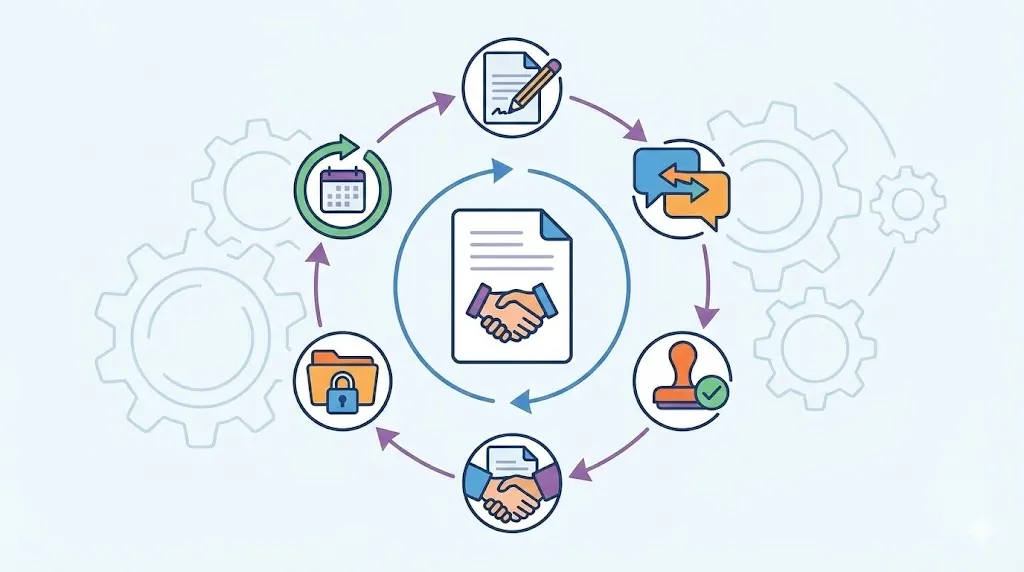
Digital contracting revolutionizes this landscape by leveraging intelligent, automated tools that accelerate contract creation, negotiation, and execution. This approach enhances visibility into contract status and deadlines while significantly reducing errors through enforced compliance rules. By adopting a structured digital strategy, companies can dramatically shorten turnaround times and strengthen regulatory adherence.
However, successful paperless transformation requires more than technology adoption, it demands a deliberate plan and appropriate tools. Without a clear framework, organizations risk poor adoption and security vulnerabilities. This guide provides a comprehensive roadmap to evaluate your current processes, select optimal platforms, and empower your team for a secure, efficient digital contracting environment.
TL;DR
Digital Contracting replaces paper contracts with digital workflows that speed up business. It improves accuracy and reduces risk by automating contract stages. This guide walks you through auditing your current contracts, choosing a system, and digitizing documents. It also covers e-signatures, training, and working with partners. Taking a step-by-step approach helps avoid common pitfalls and ensures smooth adoption. Going paperless right brings faster deals, better compliance, and clearer contract views.
Prerequisites and Setup
Assessing Organizational Readiness
Before switching to digital contracting, assess your company’s readiness. Review current contract volumes, team workflows, and IT capabilities. Identify which departments create, approve, or store contracts. Also, check if staff have experience with digital tools or need extra training.
Evaluate your company culture around change. Are teams open to new software, or do they resist it? Understanding this helps tailor your rollout plan. Set clear goals for what you want digital contracting to achieve, such as reducing turnaround time or improving compliance. These goals guide your priorities and metrics.
Identifying Stakeholders and Access Needs
Map out all stakeholders involved in contracts. This includes legal, sales, procurement, finance, and external partners. Define roles clearly: who drafts, who approves, who signs, and who stores contracts. Determine who needs read-only access versus full editing rights.
Consider access needs carefully. Overly broad permissions create security risks. Restrict sensitive contracts to relevant users only. Also, plan for audit trails to track who views or changes documents. This supports legal compliance and dispute resolution.
Selecting Essential Tools and Resources
Choose tools that fit your business size, industry, and goals. At minimum, you’ll need a digital contract management system with these features:
Contract creation and editing capabilities
Secure storage with metadata tagging
Workflow automation for approvals and signatures
Reporting and audit logs for compliance
Also, pick electronic signature solutions that meet legal standards in your jurisdiction. Cloud-based contract management systems offer scalability and remote access, often at lower cost. Finally, ensure IT can support integrations with existing systems like CRM or ERP.
Budget realistically for software licenses, training, and change management efforts. Getting executive buy-in early helps secure resources and smooths adoption.
Step 1: Audit Your Current Paper Contracting Processes
Cataloging Document Types and Volumes
Start by listing all contract types your company uses. This could include:
Sales contracts
NDAs (Non-Disclosure Agreements)
Vendor and supplier agreements
Employment contracts
Lease and rental contracts
Count how many contracts you process monthly or annually. Note which ones have the highest volume or complexity. This data helps prioritize which contracts to digitize first.
Mapping Contract Workflows and Access Points
Document how contracts currently flow through your company. Identify each step: drafting, review, approval, signing, and storage. Note which departments handle each phase and how they communicate.
Also, map where contracts are stored—physical filing cabinets, shared drives, or email inboxes. Highlight any manual handoffs or bottlenecks, like waiting for signatures or lost paperwork. This map reveals inefficiencies that digital contracting can fix.
Identifying Pain Points and Bottlenecks
Gather feedback from contract users about daily challenges. Common issues include:
Lost or misplaced contracts
Delays waiting for signatures
Confusing or inconsistent templates
Lack of visibility into contract status
Difficulty tracking renewals or obligations
Identify top pain points to address in your digital setup. For example, if contracts often stall at approval, focus on automating workflow routing. If storage is scattered, prioritize centralized digital filing.
This audit sets a baseline for measuring improvements after you implement digital contracting.
Related articles: Contract Drafting Tips: Create Contracts Effortlessly
Step 2: Choose the Right Digital Contract Management System
Evaluating Core Features and Integrations
Look for contract lifecycle management software that covers the full contract journey. Key features include:
Template libraries to standardize contract creation
Automated approval workflows to speed reviews
Electronic signature integration for fast execution
Centralized dashboards showing contract status
Searchable contract repository with metadata
Check if the system integrates with your CRM, ERP, or document management tools. Integration reduces duplicate data entry and ensures contracts link to relevant business records.
Considering Compliance and Security Requirements
Your digital platform must comply with legal and regulatory rules. This includes data privacy laws like GDPR or HIPAA if applicable. Verify the software supports:
Role-based access controls
Audit logs tracking changes and access
Encryption of data at rest and in transit
Secure backup and disaster recovery
Review e-signature solutions for legal validity in your jurisdiction. Popular standards include ESIGN Act, UETA, and eIDAS in Europe. Using compliant tools avoids disputes over contract enforceability.
Comparing Vendor Support and Scalability
Evaluate vendor reputation and support services. Consider:
Availability of onboarding and training help
Customer service responsiveness
Regular updates and security patches
Scalability to handle growing contract volumes
Ask for demos and trials to test usability. Involve end users to get feedback on interface and features. Choose a vendor that aligns with your long-term digital contracting goals.
Feature | Must-Have | Optional but Valuable | Notes |
|---|---|---|---|
Template Management | Yes | Clause libraries | Speeds contract drafting |
Automated Workflows | Yes | Conditional routing | Cuts approval delays |
E-Signature Integration | Yes | Mobile signing support | Ensures legal execution |
Security Controls | Role-based access, encryption | Multi-factor authentication | Protects sensitive data |
Reporting & Audit Logs | Contract status, user actions | Renewal alerts, KPIs | Supports compliance and insight |
Integrations | CRM, ERP | Document management, accounting | Increases efficiency |
Vendor Support | Onboarding, training, 24/7 support | Dedicated account manager | Helps smooth adoption |
Scalability | Handles current and future volume | Cloud and on-premise options | Matches business growth |
Step 3: Digitize Existing Paper Contracts and Documents
Prioritizing Documents for Digitization
Start by selecting which contracts to digitize first. Prioritize contracts that:
Are active or up for renewal soon
Have high business impact or legal risk
Are frequently accessed or referenced
Older, archived contracts can be digitized later or stored offline if needed. This phased approach avoids overwhelming your team.
Best Practices for Scanning and OCR
Use high-quality scanners to capture paper contracts clearly. Poor scans cause errors during text recognition. Apply Optical Character Recognition (OCR) software to convert images into searchable text.
Check scanned files for legibility and completeness. Store contracts in PDF format with embedded text for easy searching. Maintain original paper copies until digital versions are verified.
Organizing Digital Files and Metadata
Create a clear folder and naming system for digital contracts. Use consistent file names including contract type, parties, and date. Tag contracts with metadata fields such as:
Contract owner
Effective and expiration dates
Status (draft, active, expired)
Good metadata improves searchability and reporting. Avoid dumping files into a single folder. Instead, use hierarchical structures or contract management software’s tagging features.
Related Article: Why Retail Needs Contract Digitization to Stay Competitive
Step 4: Implement Electronic Signatures and Approval Workflows
Selecting E-Signature Solutions That Comply with Laws
Choose e-signature platforms that meet legal standards for your region. Verify compliance with:
ESIGN Act and UETA for the US
eIDAS regulation for the EU
Other local electronic signature laws
Popular providers include DocuSign, Adobe Sign, and HelloSign. Evaluate them for security, ease of use, and integration with your contract management system.
Designing Automated Routing and Approval Processes
Map out your contract approval steps clearly. Use workflow tools to automate routing based on contract type, value, or department. For example, sales contracts over a threshold might require legal review.
Set automatic reminders for pending approvals or signatures. This reduces delays and keeps contracts moving. Design workflows to allow parallel reviews when possible, speeding turnaround.
Monitoring Workflow Efficiency and Compliance
Track key metrics like average approval time, signature completion rates, and overdue contracts. Use dashboards to identify bottlenecks or non-compliance.
Regularly audit workflows to ensure rules are followed. Update workflows as business needs change. This ongoing monitoring helps maintain efficiency and legal compliance.
Step 5: Train Your Team and Foster a Paperless Culture
Developing Comprehensive Training Programs
Create role-specific training on the new digital contracting tools. Cover how to create, review, approve, and sign contracts digitally. Include security best practices.
Use a mix of live sessions, recorded videos, and reference guides. Train early and often to build confidence. Ensure new hires get onboarding on digital processes.
Encouraging User Adoption and Feedback
Promote the benefits of paperless contracting to motivate users. Highlight time saved, easier collaboration, and fewer errors. Create champions within teams to support peers.
Gather feedback regularly to identify pain points or feature requests. Address concerns promptly to keep momentum. Reward teams who embrace digital contracting.
Establishing Ongoing Support and Resources
Set up help desks or dedicated contacts for digital contracting questions. Maintain updated FAQs and troubleshooting guides.
Schedule refresher training periodically. Keep teams informed of platform updates or process changes. A strong support system ensures lasting adoption.
Step 6: Collaborate with Clients and Suppliers to Go Digital
Communicating Benefits and Addressing Concerns
Explain how digital contracting benefits your partners:
Faster contract turnaround
Clearer contract terms and versions
Reduced paper handling and errors
Address common concerns about security or technology access openly. Provide evidence of compliance and data protection measures.
Providing Guidance and Technical Assistance
Offer step-by-step instructions for using your digital platform. Provide training sessions or webinars for key partners. Assign support contacts for questions or troubleshooting.
Make it easy for partners to sign electronically and access contracts anytime. This reduces friction and builds trust.
Establishing Digital Contracting Standards Across Partners
Agree on common contract templates, terminology, and workflows. Standardization speeds negotiations and reduces confusion.
Set expectations for digital signatures and document handling. Document these standards formally in partnership agreements to ensure consistency.
Common Mistakes and How to Fix Them
Overlooking Change Management Strategies
Many companies install new software but neglect change management. This leads to low adoption and wasted investment. Avoid this by:
Engaging users early in the process
Communicating benefits clearly
Providing ample training and support
Create a change champion network to encourage buy-in across departments.
Neglecting Security and Compliance Protocols
Skipping security reviews can expose contracts to breaches or legal issues. Fix this by:
Conducting thorough vendor security assessments
Setting strict access controls and audit trails
Regularly reviewing compliance with laws
Treat security as a continuous priority, not a one-time task.
Implementing a Diagnostic and Correction Framework
Without monitoring, issues go unnoticed. Set up regular audits to:
Track contract turnaround times
Identify workflow bottlenecks
Check for compliance gaps
Use this data to refine processes and tools. Correct small problems before they escalate.
Conclusion
Digital contracting is essential for organizations seeking faster, more secure, and transparent contract management. Begin by auditing your existing paper workflows to identify inefficiencies and pain points. Select a contract management system that aligns with your operational needs and compliance standards. Digitize contracts carefully, applying best practices for scanning and metadata organization. Implement legally compliant e-signature solutions and design automated approval workflows to minimize delays. Invest in comprehensive team training and cultivate a culture that embraces paperless efficiency. Extend these practices to your clients and suppliers to establish a seamless digital contracting ecosystem.
Initiate your transformation by auditing current workflows and piloting leading digital contract platforms with your team. This method can reduce contract turnaround times by up to 40%, according to Forrester research. While concerns about technology complexity are common, thorough training and support ensure smooth adoption. Embracing digital contracting not only lowers costs but also enhances compliance and collaboration.
Commit to continuous improvement by monitoring emerging tools and refining workflows. Expanding digital contracting capabilities across your network will keep your business agile and competitive. Establishing the right infrastructure today ensures accelerated deal cycles and mitigated risks tomorrow.
Frequently Asked Questions
What is digital contracting?
Digital contracting is the process of creating, negotiating, signing, and managing contracts entirely through digital tools. It replaces paper workflows with automated platforms that speed up contract lifecycle stages. This approach improves accuracy, reduces delays, and enhances contract visibility.
How does digital contracting improve contract lifecycle management software?
Digital contracting works hand-in-hand with contract lifecycle management software by automating workflows and centralizing contract data. It simplifies drafting, routing, approvals, and renewals, making contract management faster and more transparent. This reduces errors and compliance risks.
What are the main benefits of paperless contracting?
Paperless contracting saves time and money by cutting printing, mailing, and storage costs. It speeds up contract approvals and signatures. It also improves security by limiting physical document access and provides better audit trails for compliance.
How do I implement digital contracts successfully?
Start by auditing your current contract processes and defining goals. Choose a digital contract system that fits your needs and legal requirements. Digitize existing contracts, set up e-signature workflows, and train your team thoroughly. Monitor adoption and adjust processes regularly.
What are the top digital contract platforms to consider?
Popular platforms include DocuSign, Adobe Sign, Agiloft, and Concord. Each offers varying features like workflow automation, integrations, and compliance tools. Evaluate them based on your company size, contract volume, and industry needs.
How do digital signature solutions compare?
Compare e-signature tools on legal compliance, ease of use, integration capabilities, and security features. DocuSign and Adobe Sign lead in global compliance and integrations. Simpler tools like HelloSign may suit smaller teams but offer fewer advanced features.
What are best practices for contract automation?
Use standardized templates, automate routing based on contract criteria, and set alerts for renewals. Regularly update templates to reflect legal changes. Train users on automated workflows and monitor metrics to identify bottlenecks.
How does digital contracting reduce contract turnaround time?
Automation removes manual handoffs and speeds approvals by routing contracts instantly. Electronic signatures cut mailing delays. Centralized dashboards let teams track contract status and act quickly on pending tasks.
What legal compliance issues arise in digital contracts?
Key issues include ensuring e-signatures meet local laws, protecting sensitive data, and maintaining audit trails. Use compliant platforms with encryption and access controls. Regularly review laws affecting electronic agreements.
What are common digital contracting challenges and solutions?
Challenges include user resistance, security concerns, and technical integration issues. Overcome these by engaging stakeholders early, selecting secure platforms, providing thorough training, and choosing systems that integrate well with existing tools.
About the Company

Volody AI CLM is an Agentic AI-powered Contract Lifecycle Management platform designed to eliminate manual contracting tasks, automate complex workflows, and deliver actionable insights. As a one-stop shop for all contract activities, it covers drafting, collaboration, negotiation, approvals, e-signature, compliance tracking, and renewals. Built with enterprise-grade security and no-code configuration, it meets the needs of the most complex global organizations. Volody AI CLM also includes AI-driven contract review and risk analysis, helping teams detect issues early and optimize terms. Trusted by Fortune 500 companies, high-growth startups, and government entities, it transforms contracts into strategic, data-driven business assets.





" height="216.72211px" id="FYO0bO80Y" transform="translate(3 6.105)" width="206.073px"/><path d="M 108.174 222 C 88.432 222 70.303 217.239 53.785 207.717 C 37.267 198.196 24.173 185.052 14.504 168.285 C 4.835 151.312 0 132.165 0 110.845 C 0 89.731 4.835 70.792 14.504 54.025 C 24.173 37.052 37.267 23.804 53.785 14.282 C 70.303 4.761 88.432 0 108.174 0 C 128.116 0 146.246 4.761 162.562 14.282 C 179.08 23.804 192.073 37.052 201.541 54.025 C 211.21 70.792 216.044 89.731 216.044 110.845 C 216.044 132.165 211.21 151.312 201.541 168.285 C 192.073 185.052 179.08 198.196 162.562 207.717 C 146.044 217.239 127.915 222 108.174 222 Z M 108.174 183.189 C 120.864 183.189 132.044 180.291 141.713 174.495 C 151.382 168.492 158.936 160.006 164.375 149.035 C 169.814 138.064 172.533 125.334 172.533 110.845 C 172.533 96.355 169.814 83.729 164.375 72.965 C 158.936 61.994 151.382 53.611 141.713 47.815 C 132.044 42.02 120.864 39.122 108.174 39.122 C 95.483 39.122 84.202 42.02 74.332 47.815 C 64.663 53.611 57.109 61.994 51.67 72.965 C 46.231 83.729 43.511 96.355 43.511 110.845 C 43.511 125.334 46.231 138.064 51.67 149.035 C 57.109 160.006 64.663 168.492 74.332 174.495 C 84.202 180.291 95.483 183.189 108.174 183.189 Z" fill="rgba(255, 255, 255, 0.12)" height="222px" id="aa1McFcE9" transform="translate(227.183 3)" width="216.04399999999998px"/><path d="M 42.302 182.257 L 111.799 182.257 L 111.799 216.722 L 0 216.722 L 0 0 L 42.302 0 Z" fill="rgba(255, 255, 255, 0.12)" height="216.72211px" id="yRq4AnrsX" transform="translate(477.721 6.105)" width="111.79899999999998px"/><path d="M 108.174 222 C 88.432 222 70.303 217.239 53.785 207.717 C 37.267 198.196 24.173 185.052 14.504 168.285 C 4.835 151.312 0 132.165 0 110.845 C 0 89.731 4.835 70.792 14.504 54.025 C 24.173 37.052 37.267 23.804 53.785 14.282 C 70.303 4.761 88.432 0 108.174 0 C 128.116 0 146.246 4.761 162.562 14.282 C 179.08 23.804 192.073 37.052 201.541 54.025 C 211.21 70.792 216.045 89.731 216.045 110.845 C 216.045 132.165 211.21 151.312 201.541 168.285 C 192.073 185.052 179.08 198.196 162.562 207.717 C 146.044 217.239 127.915 222 108.174 222 Z M 108.174 183.189 C 120.864 183.189 132.044 180.291 141.713 174.495 C 151.382 168.492 158.936 160.006 164.375 149.035 C 169.814 138.064 172.534 125.334 172.534 110.845 C 172.534 96.355 169.814 83.729 164.375 72.965 C 158.936 61.994 151.382 53.611 141.713 47.815 C 132.044 42.02 120.864 39.122 108.174 39.122 C 95.483 39.122 84.202 42.02 74.332 47.815 C 64.663 53.611 57.108 61.994 51.67 72.965 C 46.231 83.729 43.511 96.355 43.511 110.845 C 43.511 125.334 46.231 138.064 51.67 149.035 C 57.108 160.006 64.663 168.492 74.332 174.495 C 84.202 180.291 95.483 183.189 108.174 183.189 Z" fill="rgba(255, 255, 255, 0.12)" height="222px" id="mo8HQspQ0" transform="translate(609.155 3)" width="216.04500000000007px"/><path d="M 73.727 0 C 95.885 0 115.324 4.45 132.044 13.351 C 148.967 22.252 161.957 34.982 171.027 51.541 C 180.287 67.894 184.917 86.937 184.917 108.671 C 184.917 130.405 180.287 149.449 171.027 165.801 C 161.957 181.947 148.967 194.47 132.044 203.371 C 115.324 212.271 95.885 216.722 73.727 216.722 L 0 216.722 L 0 0 Z M 72.216 179.773 C 94.374 179.773 111.497 173.564 123.583 161.144 C 135.669 148.724 141.713 131.233 141.713 108.671 C 141.713 86.109 135.669 68.515 123.583 55.888 C 111.497 43.055 94.374 36.638 72.216 36.638 L 42.302 36.638 L 42.302 179.773 Z" fill="rgba(255, 255, 255, 0.12)" height="216.72211px" id="I3iXX5Hi_" transform="translate(859.693 6.105)" width="184.91699999999992px"/><path d="M 185.22 0 L 113.91 141.273 L 113.91 216.722 L 71.61 216.722 L 71.61 141.273 L 0 0 L 47.74 0 L 93.06 99.046 L 138.08 0 Z" fill="rgba(255, 255, 255, 0.12)" height="216.72211px" id="nzHyWC0_d" transform="translate(1061.78 6.105)" width="185.22000000000003px"/></svg>)