

Large organizations require a disciplined contract approval framework that aligns ownership, authority, risk, and visibility across every business unit. A governed workflow reduces delays, strengthens accountability, and gives teams the control needed to move agreements from request to signature with confidence.
TL;DR
Map each contract from request through filing, with clear owners and required information.
Route agreements by value, risk, contract type, region, and delegated approval authority.
Replace email handoffs with shared records, controlled versions, reminders, and visible approval queues.
Use governance rules to protect approvals while allowing approved local and business differences.
Measure stage time, queue age, rework, exceptions, and workload across teams and regions.
Choose CLM software that connects workflows, records, systems, reporting, and human decisions.
Map the Contract Approval Lifecycle
From Contract Request to Final Filing
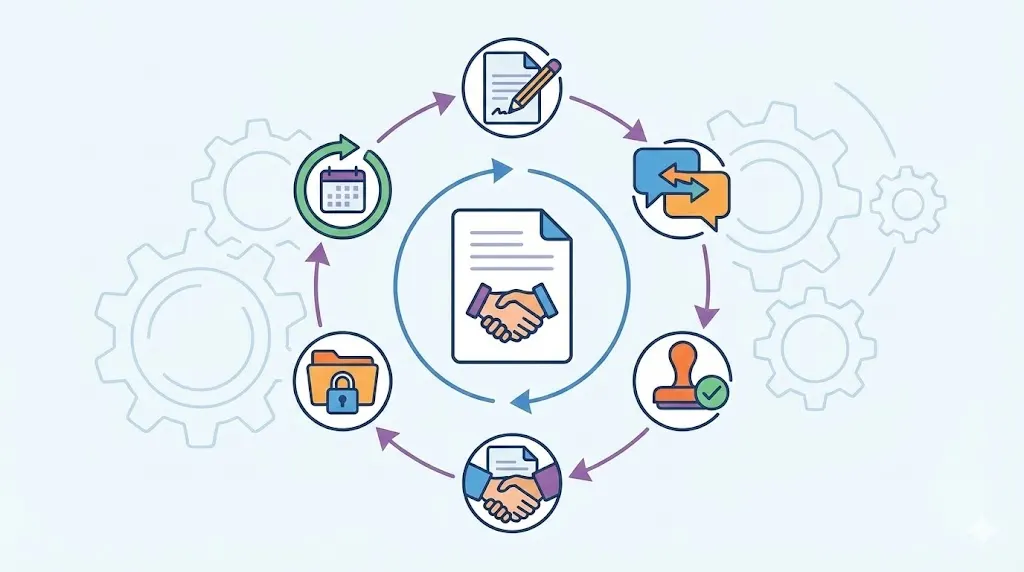
A strong contract review process starts with a structured request. The request should capture the contract type, business owner, value, region, and renewal terms. It should also show key risk indicators, such as personal data, unusual liability, or regulated work.
The workflow then moves through drafting, business review, and negotiation. Legal review follows when terms need specialist attention. Final approval comes before signature, followed by centralized filing and obligation tracking.
Each stage should have a clear entry and exit point. For example, legal review should not begin with missing pricing or unclear business terms. A complete request helps each reviewer make a faster decision.
The final record should include the signed agreement and approval evidence. It should also include renewal dates, duties, and related documents. This turns approval management into an ongoing control, not a one-time event.
Define Ownership at Every Stage
Every stage needs a named owner. The requestor supplies facts and explains the business need. Contract managers guide the workflow and check required information.
Legal counsel reviews legal terms, risks, and exceptions. Procurement checks supplier terms, pricing, and buying rules. Finance reviews spend, payment duties, and financial exposure.
Security may review data access and technical requirements. Business leaders confirm commercial value and operating fit. Executives approve matters that exceed their delegated authority.
Authorized signatories execute the final agreement. A responsibility matrix shows who acts, reviews, approves, and receives updates. This prevents duplicated work and unclear handoffs.
Ownership should follow the role, not a person’s inbox. When someone changes jobs, the route must still work. Named roles, backup approvers, and delegation rules help maintain continuity.
Create a Single Source of Truth
A centralized contract record should hold every important item. This includes the request, drafts, comments, approvals, signatures, and final agreement. It should also hold related correspondence and post-signature duties.
Teams should find the current version without searching old emails. Version control shows which draft reviewers saw and approved. Search also helps teams find agreements by party, region, type, or date.
Email threads create weak approval evidence. Messages may be deleted, forwarded, or separated from the final contract. They also make it hard to prove who approved which version.
A central record connects approval history with business results. Teams can track renewals, obligations, and contract status from one place. Leaders can also see where work waits across the organization.
Related articles: Contract Versions: A Guide to Easily Tracking Each Update
Design Approval Routing Around Risk and Authority
Role and function rules: Route each agreement to the right team using clear fields. The workflow can use department, business unit, contract type, geography, or assigned role. Named approvers should replace vague group inboxes whenever possible. Backup approvers should take over when people leave, move roles, or take extended leave.
Value and risk rules: Set approval thresholds for value, payment commitments, and liability. Add reviews for indemnity, intellectual property, data access, insurance, or regulatory exposure. Nonstandard terms should trigger the right specialist review. Low-risk agreements should avoid unnecessary executive or legal steps.
Parallel and sequential reviews: Use sequential approval when one decision depends on another. Legal may need commercial terms before assessing final risk. Use parallel reviews when finance, security, procurement, and legal can work independently. The system should still record each decision and show the complete approval path.
Escalation and exceptions: Send reminders before tasks become overdue. Escalate late tasks to managers or approved substitutes. Rejected requests should return with clear reasons and next steps. Material changes should restart affected approvals instead of relying on informal messages.
Routing should reflect authority, not personal preference. A finance review may depend on payment value. A security review may depend on data access and system connection.
Contract authorization also needs clear boundaries. An approver may accept business terms but lack signature authority. The workflow must separate review rights from signing rights.
Delegation should have dates and limits. A temporary approver should not gain unlimited authority. The record should show who acted, under which delegation, and when.
Related articles: Contract Management Software for Finance: A Detailed Guide
Address the Bottlenecks That Slow Enterprise Approvals
Email Dependency and Manual Handoffs
Email often becomes the hidden approval system. Requestors forward documents, add recipients, and ask for quick decisions. Each handoff increases the chance of delay or missing context.
Shared inboxes create similar problems. They may show a message, but not the full approval path. Spreadsheets also require manual updates and often become stale.
A workflow should show the task, owner, due date, and contract version. Approvers need the business reason and key terms beside the request. This reduces searching and helps them act with confidence.
Version Conflicts During Negotiation
Negotiation creates many drafts and comments. Different teams may store files in email, drives, or local folders. Clear file names alone cannot solve this problem.
Controlled revisions show what changed between drafts. Comparison tools help reviewers focus on new or removed language. The workflow should identify the version linked to each approval.
A material edit should trigger a fresh review. Not every wording change needs a full restart. The process should define which changes affect legal, commercial, security, or finance approval.
Unclear Policies and Approval Authority
Unclear policies create two opposite problems. Some contracts receive too many reviews. Others move forward without the right authorization.
Thresholds should use plain examples. A policy might explain when a data review starts. It might also show which role approves a long payment commitment.
Approval authority must stay current after reorganizations. Old roles can send tasks to vacant positions. Regular policy checks help keep routes aligned with the organization.
Limited Cross Organization Visibility
Large organizations need a shared view of approval work. Leaders should see open requests, aging tasks, and regional differences. They should also see workload by team and contract type.
A dashboard can reveal repeated delays. One region may lack backup approvers. Another may receive poor intake data from a business unit.
Shared data supports better fixes than individual blame. Leaders can change staffing, templates, service targets, or routing rules. They can also spot risks before deadlines are missed.
Related articles: AI Advancements in Contract Management Tools by 2026
Establish Governance for Consistent Decisions
Templates and intake: Approved templates give teams a safe starting point. Clause libraries help users select accepted wording for common terms. Structured forms collect needed facts before drafting begins. Mandatory fields should cover value, region, owner, type, renewal, and risk.
Policies and delegation: Policies should define thresholds, signing rights, and required reviewers. They should cover conflicts, segregation of duties, and temporary delegation. Changes to price or legal terms may require renewed approval. Local rules should fit within shared minimum controls.
Audit and compliance: Retain requests, drafts, comments, approvals, rejections, signatures, and timestamps. Keep the final agreement connected to its approval history. These records support internal checks and regulatory questions. They also help resolve disputes about who approved what.
Exceptions and local needs: Exceptions should have a reason, owner, and end date. Regional teams may need local clauses or language. The workflow should record those differences instead of hiding them. Leaders can then review whether each exception remains necessary.
Governance should guide daily work, not sit in a forgotten policy file. Users need short instructions at the point of action. The system should explain why a review appears and what evidence it needs.
Segregation of duties protects against weak controls. The person requesting a contract should not always approve it. The person approving spend may also lack authority to sign.
Good governance allows controlled flexibility. A global company can set common rules for data, value, and signatures. Regions can then add approved checks for local law and entity needsOrganizations should also align their security-related contract controls with established frameworks for cybersecurity governance and risk management, such as the NIST Cybersecurity Framework.
Related articles: Enterprise Contract Lifecycle Management Software
Automate the Work Without Losing Control
Automate Intake and Document Generation
Self-service intake forms can guide users through the first step. The form can ask different questions for sales, procurement, employment, or technology agreements. This keeps requests focused and reduces missing information.
Approved templates can produce a reliable first draft. Clause libraries give users accepted options for common terms. Structured data can flow into the document without repeated typing.
The same data can support connected systems later. Customer details may move from a sales system. Supplier details may come from procurement tools.
Automation should not hide the source of key information. Users should be able to check important fields before submission. A clear review step helps catch errors early.
Trigger Reviews From Contract Content
Rules can start reviews from contract facts and terms. A data processing clause may trigger security review. A foreign jurisdiction may require regional legal input.
Unusual liability, insurance, or renewal terms can also change the route. The system may flag clause changes against approved language. It can then send the request to the right specialist.
Content-based routing focuses expert time on real risk. Standard agreements can follow a shorter route. Complex agreements can receive deeper review without slowing every request.
Rules need regular testing. A new contract type may need different conditions. Policy owners should confirm that each trigger still matches business risk.
Improve Notifications and Escalations
Approvers need clear task notices. Each notice should show the contract, business purpose, key terms, and requested action. It should also show the due date and current version.
Reminders should follow the service target. Escalations should reach a manager when tasks remain open. Substitute approvers can act during planned or unexpected absences.
Notifications should not send people hunting through several systems. A useful message gives enough context for a first decision. It should also link directly to the approval record.
Preserve Human Judgment
Automation should handle repeatable steps and routine routing. Authorized people must decide on material risks and business tradeoffs. The system should support judgment rather than replace it.
Approvers need a way to reject, return, or request changes. Overrides should require a reason and named authority. Material edits should also restart affected approvals.
Human review matters most when facts are uncertain. A contract may carry a business benefit but create unusual exposure. The workflow should make that tradeoff visible.
Related articles: Best Contract Management Software in 2026: Top 20 CLM Tools
Measure Approval Performance Across the Organization
Cycle time and queue age: Track time from request to first draft. Track time in legal review, business approval, and total time to signature. Show how long each open task has waited. Stage data reveals the real delay better than one overall average.
Quality and rework: Count incomplete submissions, rejected drafts, and approval restarts. Track missing information, version conflicts, and nonstandard clause use. These measures show where intake or templates fail. Teams can then improve forms, guidance, or training.
Regional and functional views: Compare approval paths by region, business unit, and contract type. A supplier agreement may move differently from a sales agreement. Reports should protect sensitive details while showing useful workload patterns. Leaders can then focus help where delays repeat.
Control and exception results: Track policy exceptions, delegated approvals, and late escalations. Review whether approvals followed the required authority. Monitor obligations and renewals after signature. This connects approval quality with longer-term contract performance.
Cycle time alone does not show process health. A fast approval may still contain poor controls. A slower approval may reflect a complex, high-risk deal.
Reports should help leaders choose an action. High queue age may require more approvers or better delegation. High restart rates may point to late edits or unclear policy rules.
Teams should review results on a regular schedule. Compare trends after workflow changes. Keep useful measures stable so leaders can see whether changes worked.
Related articles: Mastering the Stages of Contract Lifecycle
Build a Scalable Operating Model for Change
Coordinate Central and Local Teams
Central teams should own common policies, core fields, and minimum controls. They can also manage shared templates and enterprise approval rules. Local teams may manage language, local law, and entity-specific checks.
This model avoids two common errors. Full central control can ignore regional needs. Full local control can create different standards and hidden risk.
Global rules should state what cannot change. They should also show where approved local choices apply. Conditional routing can support both needs in one workflow.
Train Requestors and Approvers
Requestors need simple guidance on contract types and required data. Approvers need different guidance on risk, spend, and authority. Signatories need clear limits on what they may execute.
Training should use short examples from daily work. Contextual prompts can appear inside the request or approval task. Refresher training should follow policy or system changes.
New staff should learn the process early. Managers should understand backup and delegation rules. This reduces workarounds and improves adoption across teams.
Govern Workflow Changes
Workflows change after reorganizations, new contract types, or legal updates. Each change needs an owner, test plan, and change record. Pilot groups can test the route before broad release.
Testing should cover normal and unusual cases. Include rejected requests, delegated approvals, material edits, and vacant roles. A rollback plan protects the business if a change fails.
Policy owners should review approval rules on a set schedule. They should compare rules with current roles and business needs. A change log preserves the reason behind each update.
Improve Through Feedback
Users can show where the workflow creates needless effort. Rejected requests can reveal unclear forms or missing guidance. Audit findings can reveal weak controls or poor records.
Teams should review this feedback with performance data. Remove steps that add no real control. Keep steps that protect material risks or legal duties.
Improvement should follow a steady cycle. Test a change, measure its effect, and collect user comments. Then keep, revise, or remove the change.
Related articles: Enterprise Contract Lifecycle Management Software
Why Contract Management Software Matters
Contract management software gives large organizations one place for intake, drafting, approval routing, signatures, and filing. It also keeps versions, notices, audit trails, and executed agreements together. This reduces manual handoffs and gives teams a clearer contract approval Authority management process.
A strong platform supports different contract types and approval paths. Configurable rules can use value, risk, region, department, or contract terms. Role-based permissions limit access to the right people. Named approvers and delegation controls also protect contract authorization.
Search matters when teams manage many agreements. A central repository helps users find drafts, signed contracts, obligations, and renewals. It also reduces duplicate data entry and confusion over the current version.
Integrations connect approval work with existing systems. Salesforce can provide customer and opportunity details. Procurement platforms can supply supplier and purchasing data. Electronic signature tools can complete execution and return the signed record.
Reporting should show status, stage time, queue age, and bottlenecks. It should also track obligations, renewals, exceptions, and approval restarts. These views help leaders improve enterprise approval workflows with evidence.
Technology should strengthen human judgment, not replace it. Legal, finance, security, and business leaders must still decide on material risks. The system should make those decisions faster and easier to audit.
A phased start can lower disruption. Begin with intake, templates, repository search, and basic routing. Add conditional approvals, deeper reporting, obligation tracking, and renewal automation as teams gain confidence.
Volody's CLM Software supports centralized contract records, approval workflow automation, and AI Contract Summaries. Teams can track approval status, key obligations, renewal dates, and contract risks from one system. These features give approvers useful context without forcing them to search across email and shared drives.
For example, a technology contract can route to security and finance together. Volody's CLM Software can then show the final approval record, renewal date, and key duties after signature.
Ready to bring speed, control, and visibility to enterprise contract approvals? Explore Volody's CLM Software to centralize workflows, strengthen governance, and improve legal operations.
FAQ
What is enterprise contract management?
Enterprise contract management coordinates contract creation, review, approval, signing, storage, and ongoing duties. It gives large organizations one process across departments, regions, and contract types. A CLM platform can support routing, permissions, audit trails, search, and renewal tracking. The goal is faster work, stronger controls, and clearer accountability.
How should approval routes be determined across a large organization?
Approval routes should reflect value, risk, contract type, region, and business function. Low-risk agreements can use short approval paths. Contracts involving sensitive data, major commitments, unusual liability, or regulation may need specialist review. Conditional routing applies the right controls without sending every contract to every team.
What should a contract approval policy include?
A contract approval policy should define thresholds, approver roles, signing authority, and review duties. It should also cover escalation times, delegation, conflicts, and separation of duties. The policy should explain amendments, renewals, exceptions, and local requirements. Clear records rules help prove that each approval was valid.
Which workflow capabilities are important for enterprise contract approvals?
Important capabilities include multi-step routing, conditional logic, named approvers, and role-based permissions. Reminders, escalations, delegation, version control, and audit trails also matter. A strong workflow supports parallel reviews and approval restarts after material edits. It should connect with CRM, procurement, and electronic signature tools.
How can organizations track approval bottlenecks and improve contract cycle times?
Organizations should track time in each stage and the age of open tasks. Useful measures include legal review time, business approval time, restart rates, and overdue work. Dashboards should show results by team, region, and contract type. Leaders can then improve staffing, templates, routing, or service targets.
How should contract approvals connect with Salesforce, procurement, and eSignature tools?
Connections should move key contract data without repeated manual entry. Salesforce can provide customer and opportunity details. Procurement tools can provide supplier and buying information. Electronic signature tools can complete execution and return signed files. The CLM record should preserve the full approval history and final agreement.
How can global organizations balance standardization with local requirements?
Global organizations can set common fields, core templates, and minimum controls. Regional teams can add approved language, local reviews, and entity-specific rules. Conditional routing can direct contracts to the right local experts. An exception record should explain each difference and show when it needs review.
About the Company

Volody AI CLM is an Agentic AI-powered Contract Lifecycle Management platform designed to eliminate manual contracting tasks, automate complex workflows, and deliver actionable insights. As a one-stop shop for all contract activities, it covers drafting, collaboration, negotiation, approvals, e-signature, compliance tracking, and renewals. Built with enterprise-grade security and no-code configuration, it meets the needs of the most complex global organizations. Volody AI CLM also includes AI-driven contract review and risk analysis, helping teams detect issues early and optimize terms. Trusted by Fortune 500 companies, high-growth startups, and government entities, it transforms contracts into strategic, data-driven business assets.




" height="216.72211px" id="FYO0bO80Y" transform="translate(3 6.105)" width="206.073px"/><path d="M 108.174 222 C 88.432 222 70.303 217.239 53.785 207.717 C 37.267 198.196 24.173 185.052 14.504 168.285 C 4.835 151.312 0 132.165 0 110.845 C 0 89.731 4.835 70.792 14.504 54.025 C 24.173 37.052 37.267 23.804 53.785 14.282 C 70.303 4.761 88.432 0 108.174 0 C 128.116 0 146.246 4.761 162.562 14.282 C 179.08 23.804 192.073 37.052 201.541 54.025 C 211.21 70.792 216.044 89.731 216.044 110.845 C 216.044 132.165 211.21 151.312 201.541 168.285 C 192.073 185.052 179.08 198.196 162.562 207.717 C 146.044 217.239 127.915 222 108.174 222 Z M 108.174 183.189 C 120.864 183.189 132.044 180.291 141.713 174.495 C 151.382 168.492 158.936 160.006 164.375 149.035 C 169.814 138.064 172.533 125.334 172.533 110.845 C 172.533 96.355 169.814 83.729 164.375 72.965 C 158.936 61.994 151.382 53.611 141.713 47.815 C 132.044 42.02 120.864 39.122 108.174 39.122 C 95.483 39.122 84.202 42.02 74.332 47.815 C 64.663 53.611 57.109 61.994 51.67 72.965 C 46.231 83.729 43.511 96.355 43.511 110.845 C 43.511 125.334 46.231 138.064 51.67 149.035 C 57.109 160.006 64.663 168.492 74.332 174.495 C 84.202 180.291 95.483 183.189 108.174 183.189 Z" fill="rgba(255, 255, 255, 0.12)" height="222px" id="aa1McFcE9" transform="translate(227.183 3)" width="216.04399999999998px"/><path d="M 42.302 182.257 L 111.799 182.257 L 111.799 216.722 L 0 216.722 L 0 0 L 42.302 0 Z" fill="rgba(255, 255, 255, 0.12)" height="216.72211px" id="yRq4AnrsX" transform="translate(477.721 6.105)" width="111.79899999999998px"/><path d="M 108.174 222 C 88.432 222 70.303 217.239 53.785 207.717 C 37.267 198.196 24.173 185.052 14.504 168.285 C 4.835 151.312 0 132.165 0 110.845 C 0 89.731 4.835 70.792 14.504 54.025 C 24.173 37.052 37.267 23.804 53.785 14.282 C 70.303 4.761 88.432 0 108.174 0 C 128.116 0 146.246 4.761 162.562 14.282 C 179.08 23.804 192.073 37.052 201.541 54.025 C 211.21 70.792 216.045 89.731 216.045 110.845 C 216.045 132.165 211.21 151.312 201.541 168.285 C 192.073 185.052 179.08 198.196 162.562 207.717 C 146.044 217.239 127.915 222 108.174 222 Z M 108.174 183.189 C 120.864 183.189 132.044 180.291 141.713 174.495 C 151.382 168.492 158.936 160.006 164.375 149.035 C 169.814 138.064 172.534 125.334 172.534 110.845 C 172.534 96.355 169.814 83.729 164.375 72.965 C 158.936 61.994 151.382 53.611 141.713 47.815 C 132.044 42.02 120.864 39.122 108.174 39.122 C 95.483 39.122 84.202 42.02 74.332 47.815 C 64.663 53.611 57.108 61.994 51.67 72.965 C 46.231 83.729 43.511 96.355 43.511 110.845 C 43.511 125.334 46.231 138.064 51.67 149.035 C 57.108 160.006 64.663 168.492 74.332 174.495 C 84.202 180.291 95.483 183.189 108.174 183.189 Z" fill="rgba(255, 255, 255, 0.12)" height="222px" id="mo8HQspQ0" transform="translate(609.155 3)" width="216.04500000000007px"/><path d="M 73.727 0 C 95.885 0 115.324 4.45 132.044 13.351 C 148.967 22.252 161.957 34.982 171.027 51.541 C 180.287 67.894 184.917 86.937 184.917 108.671 C 184.917 130.405 180.287 149.449 171.027 165.801 C 161.957 181.947 148.967 194.47 132.044 203.371 C 115.324 212.271 95.885 216.722 73.727 216.722 L 0 216.722 L 0 0 Z M 72.216 179.773 C 94.374 179.773 111.497 173.564 123.583 161.144 C 135.669 148.724 141.713 131.233 141.713 108.671 C 141.713 86.109 135.669 68.515 123.583 55.888 C 111.497 43.055 94.374 36.638 72.216 36.638 L 42.302 36.638 L 42.302 179.773 Z" fill="rgba(255, 255, 255, 0.12)" height="216.72211px" id="I3iXX5Hi_" transform="translate(859.693 6.105)" width="184.91699999999992px"/><path d="M 185.22 0 L 113.91 141.273 L 113.91 216.722 L 71.61 216.722 L 71.61 141.273 L 0 0 L 47.74 0 L 93.06 99.046 L 138.08 0 Z" fill="rgba(255, 255, 255, 0.12)" height="216.72211px" id="nzHyWC0_d" transform="translate(1061.78 6.105)" width="185.22000000000003px"/></svg>)